
分组所有shapesVBA excel /Word
分组所有shapesVBA excel /Word
提问于 2017-09-29 23:02:35
我创建了宏,允许我从特定的路径打开单词,然后在ActiveDocument中将不同的形状定位在不同的区域,我想要的是,在完成打开单词时,修改形状也可以完成该活动文档中的所有形状分组,这是我用于打开单词的代码。
Dim wrdApp As Word.Application
Dim wrdDoc As Word.Document
Dim shp As Object
Set wrdApp = CreateObject("Word.Application")
wrdApp.Visible = True

Set wrdDoc = wrdApp.Documents.Open(Sheets("Path").Range("B2").Value)
With wrdDoc
这是分组代码
wrdDoc.ActiveDocument.Shapes.SelectAll
Selection.ShapeRange.Group
我没有成功地适应它--一个错误不断地向我显现
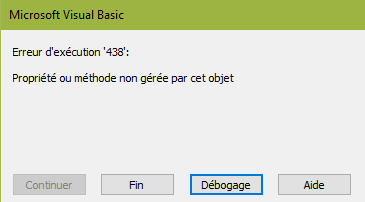
回答 2
Stack Overflow用户
回答已采纳
发布于 2017-10-03 08:22:01
所以感谢所有帮助我的人
经过一点思考,我的问题得到了解决
wrdDoc.Shapes.Range(Array("Groupe 19", "Group 646", "Image 652", "Group643", "Image 1", "Text Box 642", "Zone de texte 2")).GroupI‘祝你今天过得愉快
Stack Overflow用户
发布于 2017-09-29 23:53:20
excel的东西误导了我,你应该说你从工作表中得到了文件名。
wrdDoc是一个文档对象。ActiveDocument也是一个文档对象。
wrdDoc.ActiveDocument就像说ActiveDocument.ActiveDocument ..。这很糟糕
只需使用wrdDoc.Shapes.SelectAll或ActiveDocument.Shapes.SelectAll
页面原文内容由Stack Overflow提供。腾讯云小微IT领域专用引擎提供翻译支持
原文链接:
https://stackoverflow.com/questions/46497936
复制相关文章
相似问题
腾讯云开发者

Copyright © 2013 - 2026 Tencent Cloud. All Rights Reserved. 腾讯云 版权所有
深圳市腾讯计算机系统有限公司 ICP备案/许可证号:粤B2-20090059  粤公网安备44030502008569号
腾讯云计算(北京)有限责任公司 京ICP证150476号 | 京ICP备11018762号