
如何在AppleScript和BBEdit中剪切文本?
在给定以下文本的文本文件中:
Monday
Tuesday
Wednesday
Thursday
Friday
Saturday
Sunday使用AppleScript和BBEdit,我希望能够缩短Sunday的时间,并在Monday之前移动它,但是当我引用BBEdit字典时,我看到了cut的能力
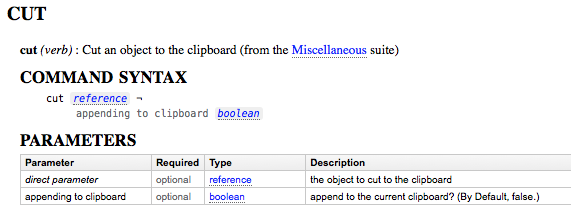
当我试图剪切文本并在行之前添加它时,我会得到一个错误:
BBEdit出了一个错误:“星期日”不理解“剪切”信息。
代码:
tell application "BBEdit"
    set theFile to "foobar.txt"
    select insertion point before first character of text document theFile
    repeat
        set theWeekend to find "(?<=Saturday\\n)Sunday" searching in text 1 of text document theFile options {search mode:grep} with selecting match
        if theWeekend is not found then exit repeat
        set theWeekend to found text of theWeekend
        select insertion point before first character of text document theFile
        set beforeMon to find "(?!<=Sunday\\n)Monday" searching in text 1 of text document theFile options {search mode:grep} with selecting match
        if beforeMon is found then
            set beforeMon to found text of beforeMon
            set theLine to startLine of selection
            set addDay to select insertion point before first character of line theLine of text document theFile
            set thePull to cut theWeekend ## where error occurs
            set before line theLine of text of text document theFile to (theWeekend & return)
        end if
    end repeat
end tell如果我注释掉了set thePull to cut theWeekend,脚本在一个连续循环中工作,并将Sunday放在Monday之前,但我不能中断循环,因为grep变量theWeekend仍然是false。
其他失败的尝试:
 cut selection of (theWeekend)
 cut theWeekend
 cut theWeekend of selection
 cut selection of contents of (theWeekend)
 cut contents of theWeekend
在“BBEdit”和“AppleScript”中,我怎样才能把这一天变成现实呢?
回答 2
Stack Overflow用户
发布于 2017-09-30 15:23:24
错误是theWeekend变量包含一个字符串,而不是对字符串的引用。
剪切命令需要引用文档中的(字符、单词或行),如下所示:
cut characters 51 thru 56 of text document 1
cut line 7 of text document 1
cut word 7 of text document 1
cut selection -- or this因此,使用found 属性而不是found 。
tell application "BBEdit"
    activate
    tell text document "foobar.txt"
        select insertion point before first character
        repeat
            set theWeekend to find "(?<=Saturday\\n)Sunday" searching in text 1 options {search mode:grep} with selecting match
            if theWeekend is not found then exit repeat
            select insertion point before first character
            set beforeMon to find "(?!<=Sunday\\n)Monday" searching in text 1 options {search mode:grep} with selecting match
            if beforeMon is found then
                cut (found object of theWeekend) -- the cut command returns nothing, it's useless to put the result in a variable
                set before (found object of beforeMon) to (found text of theWeekend) & return
            end if
        end repeat
    end tell
end tellStack Overflow用户
发布于 2017-09-30 15:22:08
下面是您代码的修改版本,在测试中对我起了作用:
我完全删除了set theWeekend to found text of theWeekend行,同时修改:
set before line theLine of text of text document theFile to (theWeekend & return)至:
set before line theLine of text of text document theFile to (found text of theWeekend & linefeed)- 在本例中,
theWeekend是从find命令返回的list,将其保留为list,因为您实际上需要使用其中的两个属性。- 这个实例中的
found text,以及上面的set thePull to cut ...行中的found object。
- 这个实例中的
- 我通常使用
linefeed而不是return,因为在某些情况下(虽然不是这种情况),后者最终会变成0D而不是0A。换句话说,它最终是一个\r,而不是典型的macOS文档中的\n。
我还将set thePull to cut theWeekend更改为:
set thePull to cut (found object of theWeekend)code 返工AppleScript
tell application "BBEdit"
    set theFile to "foobar.txt"
    select insertion point before first character of text document theFile
    repeat
        set theWeekend to find "(?<=Saturday\\n)Sunday" searching in text 1 of text document theFile options {search mode:grep} with selecting match
        log theWeekend
        if theWeekend is not found then exit repeat
        select insertion point before first character of text document theFile
        set beforeMon to find "(?!<=Sunday\\n)Monday" searching in text 1 of text document theFile options {search mode:grep} with selecting match
        if beforeMon is found then
            set beforeMon to found text of beforeMon
            set theLine to startLine of selection
            set addDay to select insertion point before first character of line theLine of text document theFile
            set thePull to cut (found object of theWeekend)
            set before line theLine of text of text document theFile to (found text of theWeekend & return)
        end if
    end repeat
end tellhttps://stackoverflow.com/questions/46496891
复制相似问题
腾讯云开发者

Copyright © 2013 - 2026 Tencent Cloud. All Rights Reserved. 腾讯云 版权所有
深圳市腾讯计算机系统有限公司 ICP备案/许可证号:粤B2-20090059  粤公网安备44030502008569号
腾讯云计算(北京)有限责任公司 京ICP证150476号 | 京ICP备11018762号