
Vim中当前行号的对齐
Vim中当前行号的对齐
提问于 2017-09-27 09:11:05
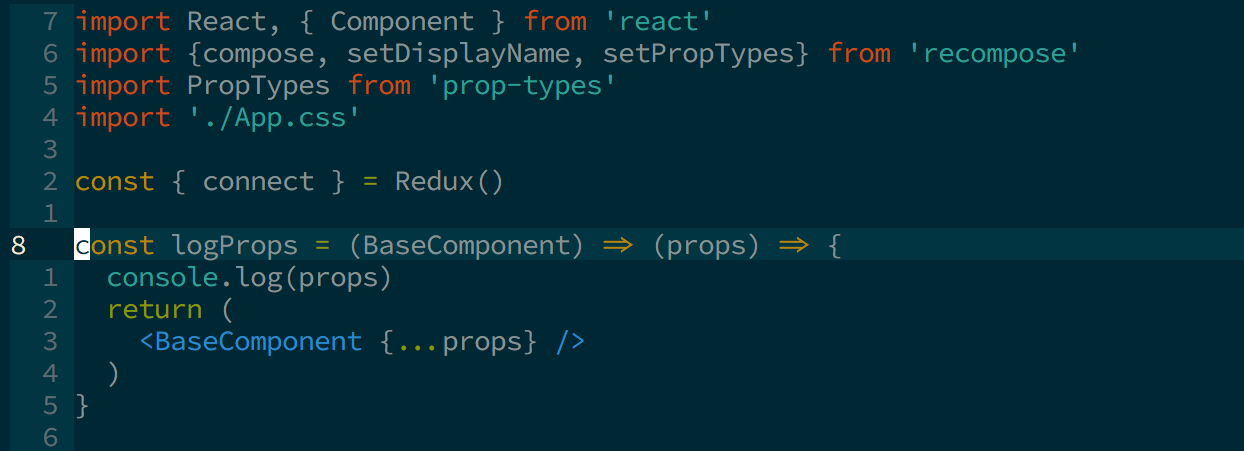
在Vim中,我使用相对行号,在我的.vimrc中有highlight CursorLineNr ctermfg=LightGray,使当前的行号更加突出。
我想知道是否也可以更改当前行号的对齐方式?默认情况下,它是与左边对齐的,但我希望它像其他数字一样与右边对齐。
回答 1
Stack Overflow用户
回答已采纳
发布于 2017-09-27 09:47:39
number和rnu选项的组合将改变行号的显示。如果您有nonu和rnu,那么当前行号将与其他(相对)行号对齐,但是当前行号显示的始终是0。
如果同时启用nu和rnu,则会获得显示样式作为屏幕截图。这是不能改变的。
详情请查收。
:h number_relativenumber相关信息:
        The 'relativenumber' option changes the displayed number to be
    relative to the cursor.  Together with 'number' there are these
    four combinations (cursor in line 3):

        'nonu'          'nu'            'nonu'          'nu'
        'nornu'         'nornu'         'rnu'           'rnu'

        |apple          |  1 apple      |  2 apple      |  2 apple
        |pear           |  2 pear       |  1 pear       |  1 pear
        |nobody         |  3 nobody     |  0 nobody     |3   nobody
|there | 4 there | 1 there | 1 there页面原文内容由Stack Overflow提供。腾讯云小微IT领域专用引擎提供翻译支持
原文链接:
https://stackoverflow.com/questions/46443872
复制相关文章
相似问题
腾讯云开发者

Copyright © 2013 - 2026 Tencent Cloud. All Rights Reserved. 腾讯云 版权所有
深圳市腾讯计算机系统有限公司 ICP备案/许可证号:粤B2-20090059  粤公网安备44030502008569号
腾讯云计算(北京)有限责任公司 京ICP证150476号 | 京ICP备11018762号