
Swift @IBDesignable/@IBInspectable样式
Swift @IBDesignable/@IBInspectable样式
提问于 2017-09-22 02:42:57
我正在尝试在表单元格原型中对UIView进行样式化,使其具有阴影,并进行更多的样式定制,但由于某种原因,在构建项目时,没有应用更改。
我在单独的文件CustomView.swift中有它的下一个代码
import UIKit

@IBDesignable
class CustomView: UIView {


    @IBInspectable var cornerRadius: CGFloat = 0 {
        didSet {
            layer.cornerRadius = cornerRadius
            layer.masksToBounds = cornerRadius > 0
        }
    }

    @IBInspectable var shadowOpacity: Float = 0 {
        didSet {
            layer.shadowOpacity = shadowOpacity
        }
    }

    @IBInspectable var shadowRadius: CGFloat = 0 {
        didSet {
            layer.shadowRadius = shadowRadius
        }
    }

    @IBInspectable var shadowOffset: CGSize = CGSize(width: 0.0, height: 0.0) {
        didSet {
            layer.shadowOffset = shadowOffset
        }
    }

    @IBInspectable var shadowColor: UIColor? = UIColor(red: 157/255, green: 157/255, blue: 157/255, alpha: 1.0) {
        didSet {
            layer.shadowColor = shadowColor?.cgColor
        }
    }

}
我看到Xcode 9的“属性检查器”中的字段。
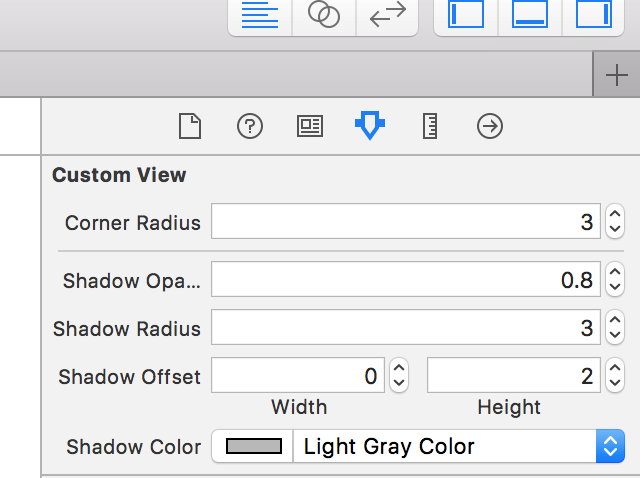
但是在建好它之后,变化基本上没有应用,我没有看到阴影。
最有趣的是,我使用相同的方法定制文本字段和按钮,这段代码适用于UIButton/UITextField,但不适用于UIView
有人知道为什么它不适用于UIView吗?
任何帮助都非常感谢。
谢谢。
回答 2
Stack Overflow用户
回答已采纳
发布于 2017-09-22 03:25:01
检查您的代码:
layer.masksToBounds = cornerRadius > 0将其改为:
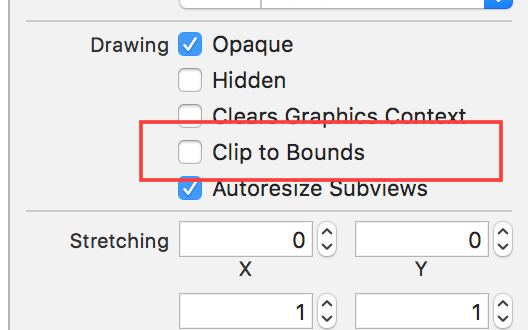
layer.masksToBounds = false并确保将clipsToBounds设置为false,代码如下所示:
clipsToBounds = false或者在你的故事板上:
Stack Overflow用户
发布于 2017-09-22 06:13:29
请更新功能
@IBInspectable
    var cornerRadius: CGFloat = 0 {
        didSet {
            layer.cornerRadius = cornerRadius
        }
}页面原文内容由Stack Overflow提供。腾讯云小微IT领域专用引擎提供翻译支持
原文链接:
https://stackoverflow.com/questions/46356028
复制相关文章
相似问题
腾讯云开发者

Copyright © 2013 - 2026 Tencent Cloud. All Rights Reserved. 腾讯云 版权所有
深圳市腾讯计算机系统有限公司 ICP备案/许可证号:粤B2-20090059  粤公网安备44030502008569号
腾讯云计算(北京)有限责任公司 京ICP证150476号 | 京ICP备11018762号