
安装npm软件包错误
安装npm软件包错误
提问于 2017-09-21 08:15:34
我创建了一个使用hummus.js模块的API。本地测试的->运行良好。
现在,我上传了我的API,并尝试运行npm install来安装所有依赖项。但我发现了一个错误:
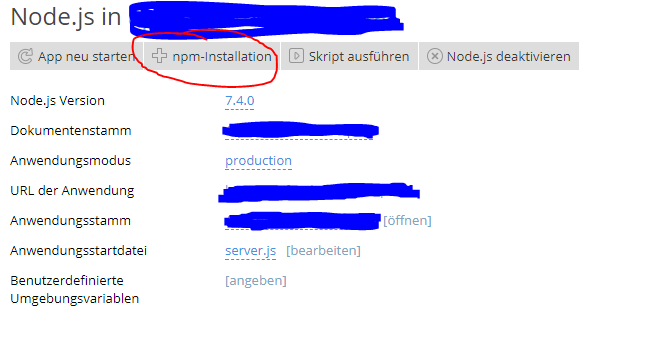
npm-Installation
Execution filemng has failed with exit code 1, stdout:
> hummus@1.0.81 install /var/www/vhosts/XXX/XXX/node_modules/hummus
> node-pre-gyp install --fallback-to-build
, stderr: npm WARN lifecycle npm is using /opt/plesk/node/7/bin/node but there is no node binary in the current PATH. Use the `--scripts-prepend-node-path` option to include the path for the node binary npm was executed with.
/usr/bin/env: 'node': No such file or directory
npm WARN XXX@0.0.1 No description
npm WARN XXX@0.0.1 No repository field.
npm WARN XXX@0.0.1 No license field.
npm ERR! Linux 4.4.0-21-generic
npm ERR! argv "/opt/plesk/node/7/bin/node" "/opt/plesk/node/7/bin/npm" "install"
npm ERR! node v7.4.0
npm ERR! npm v4.0.5
npm ERR! file sh
npm ERR! code ELIFECYCLE
npm ERR! errno ENOENT
npm ERR! syscall spawn
npm ERR! hummus@1.0.81 install: `node-pre-gyp install --fallback-to-build`
npm ERR! spawn ENOENT
npm ERR!
npm ERR! Failed at the hummus@1.0.81 install script 'node-pre-gyp install --fallback-to-build'.
npm ERR! Make sure you have the latest version of node.js and npm installed.
npm ERR! If you do, this is most likely a problem with the hummus package,
npm ERR! not with npm itself.
npm ERR! Tell the author that this fails on your system:
npm ERR! node-pre-gyp install --fallback-to-build
npm ERR! You can get information on how to open an issue for this project with:
npm ERR! npm bugs hummus
npm ERR! Or if that isn't available, you can get their info via:
npm ERR! npm owner ls hummus
npm ERR! There is likely additional logging output above.
npm ERR! Please include the following file with any support request:
npm ERR! /var/www/vhosts/XXX/XXX/npm-debug.log错误来自hummus-js包。因此,我想尝试安装node-gyp ( npm install -g node-gyp )。但我不知道怎么做?在Plesk中,我不能安装一个模块。当我尝试使用ssh时,我得到了:
未找到NPM命令
我是一个服务器管理员,所以我很高兴每一个帮助!
问候
编辑: My Server = Ubuntu 16.04 LTS Server 64 EDIT+ Plesk Onyx
回答 1
Stack Overflow用户
发布于 2017-09-21 08:43:01
如果我的假设是正确的,这归结为你没有在你的另一台机器上安装节点。然后,为debian和基于ubuntu的OS运行SSH。
curl -sL https://deb.nodesource.com/setup_8.x | sudo -E bash -
sudo apt-get install -y nodejs
(再次假设您想要Node 8.x),然后运行
sudo apt-get install -y build-essential以及CentOS和其他企业Linux :
curl --silent --location https://rpm.nodesource.com/setup_8.x | sudo bash -
sudo yum -y install nodejs
sudo yum install gcc-c++ make
那就试着重做你做过的事。
页面原文内容由Stack Overflow提供。腾讯云小微IT领域专用引擎提供翻译支持
原文链接:
https://stackoverflow.com/questions/46338792
复制相关文章
相似问题
腾讯云开发者

Copyright © 2013 - 2026 Tencent Cloud. All Rights Reserved. 腾讯云 版权所有
深圳市腾讯计算机系统有限公司 ICP备案/许可证号:粤B2-20090059  粤公网安备44030502008569号
腾讯云计算(北京)有限责任公司 京ICP证150476号 | 京ICP备11018762号