
SharpDx:设置字符宽度
我正在使用C# Direct2D编写一个SharpDX应用程序,但是我可以理解C++中提供的答案/示例。
我希望渲染文本并更改某些字符的宽度,使其与图片类似:
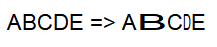
字母B扩大到200%,字母D减少到50%
在下面的代码中,我画出了图形的几何形状,因此可以更改几何图形的宽度,但这不是一个很好的解决方案,因为几何图形的绘制就像你在图片中看到的那样模糊。

最后,有两个问题:
- 我如何改变字符的宽度?
- 如何不模糊地绘制字母的几何图形。(可以用ClearType绘制几何图形?) RenderGlyphRun1(FontFace1 fontFace) { var偏移=新列表();var fontEmSize_ = 12;glyphRun GlyphRun =新GlyphRun();glyphRun.FontFace = fontFace;glyphRun.FontSize = fontEmSize_;glyphRun.BidiLevel = 1;var left =650 F;var top = 50f;var baseLine =(浮)(fontFace.Metrics.LineGap+ fontFace.Metrics.Ascent) / fontFace.Metrics.DesignUnitsPerEm * glyphRun.FontSize;string textToDraw = "ABCDE";{ fontFace.GetDesignGlyphMetrics(glyphRun.Indices,(textToDraw中的字符){Offsets.Add(新的GlyphOffset());} var charArr = textToDraw.Select(x => (int)x).ToArray();glyphRun.Indices = fontFace.GetGlyphIndices(charArr);var度量=var false);glyphRun.Advances = metrics.Select(x => (浮子)x.AdvanceWidth/ fontFace.Metrics.DesignUnitsPerEm *glyphRun.FontSize)fontFace.Metrics.DesignUnitsPerEm();glyphRun.Offsets = Offsets.ToArray();RenderTarget2D.BeginDraw();RenderTarget2D.Clear(SharpDX.Color.White);RenderTarget2D.DrawGlyphRun(新Vector2(左,顶),glyphRun,新SharpDX.Color.Black),MeasuringMode.Natural;top += baseLine;var pathGeometry =新PathGeometry(Factory2D);var geometrySink = pathGeometry.Open();fontFace.GetGlyphRunOutline(glyphRun.FontSize,glyphRun.Indices,glyphRun.Advances,glyphRun.Offsets,glyphRun.IsSideways,glyphRun.BidiLevel %2 != 0,geometrySink);geometrySink.Close();geometrySink.Dispose();fontFace.Dispose();变量矩阵=新Matrix3x2() { M11 = 1,M12 = 0,M21 = 0,M22 = 1,M31 =左,M32 = top };var transformedGeometry =新TransformedGeometry(Factory2D,pathGeometry,矩阵);var brushColor = (Color4)SharpDX.Color.Black;var画笔=新SolidColorBrush(RenderTarget2D,SharpDX.Color.Black);transformedGeometry.Dispose();brush.Dispose();RenderTarget2D.EndDraw();}
回答 2
Stack Overflow用户
发布于 2018-10-07 16:52:21
由于有些字母应该是窄的,有些是普通的,有些是宽的,所以您不能使用一个GlyphRun,但是必须创建3个不同的GlyphRun。
使任何GlyphRun的所有字母都宽或窄:
- 将
Transform配置为RenderTarget - 绘制
GlyphRun - 返回原始
Transform
宽变换:RenderTarget2D.Transform = new SharpDX.Mathematics.Interop.RawMatrix3x2(1.5f, 0, 0, 1, 0, 0);
窄变换:RenderTarget2D.Transform = new SharpDX.Mathematics.Interop.RawMatrix3x2(0.5f, 0, 0, 1, 0, 0);
在此解决方案之后,您不需要将GlyphRun转换为geometry并混淆模糊的字母。
Stack Overflow用户
发布于 2018-10-05 06:48:20
Direct2D文本呈现功能分为两部分:
1) DrawText和DrawTextLayout方法,使调用方能够传递用于多种格式的字符串和格式化参数或DWrite文本布局对象。这应该适用于大多数来电者。
2)第二种方法是渲染文本,作为DrawGlyphRun方法公开,为已经知道要呈现的象形文字位置的客户提供栅格化。在Direct2D中绘图时,以下两条一般规则可以帮助提高文本性能。
现在我看到您使用的是第二种方法,但在第一种方法中,可以将呈现设置为ClearType:
RenderTarget2D.TextAntialiasMode = TextAntialiasMode.Cleartype;我不知道如何将其包含在示例中,但是Sharp示例如下所示:
using System;
using SharpDX;
using SharpDX.Direct2D1;
using SharpDX.DirectWrite;
using SharpDX.Samples;
using TextAntialiasMode = SharpDX.Direct2D1.TextAntialiasMode;

namespace TextRenderingApp
{
  public class Program : Direct2D1DemoApp
  {
    public TextFormat TextFormat { get; private set; }
    public TextLayout TextLayout { get; private set; }

    protected override void Initialize(DemoConfiguration demoConfiguration)
    {
        base.Initialize(demoConfiguration);

        // Initialize a TextFormat
        TextFormat = new TextFormat(FactoryDWrite, "Calibri", 128) {TextAlignment = TextAlignment.Center, ParagraphAlignment = ParagraphAlignment.Center};

        RenderTarget2D.TextAntialiasMode = TextAntialiasMode.Cleartype;

        // Initialize a TextLayout
        TextLayout = new TextLayout(FactoryDWrite, "SharpDX D2D1 - DWrite", TextFormat, demoConfiguration.Width, demoConfiguration.Height);
    }


    protected override void Draw(DemoTime time)
    {
        base.Draw(time);

        // Draw the TextLayout
        RenderTarget2D.DrawTextLayout(new Vector2(0,0), TextLayout, SceneColorBrush, DrawTextOptions.None );
    }


    [STAThread]
    static void Main(string[] args)
    {
        Program program = new Program();
        program.Run(new DemoConfiguration("SharpDX DirectWrite Text Rendering Demo"));
    }
  }
}样本取自:https://github.com/sharpdx/SharpDX-Samples/blob/master/Desktop/Direct2D1/TextRenderingApp
https://stackoverflow.com/questions/46321771
复制相似问题
腾讯云开发者

Copyright © 2013 - 2026 Tencent Cloud. All Rights Reserved. 腾讯云 版权所有
深圳市腾讯计算机系统有限公司 ICP备案/许可证号:粤B2-20090059  粤公网安备44030502008569号
腾讯云计算(北京)有限责任公司 京ICP证150476号 | 京ICP备11018762号