
如何在Recycerview StaggeredGridLayout中加载毕加索图像之前设置StaggeredGridLayout高度和宽度
如何在Recycerview StaggeredGridLayout中加载毕加索图像之前设置StaggeredGridLayout高度和宽度
提问于 2017-09-19 20:16:29
我希望在使用毕加索加载图像之前设置ImageView高度。试图阻止父视图将其高度更改为图像。我正在获取图像的高度和宽度,并将其设置在毕加索的内部,然后将其缩小。
在使用毕加索加载图像之前,如何根据“ImageView”和"webformatWidth“缩放图像,以防止调整大小。
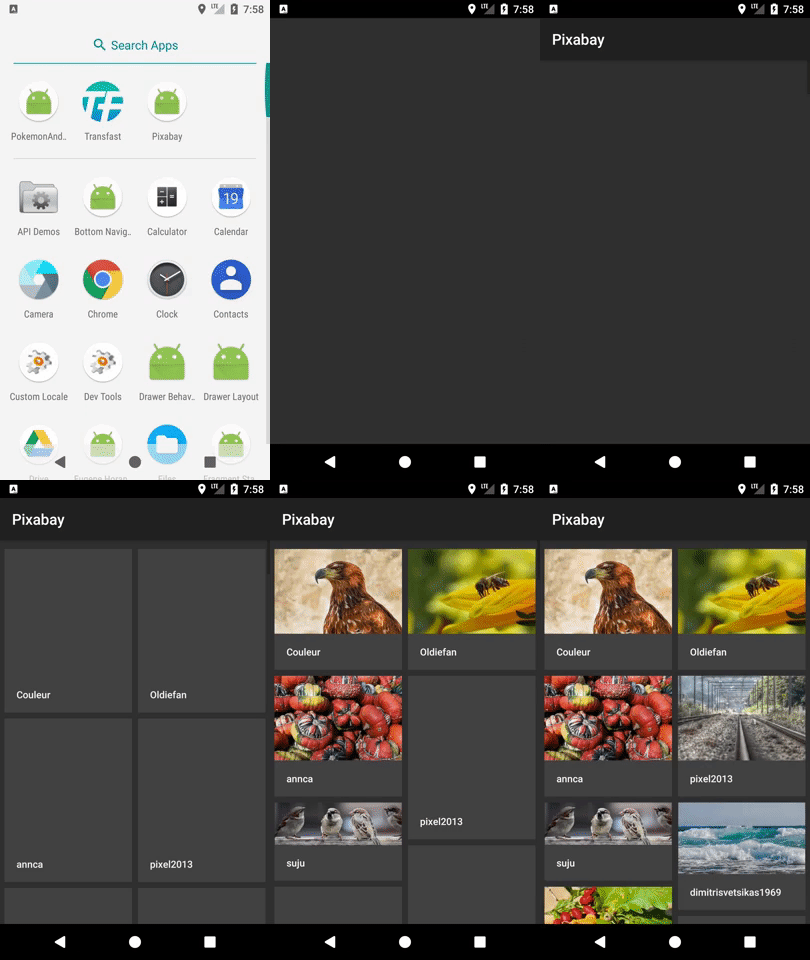
数据
{
    ...
    "hits":[
        {
            "webformatHeight":426,
            "webformatWidth":640,
            "webformatURL":"https://pixabay.com/get/eb32b5062dfd013ed95c4518b74a4291ea77ead204b0144190f8c478a2ebb3_640.jpg",
            ...
        },
        ...
    ]
}
回收器实现
RecyclerView recycler = (RecyclerView) findViewById(R.id.recycler);
mPixabayAdapter = new PixabayAdapter();
recycler.setLayoutManager(new StaggeredGridLayoutManager(2, StaggeredGridLayoutManager.VERTICAL));
recycler.setAdapter(mPixabayAdapter);
ViewHolder
class ViewHolder extends RecyclerView.ViewHolder {

    private ImageView mImage;
    private TextView mTitle;

    private ViewHolder(View view) {
        super(view);
        mImage = view.findViewById(R.id.image);
        mTitle = view.findViewById(R.id.title);
    }

    void bindView() {
        ColorDrawable[] shotLoadingPlaceholders = new ColorDrawable[]{new ColorDrawable(ContextCompat.getColor(itemView.getContext(), R.color.background_light))};
        Hit hit = mHitList.get(getAdapterPosition());
        mTitle.setText(hit.getUser());
        Picasso
                .with(mImage.getContext())
                .load(hit.getWebformatURL())
                .placeholder(shotLoadingPlaceholders[0])
                .resize(hit.getImageWidth(), hit.getImageHeight())
                .priority(Picasso.Priority.HIGH)
                .onlyScaleDown()
                .into(mImage);
    }
}
XML
<?xml version="1.0" encoding="utf-8"?>
<RelativeLayout xmlns:android="http://schemas.android.com/apk/res/android"
    android:layout_width="match_parent"
    android:layout_height="wrap_content"
    android:padding="4dp">

    <ImageView
        android:id="@+id/image"
        android:layout_width="match_parent"
        android:layout_height="wrap_content"
        android:adjustViewBounds="true" />

    <TextView
        android:id="@+id/title"
        android:layout_width="match_parent"
        android:layout_height="48dp"
        android:layout_below="@+id/image"
        android:background="@color/background_light"
        android:fontFamily="sans-serif-medium"
        android:gravity="center_vertical"
        android:maxLines="1"
        android:paddingLeft="16dp"
        android:paddingRight="16dp"
        android:textColor="@color/white_light"
        android:textSize="13sp" />
</RelativeLayout>回答 2
Stack Overflow用户
回答已采纳
发布于 2017-09-20 00:01:05
用width/height计算图像的高宽比,并将ImageView封装在以下内容中:
public class RelativeSizeLayout extends FrameLayout {
    private float aspectRatio = 1.77f;

    public RelativeSizeLayout(Context context) {
        this(context,null);
    }

    public RelativeSizeLayout(Context context, AttributeSet attrs) {
        this(context, attrs, 0);
    }

    public RelativeSizeLayout(Context context, AttributeSet attrs, int defStyle) {
        super(context, attrs, defStyle);
    }

    @Override
    public boolean shouldDelayChildPressedState() {
        return false;
    }

    @Override
    protected void onMeasure(int widthMeasureSpec, int heightMeasureSpec) {
        final int width = MeasureSpec.getSize(widthMeasureSpec);
        heightMeasureSpec = MeasureSpec.makeMeasureSpec((int) (width / aspectRatio), MeasureSpec.EXACTLY);
        super.onMeasure(widthMeasureSpec, heightMeasureSpec);
    }

    public void setAspectRatio(float ratio) {
        aspectRatio = ratio;
    }
}Stack Overflow用户
发布于 2017-09-19 21:25:49
您可以在layoutParams上设置ImageView的宽度和高度,即命中类,如下所示。
RelativeLayout.LayoutParams layoutParams = new RelativeLayout.LayoutParams(hit.getImageWidth(), hit.getImageHeight());
mImage.setLayoutParams(layoutParams);
打招呼。
页面原文内容由Stack Overflow提供。腾讯云小微IT领域专用引擎提供翻译支持
原文链接:
https://stackoverflow.com/questions/46309081
复制相关文章
相似问题
腾讯云开发者

Copyright © 2013 - 2026 Tencent Cloud. All Rights Reserved. 腾讯云 版权所有
深圳市腾讯计算机系统有限公司 ICP备案/许可证号:粤B2-20090059  粤公网安备44030502008569号
腾讯云计算(北京)有限责任公司 京ICP证150476号 | 京ICP备11018762号