
右列堆栈复选框,左边使用CSS网格标签。
右列堆栈复选框,左边使用CSS网格标签。
提问于 2017-09-19 11:02:01
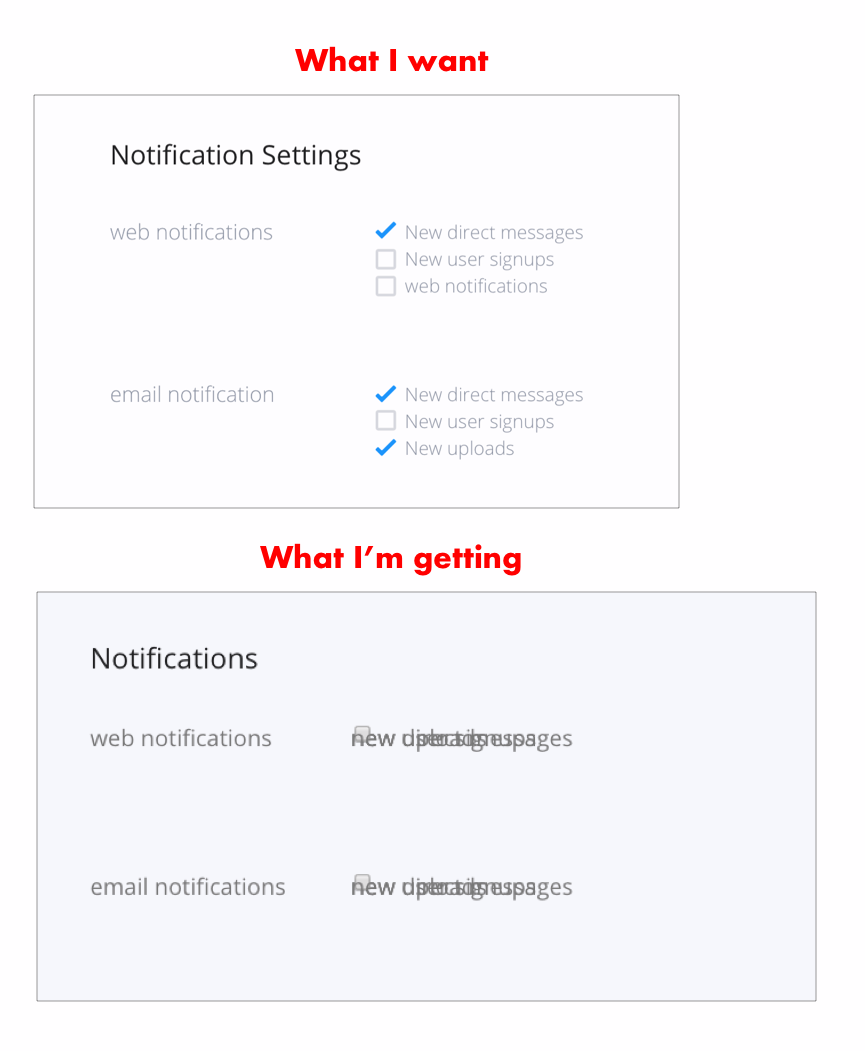
我很难让复选框正确地堆叠在他们自己的网格列中。我使用的是ReactQL (jsx),所以我不认为它会在代码片段编辑器中正确显示。浮标在这里没用。
/* checkboxes */

.section__checkboxes {
  display: grid;
  grid-template-columns: 2fr 4fr;
  grid-column-gap: 2em;
}

.description {
  grid-column: 1 / 2;
  grid-row: 2 / 3;
}

.checkbox {
  grid-column: 2 / 2;
  grid-row: 2 / 3;
}

.choice {
  grid-column: 2 / 3;
  grid-row: 2 / 3;
}<script src="https://cdnjs.cloudflare.com/ajax/libs/react/15.1.0/react.min.js"></script>
<script src="https://cdnjs.cloudflare.com/ajax/libs/react/15.1.0/react-dom.min.js"></script>
<div className={cn (css.section__checkboxes, css.section_wrapper)}>
<label className={css.description} htmlFor="checkbox_2">email notifications</label>
<input id="checkbox_2_1" name="checkbox_2_1" className={css.checkbox} type="checkbox" value="1" />
<label className={css.choice} htmlFor="checkbox_2_1">new direct messages</label>
<input id="checkbox_2_2" name="checkbox_2_2" className={css.checkbox} type="checkbox" value="1" />
<label className={css.choice} htmlFor="checkbox_2_2">new user signups</label>
<input id="checkbox_2_3" name="checkbox_2_3" className={css.checkbox} type="checkbox" value="1" />
<label className={css.choice} htmlFor="checkbox_2_3">new uploads</label>
</div>
回答 1
Stack Overflow用户
回答已采纳
发布于 2017-09-19 11:13:21
您可以对grid-row: span 3使用description来跨越左边的行。如果要保留当前标记,可以添加grid-template-columns: 1fr auto 2fr。见下面的演示:
.section__checkboxes {
  display: grid;
  grid-template-columns: 1fr auto 2fr;
  grid-column-gap: 2em;
}

.description {
  grid-row: span 3;
}<script src="https://cdnjs.cloudflare.com/ajax/libs/react/15.1.0/react.min.js"></script>
<script src="https://cdnjs.cloudflare.com/ajax/libs/react/15.1.0/react-dom.min.js"></script>
<div class="section__checkboxes section_wrapper">
<label class="description" for="checkbox_2">email notifications</label>
<input id="checkbox_2_1" name="checkbox_2_1" class="checkbox" type="checkbox" value="1" />
<label class="choice" for="checkbox_2_1">new direct messages</label>
<input id="checkbox_2_2" name="checkbox_2_2" class="checkbox" type="checkbox" value="1" />
<label class="choice" for="checkbox_2_2">new user signups</label>
<input id="checkbox_2_3" name="checkbox_2_3" class="checkbox" type="checkbox" value="1" />
<label class="choice" for="checkbox_2_3">new uploads</label>
</div>
如果要更改标记并将label和checkboxes封装在一起,您可以这样做:
.section__checkboxes {
  display: grid;
  grid-template-columns: 1fr 2fr;
  grid-column-gap: 2em;
}

.description {
  grid-row: span 3;
}<script src="https://cdnjs.cloudflare.com/ajax/libs/react/15.1.0/react.min.js"></script>
<script src="https://cdnjs.cloudflare.com/ajax/libs/react/15.1.0/react-dom.min.js"></script>
<div class="section__checkboxes section_wrapper">
<label class="description" for="checkbox_2">email notifications</label>
<div>
<input id="checkbox_2_1" name="checkbox_2_1" class="checkbox" type="checkbox" value="1" />
<label class="choice" for="checkbox_2_1">new direct messages</label>
</div>
<div>
<input id="checkbox_2_2" name="checkbox_2_2" class="checkbox" type="checkbox" value="1" />
<label class="choice" for="checkbox_2_2">new user signups</label>
</div>
<div>
<input id="checkbox_2_3" name="checkbox_2_3" class="checkbox" type="checkbox" value="1" />
<label class="choice" for="checkbox_2_3">new uploads</label>
</div>
</div>
页面原文内容由Stack Overflow提供。腾讯云小微IT领域专用引擎提供翻译支持
原文链接:
https://stackoverflow.com/questions/46298756
复制相关文章
相似问题
腾讯云开发者

Copyright © 2013 - 2026 Tencent Cloud. All Rights Reserved. 腾讯云 版权所有
深圳市腾讯计算机系统有限公司 ICP备案/许可证号:粤B2-20090059  粤公网安备44030502008569号
腾讯云计算(北京)有限责任公司 京ICP证150476号 | 京ICP备11018762号