
SVG:单击基础svg
SVG:单击基础svg
提问于 2017-09-18 13:05:50
我有这个页面与2 svg图像在上面。看起来svg (item1)图像是重叠的,可以防止单击底层svg (item2)。
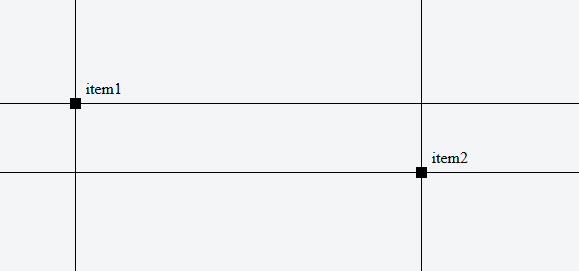
我尝试在元素上使用指针事件,但我似乎无法让它在底层item2上工作。
也许de还在阻止“单击事件”
这是代码:
HTML:
<script src="https://ajax.googleapis.com/ajax/libs/jquery/3.2.1/jquery.min.js"></script>
<script src="js/main.js"></script>
<body>
    <div id="main">
        <div id="item1">
            <svg class="crossSvg">
                <line class="verticalLine" x1="50%" y1="0" x2="50%" y2="100%"></line>
                <line class="horizontalLine" x1="0" y1="50%" x2="100%" y2="50%"></line>
                <rect class="itemSquare" x="50%" y="50%" width="10" height="10" transform="translate(-5,-5)"/>
                <text class="itemTitle" x="50%" y="50%" transform="translate(10,-10)">item1</text>
            </svg>
            <svg class="closeSvg">
                <rect class="closeSquare" x="0" y="0" width="10" height="10"/>
                <line x1="90%" y1="50%" x2="91%" y2="51%"></line>
            </svg>
        </div>
        <div id="item2">
            <svg class="crossSvg">
                <line class="verticalLine" x1="50%" y1="0" x2="50%" y2="100%"></line>
                <line class="horizontalLine" x1="0" y1="50%" x2="100%" y2="50%"></line>
                <rect class="itemSquare" x="50%" y="50%" width="10" height="10" transform="translate(-5,-5)"/>
                <text class="itemTitle" x="50%" y="50%" transform="translate(10,-10)">item2</text>
            </svg>
            <svg class="closeSvg">
                <rect class="closeSquare" x="0" y="0" width="10" height="10"/>
                <line x1="90%" y1="50%" x2="91%" y2="51%"></line>
            </svg>
        </div>
    </div>
</body>
JAVASCRIPT:
$( document ).ready(function() {
    $('.itemSquare').on('click', function(){
        alert("Hello! I am an alert box!!");
    });
});
CSS:
#main{
    width: 100vw;
    height: 100vh;
}

#item1, #item2{
    position: absolute;
    width: 200vw;
    height: 200vh;
}
/* ---- positioning items ---- */
#item1{
    left: -90vw;
    top: -80vh;
    z-index:100;
}

#item2{
    left: -50vw;
    top: -70vh;
}
/* ---- item content ---- */
.itemContent{
    display: none;
    position: absolute;
    top: 50%;
    left: 50%;
    width: 90vw;
    overflow: hidden;
    padding: 5px;
}

/* ---- SVG's ----- */
.crossSvg{
    position: absolute;
    width: 100%;
    height: 100%;
    background: none;
    pointer-events: all;
}

.verticalLine, .horizontalLine {
    stroke: black;
    stroke-width: 1;
    shape-rendering: crispEdges;
}

.itemSquare{
    display: hidden;
    fill: black;
    stroke: black;
    stroke-width: 1;
    shape-rendering: crispEdges;
    pointer-events: fill;
}

.closeSvg{
    position: absolute;
    top: 50%;
    left: 95%;
    margin-top: -5px;
}

.closeSquare{
    fill: black;
    stroke: black;
    stroke-width: 1;
    shape-rendering: crispEdges;
}我把这个放进了小提琴:https://jsfiddle.net/fme21qx9/3/
回答 1
Stack Overflow用户
回答已采纳
发布于 2017-09-18 20:13:08
您需要禁用包装器元素(div#item1)和SVG (svg.crossSvg)的指针事件,因为SVG具有不同的指针上下文。
如果将它添加到CSS的末尾,它可以正常工作:
#item1 {
  pointer-events: none;
}
#item1 .crossSvg {
  pointer-events: none;
}

.itemSquare {
  pointer-events: all;
}
(尽管在选择器中使用in的样式不是最佳实践)
编辑:更新了您的小提琴,以反映答案中的变化,以及我们在评论中的讨论。
页面原文内容由Stack Overflow提供。腾讯云小微IT领域专用引擎提供翻译支持
原文链接:
https://stackoverflow.com/questions/46280051
复制相关文章
相似问题
腾讯云开发者

Copyright © 2013 - 2026 Tencent Cloud. All Rights Reserved. 腾讯云 版权所有
深圳市腾讯计算机系统有限公司 ICP备案/许可证号:粤B2-20090059  粤公网安备44030502008569号
腾讯云计算(北京)有限责任公司 京ICP证150476号 | 京ICP备11018762号