
Python画布获得线的主要方向
我在一张平地画布上有两点。我需要一个函数来确定在它们之间画出的一条线最接近的主要方向(N、NW、W、SW、S等)。(方向问题)?我该怎么做呢?请注意,在画布中,左上角为(0,0).
我试过:
def dot_product(self, v, w):
    return v[0]*w[0]+v[1]*w[1]
def inner_angle(self, v, w):
    cosx=self.dot_product(v,w)/(sqrt(v[0]**2+v[1]**2)*sqrt(w[0]**2+w[1]**2))
    rad=acos(cosx)
    return rad*180/pi
def getAngle(self, A, B):
    inner=self.inner_angle(A,B)
    det = A[0]*B[1]-A[1]*B[0]
    if det<0:
        return inner
    else:
        return 360-inner
以及:
def getBearing(self, pointA, pointB):

if (type(pointA) != tuple) or (type(pointB) != tuple):
    raise TypeError("Only tuples are supported as arguments")

lat1 = math.radians(pointA[0])
lat2 = math.radians(pointB[0])

diffLong = math.radians(pointB[1] - pointA[1])

x = math.sin(diffLong) * math.cos(lat2)
y = math.cos(lat1) * math.sin(lat2) - (math.sin(lat1) * math.cos(lat2) * math.cos(diffLong))

initial_bearing = math.atan2(x, y)

initial_bearing = math.degrees(initial_bearing)
compass_bearing = (initial_bearing + 360) % 360

return compass_bearing
(我使用这个函数来获得方向(代码不完整,更像是一个例子))
def findDirection(self, p1, p2):
    bearing = self.getBearing(p1, p2) # OR getAngle()
    print(bearing)
    index = [180, 0]
    closest = min(index, key=lambda x:abs(x-bearing))
    if closest == 10:
        print(str(bearing) + " : UP")
    elif closest == 360:
        print(str(bearing) + " : DOWN")
    elif closest == 0:
        print(str(bearing) + " : RIGHT")
    elif closest == 180:
        print(str(bearing) + " : LEFT")
这些都不管用。结果似乎不够一致,无法使用。有更好的方法吗?
回答 3
Stack Overflow用户
发布于 2017-09-17 05:24:34
下面是我提出的确定指南针与线段[A, B]所指向的最接近的方向的方法,该线段由其端点point_a和point_b定义:
- 所有的计算都是在标准笛卡尔坐标下进行的,屏幕坐标的改变是在最后完成的。这简化了方法,并使代码在其他地方可重用。
- 首先将原点更改为
point_a - 用x_axis计算线段的角度
- 确定最近的方位(以标准笛卡尔坐标)
- 将标准轴承转换为屏幕坐标轴承(水平翻转)
在屏幕坐标(Y轴向下)中定义点的
get_bearings(point_a, point_b),调用 如果在标准笛卡尔坐标(Y轴向上)中定义的点,调用assign_bearing_to_compass(point_a, point_b)(代码下面的测试显示了在标准坐标和屏幕坐标中使用点的结果。)
import math


def _change_origin_of_point_b_to_point_a(point_a, point_b):
    # uses standard Y axis orientation, not screen orientation
    return (point_b[0] - point_a[0], point_b[1] - point_a[1])

def _calc_angle_segment_a_b_with_x_axis(point_a, point_b):
    # uses standard Y axis orientation, not screen orientation
    xa, ya = point_a
    xb, yb = _change_origin_of_point_b_to_point_a(point_a, point_b)
    return math.atan2(yb, xb)

def determine_bearing_in_degrees(point_a, point_b):
    """returns the angle in degrees that line segment [point_a, point_b)]
       makes with the horizontal X axis
    """
    # uses standard Y axis orientation, not screen orientation
    return _calc_angle_segment_a_b_with_x_axis(point_a, point_b) * 180 / math.pi

def assign_bearing_to_compass(point_a, point_b):
    """returns the standard bearing of line segment [point_a, point_b)
    """
    # uses standard Y axis orientation, not screen orientation
    compass = {'W' : [157.5, -157.5],
               'SW': [-157.5, -112.5],
               'S' : [-112.5, -67.5],
               'SE': [-67.5, -22.5],
               'E' : [-22.5, 22.5],
               "NE": [22.5, 67.5],
               'N' : [67.5, 112.5],
               'NW': [112.5, 157.5]}

    bear = determine_bearing_in_degrees(point_a, point_b)
    for direction, interval in compass.items():
        low, high = interval
        if bear >= low and bear < high:
            return direction
    return 'W'

def _convert_to_negative_Y_axis(compass_direction):
    """flips the compass_direction horizontally
    """
    compass_conversion = {'E' : 'E',
                          'SE': 'NE',
                          'S' : 'N',
                          'SW': 'NW',
                          'W' : 'W',
                          "NW": 'SW',
                          'N' : 'S',
                          'NE': 'SE'}
    return compass_conversion[compass_direction]

def get_bearings(point_a, point_b):
    return _convert_to_negative_Y_axis(assign_bearing_to_compass(point_a, point_b))
测试:
(使用标准三角圆象限)
象限一:
point_a = (0, 0)
points_b = [(1, 0), (1, 3), (1, 2), (1, 1), (2, 1), (3, 1), (0, 1)]
print("point_a, point_b     Y_up     Y_down (in screen coordinates)")
for point_b in points_b:
    print(point_a, ' ', point_b, '      ', assign_bearing_to_compass(point_a, point_b), '        ', get_bearings(point_a, point_b))
结果:
point_a, point_b     Y_up     Y_down (in screen coordinates)
(0, 0)   (1, 0)        E          E
(0, 0)   (1, 3)        N          S
(0, 0)   (1, 2)        NE         SE
(0, 0)   (1, 1)        NE         SE
(0, 0)   (2, 1)        NE         SE
(0, 0)   (3, 1)        E          E
(0, 0)   (0, 1)        N          S
象限二:
point_a = (0, 0)
points_b = [(-1, 0), (-1, 3), (-1, 2), (-1, 1), (-2, 1), (-3, 1), (0, 1)]
print("point_a, point_b     Y_up     Y_down (in screen coordinates)")
for point_b in points_b:
    print(point_a, ' ', point_b, '      ', assign_bearing_to_compass(point_a, point_b), '        ', get_bearings(point_a, point_b))
结果:
point_a, point_b     Y_up     Y_down (in screen coordinates)
(0, 0)   (-1, 0)       W          W
(0, 0)   (-1, 3)       N          S
(0, 0)   (-1, 2)       NW         SW
(0, 0)   (-1, 1)       NW         SW
(0, 0)   (-2, 1)       NW         SW
(0, 0)   (-3, 1)       W          W
(0, 0)   (0, 1)        N          S
象限三:
point_a = (0, 0)
points_b = [(-1, 0), (-1, -3), (-1, -2), (-1, -1), (-2, -1), (-3, -1), (0, -1)]
print("point_a, point_b     Y_up     Y_down (in screen coordinates)")
for point_b in points_b:
    print(point_a, ' ', point_b, '      ', assign_bearing_to_compass(point_a, point_b), '        ', get_bearings(point_a, point_b))
结果:
point_a, point_b     Y_up     Y_down (in screen coordinates)
(0, 0)   (-1, 0)        W          W
(0, 0)   (-1, -3)       S          N
(0, 0)   (-1, -2)       SW         NW
(0, 0)   (-1, -1)       SW         NW
(0, 0)   (-2, -1)       SW         NW
(0, 0)   (-3, -1)       W          W
(0, 0)   (0, -1)        S          N
象限四:
point_a = (0, 0)
points_b = [(1, 0), (1, -3), (1, -2), (1, -1), (2, -1), (3, -1), (0, -1)]
print("point_a, point_b     Y_up     Y_down (in screen coordinates)")
for point_b in points_b:
    print(point_a, ' ', point_b, '      ', assign_bearing_to_compass(point_a, point_b), '        ', get_bearings(point_a, point_b))
结果:
point_a, point_b     Y_up     Y_down (in screen coordinates)
(0, 0)   (1, 0)        E          E
(0, 0)   (1, -3)       S          N
(0, 0)   (1, -2)       SE         NE
(0, 0)   (1, -1)       SE         NE
(0, 0)   (2, -1)       SE         NE
(0, 0)   (3, -1)       E          E
(0, 0) (0, -1) S NStack Overflow用户
发布于 2017-09-17 04:40:46
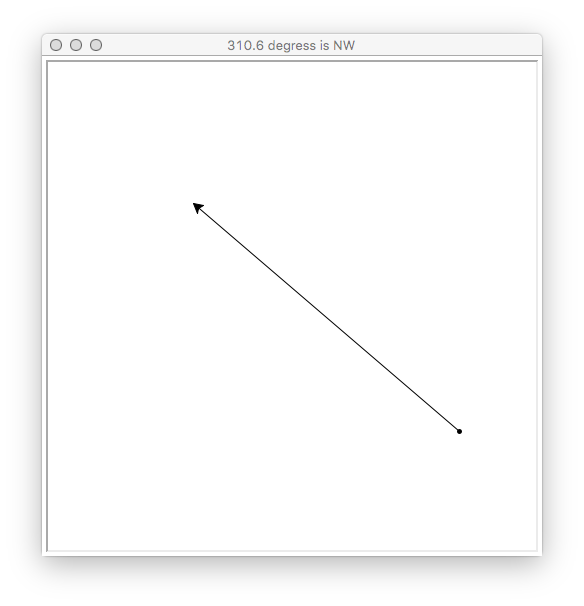
我希望这是有帮助的--为了方便,我使用了建立在tkinter上的Python海龟来实现它。我切换到标志模式,使北0度和正角顺时针方向(即东方是90度)像一个指南针。海龟方法towards()所做的大部分事情都是你想做的,所以在计算基本方向时,我试图模仿它:
from random import randrange
from turtle import Turtle, Screen
from math import pi, atan2, degrees

DIRECTIONS = ['N', 'NNE', 'NE', 'ENE', 'E', 'ESE', 'SE', 'SSE', 'S', 'SSW', 'SW', 'WSW', 'W', 'WNW', 'NW', 'NNW']

BUCKET = 360.0 / len(DIRECTIONS)

X, Y = 0, 1

SIZE = 500

def onclick_handler(x, y):
    # Draw random vector

    yertle.reset()
    yertle.hideturtle()
    yertle.penup()

    start = (randrange(-SIZE//2, SIZE//2), randrange(-SIZE//2, SIZE//2))
    end = (randrange(-SIZE//2, SIZE//2), randrange(-SIZE//2, SIZE//2))

    yertle.goto(start)
    yertle.dot()
    yertle.showturtle()
    yertle.pendown()
    yertle.setheading(yertle.towards(end))
    yertle.goto(end)

    # Compute vector direction

    x, y = end[X] - start[X], end[Y] - start[Y]

    angle = round(degrees(atan2(y, -x) - pi / 2), 10) % 360.0

    direction = DIRECTIONS[round(angle / BUCKET) % len(DIRECTIONS)]

    screen.title("{} degress is {}".format(round(angle, 2), direction))

yertle = Turtle()

screen = Screen()
screen.mode('logo')
screen.setup(SIZE, SIZE)
screen.onclick(onclick_handler)

onclick_handler(0, 0)

screen.mainloop()
该程序绘制一条随机线(具有明显的起点和方向),并计算在窗口标题中可以找到的基数方向。单击该窗口将生成一个新的行和计算。
您应该能够通过编辑DIRECTIONS变量来处理8或32个指南针点。
Stack Overflow用户
发布于 2017-09-17 16:06:14
要获得一个基本方向,需要有一个具有参考相关方向的角度(在本例中为度)的字典:
directions = {0:"N", 45:"NE", 90:"E", 135:"SE", 180:"S",
              225:"SW", 270:"W", 315:"NW", 360:"N"}
请注意,北加两次,因为在两个点之间获得350度的角度将给西北,当它应该给北。
让Tkinter画布上的两点,a和b分别具有(x1, y1)和(x2, y2)坐标。因此,它们之间的区别(dx和dy)是x1-x2和y1-y2。
现在您可以执行dy/dx的逆切线以获得一个角度。值得指出的是,如果dx是0,那么它将除以0。您可以通过添加if not dx: return "N"来防止这种情况,如果点具有相同的x值,则返回North。
此外,如果dx大于0,那么它将返回相同的值,就好像它小于0一样。这是因为切线图有180度的周期。要抵消这一点,只需添加if dx > 0: angle += 180即可。
现在您有了一个角度,您可以在前面定义的directions字典中引用它,使用Pythons内置的min函数:min(self.directions, key=lambda x: abs(x-angle))。这将返回字典中指定的最近度。为了获得基数值,我们可以在字典中访问它。
将所有这些组合在一起,将给出以下函数(TLDR)
from math import atan, degrees

...

def get_cardinal(a, b):
    dx, dy = a[0]-b[0], a[1]-b[1]
    if not dx:
        return "N"
    angle = degrees(atan(dy/dx))+90 #+90 to take into account TKinters coordinate system.
    if dx > 0:
        angle += 180
return directions[min(directions, key=lambda x: abs(x-angle))]这个,结合directions字典,给出你的答案。
https://stackoverflow.com/questions/46258873
复制相似问题
腾讯云开发者

Copyright © 2013 - 2026 Tencent Cloud. All Rights Reserved. 腾讯云 版权所有
深圳市腾讯计算机系统有限公司 ICP备案/许可证号:粤B2-20090059  粤公网安备44030502008569号
腾讯云计算(北京)有限责任公司 京ICP证150476号 | 京ICP备11018762号