
iOS 11搜索栏中搜索文本字段的错误放置
iOS 11搜索栏中搜索文本字段的错误放置
提问于 2017-09-15 14:10:49
我使用UISearchController 11中引入的新API作为导航栏的一部分。
- (void)viewDidLoad {
    [super viewDidLoad];
    [_table setDataSource:self];
    [_table setDelegate:self];
    searchController = [[UISearchController alloc] initWithSearchResultsController:nil];
    [self.navigationItem setSearchController:searchController];
    [self.navigationItem setHidesSearchBarWhenScrolling:NO];
    [searchController.searchBar setBackgroundColor:[UIColor greenColor]];
}
但是,搜索文本字段呈现在搜索栏内的错误位置。看下面的截图。
我检查了视图层次结构,发现搜索栏中的UISearchBarTextField对象(devs无法直接访问)的Fra.y值为1,这可能是造成这个问题的原因。我已经在iOS 11 beta 10和iOS 11 GM上测试了这一点。
这是众所周知的问题吗?有什么解决办法吗?还是我做错了什么?
如有任何帮助,我们将不胜感激(:
回答 2
Stack Overflow用户
发布于 2017-09-20 07:37:45
下面的代码展示了如何在textField 11上更改searchBar中的searchBar的背景颜色。
以前:

后:

Obj-C: in (void)viewDidLoad使用以下代码:
 if (@available(iOS 11, *)) {
    UITextField *textField = [self.searchController.searchBar valueForKey:@"searchField"];
    UIView *backgroundView = textField.subviews.firstObject;
    backgroundView.backgroundColor = UIColor.whiteColor;
    backgroundView.layer.cornerRadius = 10;
    backgroundView.clipsToBounds = YES;
}
Swift: in viewDidLoad()使用以下代码:
if #available(iOS 11.0, *) {
    if let textfield = scb.value(forKey: "searchField") as? UITextField {
        textfield.textColor = UIColor.blue

        if let backgroundview = textfield.subviews.first {
            backgroundview.backgroundColor = UIColor.white
            backgroundview.layer.cornerRadius = 10;
            backgroundview.clipsToBounds = true;
        }
    }
}Stack Overflow用户
发布于 2017-09-15 14:18:24
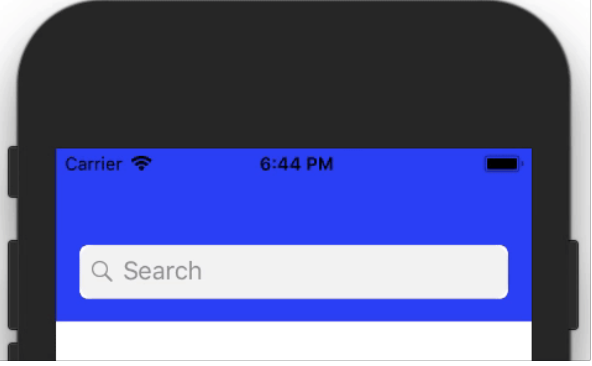
无法访问您的图像(确切问题)。所以才能看到确切的问题。但从你的陈述中我发现了你的问题。我尝试了iOS 11和它的工作状态。
我的代码已经解决了您的问题,但是它在Swift中。你需要把它转换成目标-C。对你来说做这件事并不难。
 if #available(iOS 11.0, *) {
                let sc = UISearchController(searchResultsController: nil)
                sc.delegate = self
                let scb = sc.searchBar
                scb.tintColor = UIColor.white
                scb.barTintColor = UIColor.white


                if let textfield = scb.value(forKey: "searchField") as? UITextField {
                    textfield.textColor = UIColor.blue
                    if let backgroundview = textfield.subviews.first {

                        // Background color
                        backgroundview.backgroundColor = UIColor.white

                        // Rounded corner
                        backgroundview.layer.cornerRadius = 5;
                        backgroundview.clipsToBounds = true;

                    }
                }

                if let navigationbar = self.navigationController?.navigationBar {
                    navigationbar.barTintColor = UIColor.blue
                }
                navigationItem.searchController = sc
                navigationItem.hidesSearchBarWhenScrolling = false

    }
输出:
页面原文内容由Stack Overflow提供。腾讯云小微IT领域专用引擎提供翻译支持
原文链接:
https://stackoverflow.com/questions/46241636
复制相关文章
相似问题
腾讯云开发者

Copyright © 2013 - 2026 Tencent Cloud. All Rights Reserved. 腾讯云 版权所有
深圳市腾讯计算机系统有限公司 ICP备案/许可证号:粤B2-20090059  粤公网安备44030502008569号
腾讯云计算(北京)有限责任公司 京ICP证150476号 | 京ICP备11018762号