
我们如何在uitableview单元格中设置标签约束?
我们如何在uitableview单元格中设置标签约束?
提问于 2017-09-14 07:06:02
我想在tableview单元格中设置一个标签约束。当我设置标签约束并在设备上运行时,自动布局不会在不同的设备上工作,比如iPhone 5、6和iPhone 7+。

如何设置自动布局约束,使布局对所有设备都能正常工作?
谢谢!
回答 3
Stack Overflow用户
回答已采纳
发布于 2017-09-14 09:20:44
试试这个-
将标签拖到单元格中。假设您希望从标签的两边有10个像素的边距。为所有(顶部、底部、前导、尾随)设置10的常量,然后单击Add 4约束。如下图所示
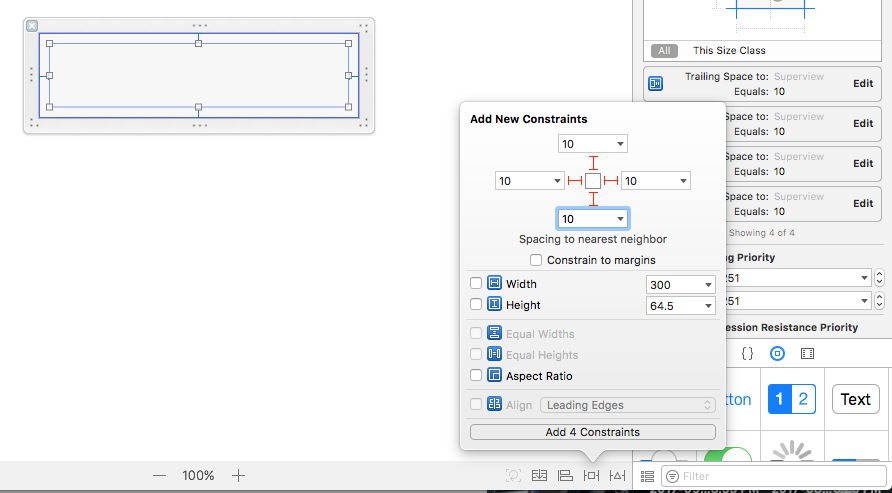
现在,如果您只有标签的宽度有问题,那么请执行以下操作-
viewWillAppear法
tableView.rowHeight = UITableViewAutomaticDimension;
tableView.estimatedRowHeight = 50.0;
然后用以下方法-
- (CGFloat)tableView:(UITableView *)tableView heightForRowAtIndexPath:(NSIndexPath*)indexPath {

     return  UITableViewAutomaticDimension;
}
你的问题应该现在就解决。
Stack Overflow用户
发布于 2017-09-14 07:15:15
您必须为单元格提供估计行高,或将其设置为“自动”。
例子:-
tableView.estimatedRowHeight = 120.0
tableView.rowHeight = UITableViewAutomaticDimension
或者像这样:-
func tableView(tableView: UITableView, estimatedHeightForRowAtIndexPath indexPath: NSIndexPath) -> CGFloat
{
 return 240
}Stack Overflow用户
发布于 2017-09-14 07:18:32
您需要设置以下参数
tableView.rowHeight = UITableViewAutomaticDimension;
tableView.estimatedRowHeight = 140.0; //some values according to the your requirement 页面原文内容由Stack Overflow提供。腾讯云小微IT领域专用引擎提供翻译支持
原文链接:
https://stackoverflow.com/questions/46212628
复制相关文章
相似问题
腾讯云开发者

Copyright © 2013 - 2026 Tencent Cloud. All Rights Reserved. 腾讯云 版权所有
深圳市腾讯计算机系统有限公司 ICP备案/许可证号:粤B2-20090059  粤公网安备44030502008569号
腾讯云计算(北京)有限责任公司 京ICP证150476号 | 京ICP备11018762号