
如何阻止buildSrc将groovy作为依赖项自动应用?
如何阻止buildSrc将groovy作为依赖项自动应用?
提问于 2017-09-13 19:16:18
我设置了一个Gradle项目,其中包含一个buildSrc模块。在buildSrc内部,在build.gradle中,我有以下内容:
dependencies {
    compile 'org.codehaus.groovy:groovy-all:2.4.12'
    ...
}
在尝试为项目进行构建时,我会收到以下错误消息:
2:07:13 PM: Executing external task 'build --stacktrace'...
:buildSrc:compileJava NO-SOURCE
:buildSrc:compileGroovy FAILED

FAILURE: Build failed with an exception.

* What went wrong:
Execution failed for task ':buildSrc:compileGroovy'.
> java.lang.ExceptionInInitializerError (no error message)
在堆栈跟踪中,我看到以下错误:
Caused by: groovy.lang.GroovyRuntimeException: Conflicting module versions. Module [groovy-all is loaded in version 2.4.11 and you are trying to load version 2.4.12
... 15 more因此,当我查看项目结构时,我看到groovy-all-2.4.11.jar被自动加载到buildSrc模块中。
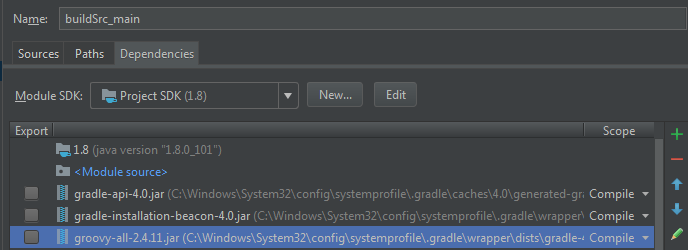
如果我在compile中删除了build.gradle中的Groovy依赖项,它就能工作,但是有什么方法可以强制模块使用我想要的版本的Groovy呢?
回答 1
Stack Overflow用户
回答已采纳
发布于 2017-09-14 11:12:10
Gradle总是将默认构建脚本应用于buildSrc项目。此脚本包含以下行:
compile localGroovy()groovy-all-2.4.11就是这样进来的。若要重写此行为,请尝试设置resolutionStrategy,例如:
configurations.compile {
  resolutionStrategy {
    force 'org.codehaus.groovy:groovy-all:2.4.12'
  }
}
但是更重要的是,为什么您想要构建一个与插件运行时不同的groovy版本.
页面原文内容由Stack Overflow提供。腾讯云小微IT领域专用引擎提供翻译支持
原文链接:
https://stackoverflow.com/questions/46205269
复制相关文章
相似问题
腾讯云开发者

Copyright © 2013 - 2026 Tencent Cloud. All Rights Reserved. 腾讯云 版权所有
深圳市腾讯计算机系统有限公司 ICP备案/许可证号:粤B2-20090059  粤公网安备44030502008569号
腾讯云计算(北京)有限责任公司 京ICP证150476号 | 京ICP备11018762号