
等距瓷砖的绘制和采摘- JAVA
我试图在Java中绘制等距瓷砖,并使用鼠标光标实现瓷砖拾取系统。我画瓷砖使用这些数学公式,我发现并适应了我的瓷砖纹理,你可以在下面找到。瓷砖是64x64px,但是平面砖的高度只有32 if,即使我用64x64 sprite来画。

映射是一个简单的2d数组,其中我的瓷砖由它们的id表示。
下面是使用toIso()函数将地图坐标转换为屏幕坐标的类。我将表示屏幕上光标位置的屏幕坐标传递给toGrid()函数,以将它们转换为映射坐标。
public class Utils {

private static int TILE_WIDTH = Tile.TILE_WIDTH;
private static int TILE_HEIGHT = Tile.TILE_HEIGHT;

private static int TILE_WIDTH_HALF = TILE_WIDTH/2;
private static int TILE_HEIGHT_HALF = TILE_HEIGHT/2;

private static int TILE_WIDTH_QUARTER = TILE_WIDTH_HALF/2;
private static int TILE_HEIGHT_QUARTER = TILE_HEIGHT_HALF/2;

public static int[] toIso(int x, int y){

    int i = (x - y) * TILE_WIDTH_HALF;
    int j = (x + y) * TILE_HEIGHT_QUARTER;

    //800 and 100 are temporary offsets I apply to center the map.
    i+=800;
    j+=100;

    return new int[]{i,j};
}

public static int[] toGrid(int x, int y){

    //800 and 100 are temporary offsets I apply to center the map.
    x-=800;
    y-=100;
    int i = ( x / ( TILE_WIDTH_HALF ) + y / ( TILE_HEIGHT_QUARTER )) / 2;
    int j = ( y / ( TILE_HEIGHT_QUARTER ) - ( x / ( TILE_WIDTH_HALF ))) / 2;

    return new int[]{i,j};
}}
目前,我通过使用两个for循环并使用toIso()函数将映射坐标转换为屏幕坐标来呈现我的瓷砖。
public void render(Graphics g){
    for(int x = 0;x<width;x++){
        for(int y = 0;y<height;y++){
            int[] isoCoords = Utils.toIso(x, y);
            int fx = isoCoords[0];//
            int fy = isoCoords[1];//
            if(world[x][y] == 0){
                Tile grass = new GrassTile(0);
                grass.render(g, grass.getId(), fx, fy);
            }else if(world[x][y] == 1){
                Tile water = new WaterTile(1);
                water.render(g, water.getId(), fx, fy);
            }
        }
    }
}
我得到一个钻石形状,我想在屏幕上渲染。
我最后更新了每个滴答,这是屏幕上的实际鼠标坐标。
int[] coords = Utils.toGrid(mouseManager.getMouseX(), mouseManager.getMouseY());
tileX = coords[0];
tileY = coords[1];
最后呈现选定的瓷砖:
BufferedImage selectedTexture = Assets.selected;
int[] coordsIsoSelected = Utils.toIso(this.tileX, this.tileY);
g.drawImage(selectedTexture, coordsIsoSelected[0], coordsIsoSelected[1], Tile.TILE_WIDTH, Tile.TILE_HEIGHT, null);

g.drawRect(Utils.toIso(tileX, tileY)[0], Utils.toIso(tileX, tileY)[1]+Tile.TILE_HEIGHT/2, Tile.TILE_WIDTH, Tile.TILE_HEIGHT/2);//I draw a rectangle to visualize what's happening.
最后,我的瓷砖检测不像预期的那样工作,它并不完美地拟合瓷砖,但是它似乎与我绘制的矩形有关。我想不出解决这个问题的办法,我提前感谢你的阅读或你能给我的任何建议。如果你需要更多的精确信息,我很乐意给你更多的信息。

下面是一段视频,展示了实际发生的事情:youtu.be/baCVIfJz2Wo
编辑:
下面是我的一些代码,您可以用来运行像我这样的应用程序。很抱歉,这个代码非常混乱,但我尽量使它尽可能短,而不干扰“游戏”的行为。
您将需要将前面提供的工作表放到项目的ressource文件夹中创建的“纹理”文件夹中。
gfx包:
package fr.romainimberti.isometric.gfx;

import java.awt.image.BufferedImage;


public class Assets {

    private static final int width = 64, height = 64;

    public static BufferedImage grass, water, selected;

    public static void init(){
        //Temp
        SpriteSheet tileSheet = new SpriteSheet(ImageLoader.loadImage("/textures/sheet.png"));

        grass = tileSheet.crop(width*2, 0, width, height);
        water = tileSheet.crop(width*9, height*5, width, height);
        selected = tileSheet.crop(0, height*5, width, height);
        //
    }
}package fr.romainimberti.isometric.gfx;
import java.awt.image.BufferedImage;
import java.io.IOException;
import javax.imageio.ImageIO;
public class ImageLoader {
public static BufferedImage loadImage(String path){
try {
return ImageIO.read(ImageLoader.class.getResource(path));
} catch (IOException e) {
e.printStackTrace();
System.exit(1);
}
return null;
}
}package fr.romainimberti.isometric.gfx;
import java.awt.image.BufferedImage;
public class SpriteSheet {
private BufferedImage sheet;
public SpriteSheet(BufferedImage sheet){
this.sheet = sheet;
}
public BufferedImage crop(int x, int y, int width, int height){
return sheet.getSubimage(x, y, width, height);
}
}项目的其余部分:
package fr.romainimberti.isometric;

public class Launcher {

    public static void main(String args[]){
        System.setProperty("sun.awt.noerasebackground", "true");
        Game game = new Game("Isometric", 1280, 720);
        game.start();
    }
}package fr.romainimberti.isometric;
import java.awt.Canvas;
import java.awt.Dimension;
import javax.swing.JFrame;
public class Display {
private JFrame frame;
private Canvas canvas;
private String title;
private int width, height;
public Display(String title, int width, int height){
this.title = title;
this.width = width;
this.height = height;
createDisplay();
}
private void createDisplay(){
frame = new JFrame(title);
frame.setDefaultCloseOperation(JFrame.EXIT_ON_CLOSE);
frame.setResizable(true);
frame.setLocationRelativeTo(null);
frame.setVisible(true);
canvas = new Canvas();
canvas.setPreferredSize(new Dimension(width, height));
canvas.setMaximumSize(new Dimension(width, height));
canvas.setMinimumSize(new Dimension(width, height));
canvas.setFocusable(true);
frame.add(canvas);
frame.pack();
}
public Canvas getCanvas(){
return canvas;
}
public JFrame getFrame(){
return frame;
}
}package fr.romainimberti.isometric;
import java.awt.Graphics;
import java.awt.image.BufferStrategy;
import java.util.concurrent.ThreadLocalRandom;
import javax.swing.JFrame;
import fr.romainimberti.isometric.gfx.Assets;
public class Game implements Runnable {
private Display display;
private int width, height;
public JFrame frame;
private boolean running = false;
private Thread thread;
public String title;
private BufferStrategy bs;
private Graphics g;
public int x, y;
public int[][] world;
public static final int TILE_WIDTH = 64;
public static final int TILE_HEIGHT = 64;
public static final int TILE_WIDTH_HALF = 32;
public static final int TILE_HEIGHT_HALF = 32;
public static final int TILE_WIDTH_QUARTER = 16;
public static final int TILE_HEIGHT_QUARTER = 16;
public int xOffset;
//Input
private MouseManager mouseManager;
public Game(String title, int width, int height){
this.width = width;
this.height = height;
this.mouseManager = new MouseManager(this);
this.world = new int[10][10];
}
private void init(){
display = new Display(title, width, height);
display.getFrame().addMouseListener(mouseManager);
display.getFrame().addMouseMotionListener(mouseManager);
display.getCanvas().addMouseListener(mouseManager);
display.getCanvas().addMouseMotionListener(mouseManager);
this.frame = display.getFrame();
Assets.init();
xOffset = frame.getWidth()/2;
//Fill the world
for(int i = 0;i<world.length;i++){
for(int j=0;j<world[0].length;j++){
int r = ThreadLocalRandom.current().nextInt(0,1+1);
if(r == 0)
world[i][j] = 0;
else
world[i][j] = 1;
}
}
}
private void tick(){
mouseManager.tick();
xOffset = frame.getWidth()/2;
}
private void render(){
bs = display.getCanvas().getBufferStrategy();
if(bs == null){
display.getCanvas().createBufferStrategy(3);
return;
}
g = bs.getDrawGraphics();
//Clear Screen
g.clearRect(0, 0, frame.getWidth(), frame.getHeight());
//Draw Here
//World render
for(int x = 0;x<world.length;x++){
for(int y = 0;y<world[0].length;y++){
int[] isoCoords = toIso(x, y);
int fx = isoCoords[0];//
int fy = isoCoords[1];//
if(world[x][y] == 0){
g.drawImage(Assets.grass, fx, fy, null);
}else if(world[x][y] == 1){
g.drawImage(Assets.water, fx, fy, null);
}
}
}
//Selected tile render
int[] coordsIsoSelected = toIso(x, y);
g.drawImage(Assets.selected, coordsIsoSelected[0], coordsIsoSelected[1], TILE_WIDTH, TILE_HEIGHT, null);
//End Drawing
bs.show();
g.dispose();
}
public void run(){
init();
int fps = 120;
double timePerTick = 1000000000 / fps;
double delta = 0;
long now;
long lastTime = System.nanoTime();
while(running){
now = System.nanoTime();
delta += (now - lastTime) / timePerTick;
lastTime = now;
if(delta >= 1){
tick();
render();
delta--;
}
}
stop();
}
public MouseManager getMouseManager(){
return mouseManager;
}
public int getWidth(){
return width;
}
public int getHeight(){
return height;
}
public synchronized void start(){
if(running)
return;
running = true;
thread = new Thread(this);
thread.start();
}
public synchronized void stop(){
if(!running)
return;
running = false;
try {
thread.join();
} catch (InterruptedException e) {
e.printStackTrace();
}
}
public static int[] toIso(int x, int y){
int i = (x - y) * TILE_WIDTH_HALF;
int j = (x + y) * TILE_HEIGHT_QUARTER;
i+=xOffset;
return new int[]{i,j};
}
public static int[] toGrid(int x, int y){
x-=xOffset;
int i = ( x / ( TILE_WIDTH_HALF ) + y / ( TILE_HEIGHT_QUARTER )) / 2;
int j = ( y / ( TILE_HEIGHT_QUARTER ) - ( x / ( TILE_WIDTH_HALF ))) / 2;
return new int[]{i,j};
}
}package fr.romainimberti.isometric;
import java.awt.event.MouseEvent;
import java.awt.event.MouseListener;
import java.awt.event.MouseMotionListener;
public class MouseManager implements MouseListener, MouseMotionListener {
private boolean leftPressed, rightPressed;
private int mouseX, mouseY;
private Game game;
public MouseManager(Game game){
this.game = game;
}
public void tick(){
game.x = game.toGrid(mouseX, mouseY)[0];
game.y = game.toGrid(mouseX, mouseY)[1];
}
// Getters
public boolean isLeftPressed(){
return leftPressed;
}
public boolean isRightPressed(){
return rightPressed;
}
public int getMouseX(){
return mouseX;
}
public int getMouseY(){
return mouseY;
}
// Implemented methods
@Override
public void mousePressed(MouseEvent e) {
if(e.getButton() == MouseEvent.BUTTON1)
leftPressed = true;
else if(e.getButton() == MouseEvent.BUTTON3)
rightPressed = true;
}
@Override
public void mouseReleased(MouseEvent e) {
if(e.getButton() == MouseEvent.BUTTON1)
leftPressed = false;
else if(e.getButton() == MouseEvent.BUTTON3)
rightPressed = false;
}
@Override
public void mouseMoved(MouseEvent e) {
mouseX = e.getX();
mouseY = e.getY();
}
@Override
public void mouseDragged(MouseEvent e) {
// TODO Auto-generated method stub
}
@Override
public void mouseClicked(MouseEvent e) {
// TODO Auto-generated method stub
}
@Override
public void mouseEntered(MouseEvent e) {
// TODO Auto-generated method stub
}
@Override
public void mouseExited(MouseEvent e) {
// TODO Auto-generated method stub
}
}如果您需要,您可以在这里找到我的项目架构,这样您就可以正确地组织所有文件。

再次,很抱歉,这个非常,非常混乱的代码,但我不得不分割所有有用的部分,我的游戏,以减少它的规模。另外,不要忘记下载并正确放置工作表文件。希望这能帮上忙。

回答 2
Stack Overflow用户
发布于 2017-10-13 12:26:40
我只想说我终于解决了。这只是一个转换到int的问题。这些是我使用的最后方法。希望它能帮助那些试图使用等距瓷砖的人。谢谢!
public static int[] toIso(int x, int y){

    int i = (x - y) * TILE_WIDTH_HALF;
    int j = (x + y) * TILE_HEIGHT_QUARTER;

    i += xOffset-TILE_WIDTH_HALF;
    j+=yOffset;

    return new int[]{i,j};
}

public static int[] toGrid(double i, double j){

    i-=xOffset;
    j-=yOffset;

    double tx = Math.ceil(((i / TILE_WIDTH_HALF) + (j / TILE_HEIGHT_QUARTER))/2);
    double ty = Math.ceil(((j / TILE_HEIGHT_QUARTER) - (i / TILE_WIDTH_HALF))/2);

    int x = (int) Math.ceil(tx)-1;
    int y = (int) Math.ceil(ty)-1;

    return new int[]{x, y};
}Stack Overflow用户
发布于 2017-09-21 14:45:02
在用128x64像素块替换新的spritesheet之后,我已经能够部分地实现所需的输出.
为什么我说“部分”?因为我只从地图的右半部分得到了想要的结果。
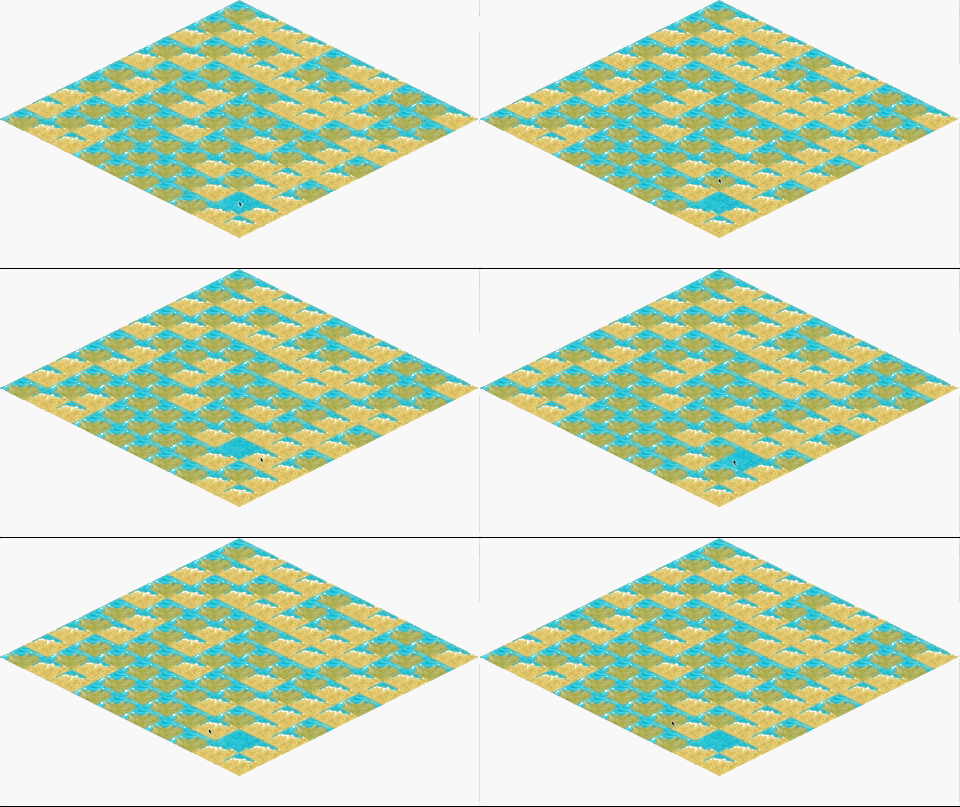
我相信这可能与地图的绘制方式有关,我不是以英语为母语的人,所以我可能误解了OP's 链接中“注释”部分的意思
注意,等距瓷砖的“原点”是顶角。但通常当我们画精灵时,它是从左上角开始的
我在程序开始时调用了toGrid()和toIso()方法如下:
int[] coordinates = Game.toIso(2, 1);
System.out.println(coordinates[0] + "-" + coordinates[1]);

int[] coordinates2 = Game.toGrid(coordinates[0], coordinates[1]);
System.out.println(coordinates2[0] + "-" + coordinates2[1]);
得到了以下结果(这确实是我们所期望的),因此我们知道这些方法是正确工作的:
64-96
2-1我肯定会修改Assets文件:
public static final int WIDTH = 128, HEIGHT = 64;在这里,我还更改了Java命名约定 (ALL_WORDS_UPPER_CASE_CONSTANTS)后面的变量名,并将其改为public而不是private
我还更改了Game文件:
public static final int TILE_WIDTH = Assets.WIDTH;
public static final int TILE_HEIGHT = Assets.HEIGHT;
public static final int TILE_WIDTH_HALF = TILE_WIDTH / 2;
public static final int TILE_HEIGHT_HALF = TILE_HEIGHT / 2;
public static final int TILE_WIDTH_QUARTER = TILE_WIDTH / 4;
public static final int TILE_HEIGHT_QUARTER = TILE_HEIGHT / 4;在Assets文件上使用这些常量,并计算HALF和QUARTER,而不是硬编码。
我还认为xOffset不应该是public,而应该是private以及程序中的其他变量.
tick()方法不需要每次计算xOffset,所以我们可以去掉它中的这一行:
xOffset = frame.getWidth() / 2 - 65;我还改变了您所选择的瓷砖的绘制方式:
// Selected tile render
int[] coordsIsoSelected = toIso(x, y);
g.drawImage(Assets.selected, coordsIsoSelected[0], coordsIsoSelected[1], TILE_WIDTH, TILE_HEIGHT, null);
对于托尔索方程,我把它们改为:
public static int[] toIso(int x, int y) {
    int i = (x - y) * TILE_WIDTH_HALF;
    int j = (x + y) * TILE_HEIGHT_HALF;

    i += xOffset;

    return new int[] { i, j };
}
下面我调整了括号的位置:
public static int[] toGrid(int x, int y) {
    x -= xOffset;

    int i = ((x / TILE_WIDTH_HALF) + (y / TILE_HEIGHT_HALF)) / 2;
    int j = ((y / TILE_HEIGHT_HALF) - (x / TILE_WIDTH_HALF)) / 2;

    return new int[] { i, j };
}https://stackoverflow.com/questions/46104610
复制相似问题
腾讯云开发者

Copyright © 2013 - 2026 Tencent Cloud. All Rights Reserved. 腾讯云 版权所有
深圳市腾讯计算机系统有限公司 ICP备案/许可证号:粤B2-20090059  粤公网安备44030502008569号
腾讯云计算(北京)有限责任公司 京ICP证150476号 | 京ICP备11018762号