
VSTS文件复制失败
我有一个包含复制文件任务的任务组。该复制文件任务用于3种不同的部署。其中两个很好,但第三个不起作用,我不知道为什么。
复制文件任务会出现此错误
##[debug]testing directory '\\bs05vm3\Bifrost\'
##[debug]task result: Failed
##[error]Unhandled: Unable to create directory '\\bs05vm3\Bifrost\'. Unable to verify
                    the directory exists: '\\bs05vm3\Bifrost\'. If directory is a file share,
                    please verify the share name is correct, the share is online, and the
                    current process has permission to access the share.

##[debug]Processed: ##vso[task.issue type=error;]Unhandled: Unable to create directory
                    '\\bs05vm3\Bifrost\'. Unable to verify the directory exists: '\\bs05vm3\Bifrost\'.
                    If directory is a file share, please verify the share name is correct,
                    the share is online, and the current process has permission to access the share.

##[debug]Processed: ##vso[task.complete result=Failed;]Unhandled: Unable to create directory '\\bs05vm3\Bifrost\'.
                    Unable to verify the directory
                    exists: '\\bs05vm3\Bifrost\'. If directory is a file share, please verify
                    the share name is correct, the share is online, and the current
                    process has permission to access the share.
##[section]Finishing: Copy Files to: \\bs05vm3\Bifrost\
因此,计算机名是正确的,我可以从我的开发PC和VSTS代理正在运行的计算机访问共享。
当前,文件共享本身为\\bs05vm3\Bifrost\,因此Everyone有读写权限。请注意,此访问仅设置为bs05vm3上的bs05vm3文件夹。
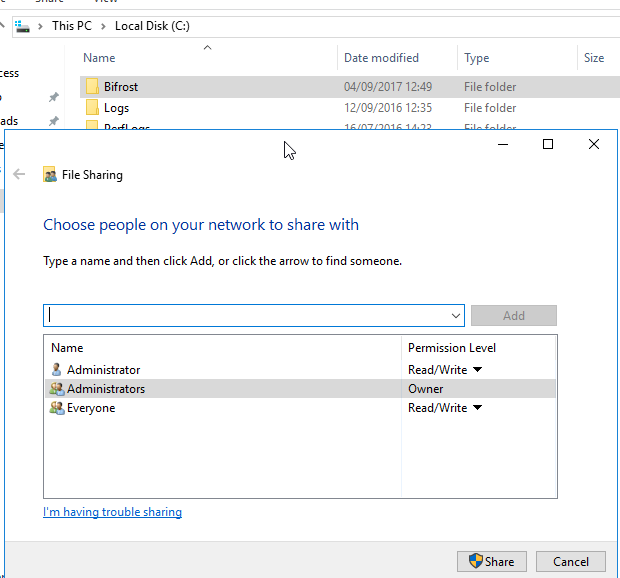
按照要求,这里有关于文件复制任务的详细信息
Task Type: Copy Files
Source Folder: $(System.DefaultWorkingDirectory)/Bifrost-Visual Studio-CI/drop/bin/Release
Contents:
    **
    !**\App.Queues.Config
    !**.pdb
    !**\App.Connections.Config
TargetFolder: \\$(RemoteComputer)\Bifrost\
在这个不起作用后,我尝试了下面的建议,并使用了如下:
Task Type: Windows File Machine Copy
Source: $(System.DefaultWorkingDirectory)/Bifrost-Visual Studio-CI/drop/bin/Release
Machines:$(RemoteComputer)
Admin Login: $(Username)
Password: $(Password)
Destination Folder: Bifrost回答 1
Stack Overflow用户
发布于 2017-09-04 13:46:26
我过去也有过同样的问题,最后我使用了“”任务来执行类似的操作。
可以在此任务中提供登录凭据。对我来说,它解决了我的问题,但是我当然不知道这对你来说是否是解决方案,因为你必须在这个任务中写下登录要点,而每个被允许编辑构建定义的人都可以看到它们。
我没有构建服务器的“在线”版本,我们有所谓的“在线”版本。不确定这是否会有区别,但只是想澄清一下。
一个提示是,我在创建与复制进程共享的网络上的文件夹时也遇到了问题。最后,我创建了我希望在共享上拥有的整个文件夹结构,首先是在artefacts目录中,而不是将整个结构与所有子文件夹复制到网络共享中。
https://stackoverflow.com/questions/46037165
复制相似问题
腾讯云开发者

Copyright © 2013 - 2026 Tencent Cloud. All Rights Reserved. 腾讯云 版权所有
深圳市腾讯计算机系统有限公司 ICP备案/许可证号:粤B2-20090059  粤公网安备44030502008569号
腾讯云计算(北京)有限责任公司 京ICP证150476号 | 京ICP备11018762号