
在.net中将Kendo导出到PDF多个页面
在.net中将Kendo导出到PDF多个页面
提问于 2017-09-04 07:12:54
我需要实现用于pdf导出的应用程序。当我搜索时,我发现kendo用户界面最适合我的需求。而且,这是非常工作,直到我出口单页。
但是当我导出多个页面时,我的kendo UI代码不能正常工作。
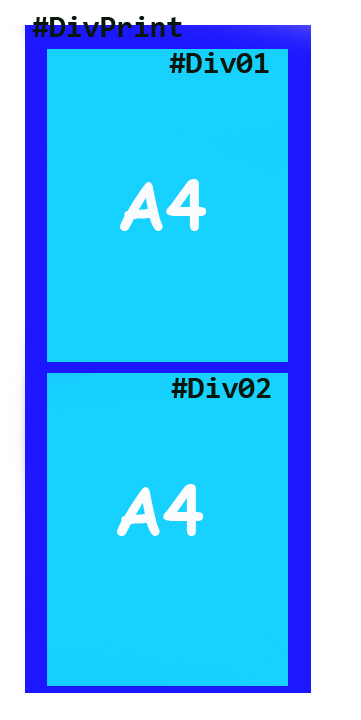
我在我的场景中有主div作为'DivPrint‘,其中包含两个A4大小的div。当我导出它时,它被导出为1页而不是2页。
$scopeChild.generatePDF = function () {


kendo.drawing.drawDOM($("#DivPrint"), {paperSize: "A4",multiPage: true                                             })
            .then(function (group) {
              kendo.drawing.pdf.saveAs(group, "Converted PDF.pdf");
               })
}回答 2
Stack Overflow用户
发布于 2018-12-12 06:46:29
您可以使用Kendo和html中可用的forcePageBreak属性,您应该提到这些类。
您的HTML应该如下所示:
<div id="DivPrint">
 <div id="Div01">Text from first div </div>
 <div id="Div02" class="page-break">Text from second div</div>
<div>
你的JS应该是这样的
kendo.drawing.drawDOM("#DivPrint", {
    paperSize: "A4",
    forcePageBreak: ".page-break"
  })
  .then(function(group) {
    kendo.drawing.pdf.saveAs(group, "Converted PDF.pdf");
})您可以在这里查看现场演示:https://jsbin.com/hedodigomu/
Stack Overflow用户
发布于 2020-10-20 16:52:13
function exportMultipleElements() {
    var exportSettings = {
        forcePageBreak: ".pageBreak",
        paperSize: "A3",
        landscape: true
    };

    var draw = kendo.drawing;
    var $ = $telerik.$;
    //use a few deferreds at once https://api.jquery.com/jquery.when/
    //https://docs.telerik.com/kendo-ui/api/javascript/drawing/methods/drawdom
    $.when(
        draw.drawDOM($("#first"), exportSettings),
        draw.drawDOM($("#second"), exportSettings),
        draw.drawDOM($("#third"), exportSettings),
        draw.drawDOM($("#fourth"), exportSettings)
    ).then(function (group1, group2, group3, group4) {//the number of arguments matches the number of deferreds

        var group = new kendo.drawing.Group({
            pdf: {
                multiPage: true
            }
        });

        //append the first three pages with the more static content, including the chart
        group.append(group1, group2, group3);
        //append the pages from the grid in the fourth element, see the rest of the functions in the full example to see how the page break selector is appended in the DOM
        group.append.apply(group, group4.children);

        return draw.exportPDF(group, exportSettings);
    }).done(function (data) {
        kendo.saveAs({
            dataURI: data,
            fileName: "multi-element-export.pdf"
        });
    });
}页面原文内容由Stack Overflow提供。腾讯云小微IT领域专用引擎提供翻译支持
原文链接:
https://stackoverflow.com/questions/46032021
复制相关文章
相似问题
腾讯云开发者

Copyright © 2013 - 2026 Tencent Cloud. All Rights Reserved. 腾讯云 版权所有
深圳市腾讯计算机系统有限公司 ICP备案/许可证号:粤B2-20090059  粤公网安备44030502008569号
腾讯云计算(北京)有限责任公司 京ICP证150476号 | 京ICP备11018762号