
在Android的上下文菜单中添加缺少的约束布局屏障
我目前正在学习ConstraintLayout教程,并停留在一个特定的步骤(https://codelabs.developers.google.com/codelabs/constraint-layout/#10)中。
源在这里(https://github.com/googlecodelabs/constraint-layout)。
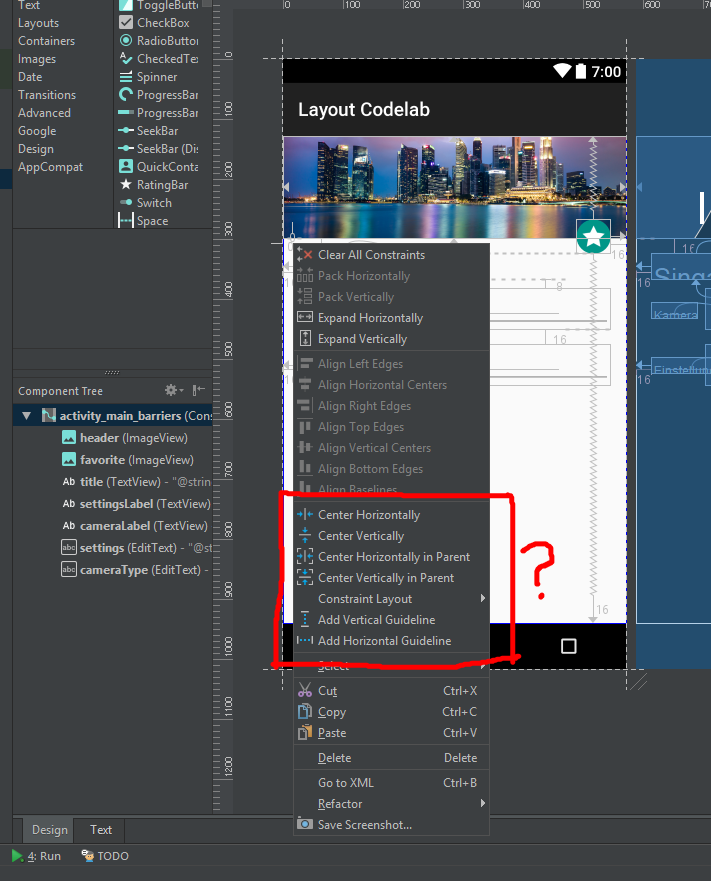
根据下面的说明,它说要添加一个垂直屏障,但我没有在菜单中看到添加选项。实际上,整个菜单选项看起来都不一样。“添加垂直屏障”菜单在哪里?
右键单击蓝图或组件树中的ConstraintLayout。您将看到添加垂直屏障和添加水平屏障选项。
我正在运行Android2.3.3。
build.gradle (模块: app)
apply plugin: 'com.android.application'

android {
    compileSdkVersion 25
    buildToolsVersion "25.0.3"
    defaultConfig {
        applicationId "com.google.googleio"
        minSdkVersion 22
        targetSdkVersion 25
        versionCode 1
        versionName "1.0"
    }
    buildTypes {
        release {
            minifyEnabled false
            proguardFiles getDefaultProguardFile('proguard-android.txt'), 'proguard-rules.pro'
        }
    }
}

dependencies {
    compile fileTree(dir: 'libs', include: ['*.jar'])
    testCompile 'junit:junit:4.12'
    compile 'com.android.support.constraint:constraint-layout:1.1.0-beta1'
}
回答 2
Stack Overflow用户
发布于 2017-09-03 22:20:54
我正在运行Android2.3.3。
我猜您的意思是您正在运行Android 2.3.3。在这种情况下,没有这样的菜单。这是在AndroidStudio3.0中添加的,从今天起可以在beta版中使用。
Stack Overflow用户
发布于 2018-02-18 11:53:49
将这一行添加到您的级(Module:app)
implementation 'com.android.support.constraint:constraint-layout:1.1.0-beta1'
https://stackoverflow.com/questions/46028235
复制相似问题
腾讯云开发者

Copyright © 2013 - 2026 Tencent Cloud. All Rights Reserved. 腾讯云 版权所有
深圳市腾讯计算机系统有限公司 ICP备案/许可证号:粤B2-20090059  粤公网安备44030502008569号
腾讯云计算(北京)有限责任公司 京ICP证150476号 | 京ICP备11018762号