
Marketo REST API -智能运动
Marketo REST API -智能运动
提问于 2017-08-27 20:48:18
我可以使用html表单和附加脚本(PHP + Rest )创建一个新的Marketo领导。大多数情况下,线索会出现在Marketo。
问题是,我的市场设置要求新的线索被添加到一个特殊的“聪明的运动”。
在Marketo的Rest 文档上,我找到了一个端点,用于将引线添加到列表,而不是添加到活动中。你遇到这个问题了吗?
class UpsertLeads{
    //these are the CIN Marketo credentials
    public $host = "####";//CHANGE ME
    public $clientId = "####";//CHANGE ME
    public $clientSecret = "####";//CHANGE ME
    public $input; //an array of lead records as objects
    public $lookupField; //field used for deduplication
    public $action; //operation type, createOnly, updateOnly, createOrUpdate, createDuplicate

    public function postData(){
        $url = $this->host . "/rest/v1/leads.json?access_token=" . $this->getToken();
        $ch = curl_init($url);
        $requestBody = $this->bodyBuilder();
        //commenting out
        //dont need to output this stuff in production
        //print_r($requestBody);
        curl_setopt($ch,  CURLOPT_RETURNTRANSFER, 1);
        curl_setopt($ch, CURLOPT_HTTPHEADER, array('accept: application/json','Content-Type: application/json'));
        curl_setopt($ch, CURLOPT_POST, 1);
        curl_setopt($ch, CURLOPT_POSTFIELDS, $requestBody);
        curl_getinfo($ch);
        $response = curl_exec($ch);
        return $response;
    }

    private function getToken(){
        $ch = curl_init($this->host . "/identity/oauth/token?grant_type=client_credentials&client_id=" . $this->clientId . "&client_secret=" . $this->clientSecret);
        curl_setopt($ch,  CURLOPT_RETURNTRANSFER, 1);
        curl_setopt($ch, CURLOPT_HTTPHEADER, array('accept: application/json',));
        $response = json_decode(curl_exec($ch));
        curl_close($ch);
        $token = $response->access_token;
        return $token;
    }

    private function bodyBuilder(){
        $body = new stdClass();
        if (isset($this->action)){
            $body->action = $this->action;
        }
        if (isset($this->lookupField)){
            $body->lookupField = $this->lookupField;
        }
        $body->input = $this->input;
        $json = json_encode($body);
        return $json;
    }

    private static function csvString($fields){
        $csvString = "";
        $i = 0;
        foreach($fields as $field){
            if ($i > 0){
                $csvString = $csvString . "," . $field;
            }elseif ($i === 0){
                $csvString = $field;
            }
        }
        return $csvString;
    }
}回答 1
Stack Overflow用户
回答已采纳
发布于 2017-12-16 22:47:18
这是不可能把你的新线索,直接通过API智能运动。
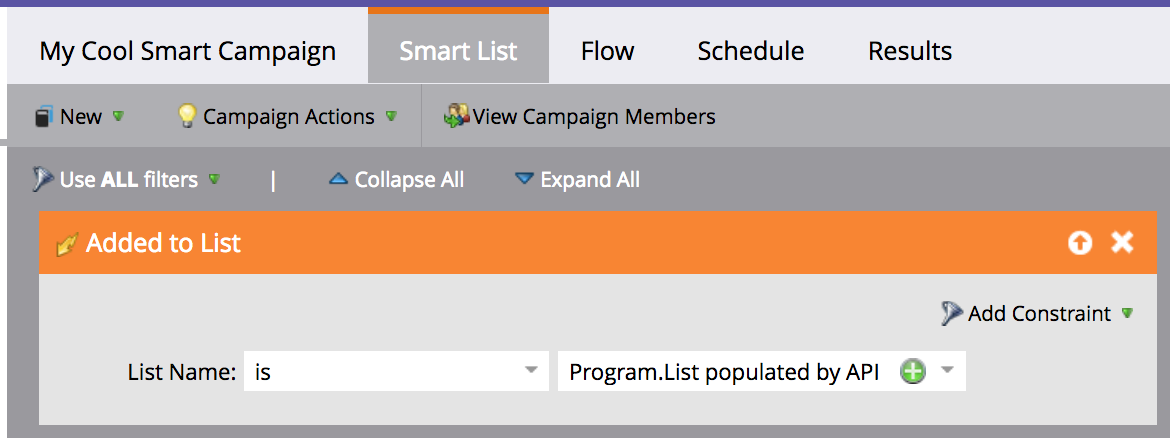
然而,您注意到的-as-您可以将它们推到一个列表中,这是成功的一半。从那里开始,你需要做的唯一的事情就是配置智能运动,从你填充的列表中获取线索。
通过设置Added to List触发器并将其指向您的列表,您可以在智能活动的智能列表选项卡上这样做。截图附呈。
这样,新的引线将立即添加到智能列表中。
页面原文内容由Stack Overflow提供。腾讯云小微IT领域专用引擎提供翻译支持
原文链接:
https://stackoverflow.com/questions/45909209
复制相关文章
相似问题
腾讯云开发者

Copyright © 2013 - 2026 Tencent Cloud. All Rights Reserved. 腾讯云 版权所有
深圳市腾讯计算机系统有限公司 ICP备案/许可证号:粤B2-20090059  粤公网安备44030502008569号
腾讯云计算(北京)有限责任公司 京ICP证150476号 | 京ICP备11018762号