
运行咕噜命令时删除输出页眉和页脚
运行咕噜命令时删除输出页眉和页脚
提问于 2017-08-27 00:34:35
我正在运行一个grunt命令,但它显示的是要删除的页眉和页脚。
这是我的Gruntfile.js
module.exports = function(grunt) {
    grunt.initConfig({
        exec: {
            ls: {
                command: 'ls -la',
                stdout: true,
                stderr: true,
            }
        }
    });
    grunt.loadNpmTasks('grunt-exec');
    grunt.registerTask('ls', ['exec:ls']);
}
我得到的是:
编辑
我对下面图片中突出显示的标题感到困惑。我想强调的是:
Running "exec:ls" (exec) task
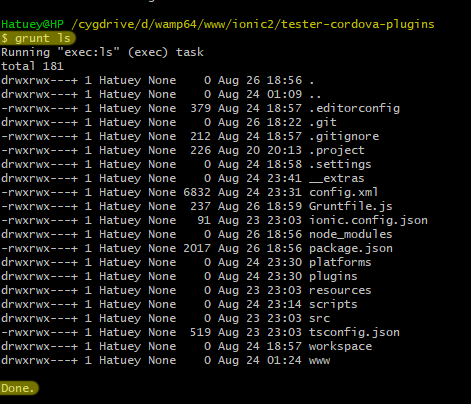
我是否可以在目标内部使用一些选项来删除(黄色高亮显示)?
回答 1
Stack Overflow用户
回答已采纳
发布于 2017-08-29 09:58:30
通过安装Running "exec:ls" (exec) task,可以省略头咕噜-记者。
Gruntfile.js
您的Gruntfile.js可以配置如下:
module.exports = function (grunt) {

  grunt.initConfig({
    reporter: {
      exec: {
        options: {
          tasks: ['exec:ls'],
          header: false
        }
      }
    },

    exec: {
      ls: {
        command: 'ls -la',
        stdout: true,
        stderr: true
      }
    }
  });

  require('load-grunt-tasks')(grunt);

  grunt.registerTask('ls', [
    'reporter:exec', //<-- The call to the reporter must be before exec.
    'exec:ls'
  ]);
}注意事项:没有使用grunt.loadNpmTasks(...)加载grunt-reporter。相反,它使用负载-咕噜-任务。这也将处理grunt-exec的加载,因此不需要grunt.loadNpmTasks(...)任何其他模块。
Done 呢?
不幸的是,grunt-reporter没有提供省略最终Done消息的特性。
要省略Done,您必须使用一个空函数来替换grunt的内部grunt.log.success函数。这种方法并不特别好,因为它有点麻烦。例如,您可以在配置的顶部添加以下内容:
module.exports = function (grunt) {

  grunt.log.success = function () {}; // <-- Add this before grunt.initConfig({...})

  // ...

}同样的黑客也可以用于头部,但grunt-reporter是一个更干净的方法。也就是说。
module.exports = function (grunt) {

  grunt.log.header = function () {}; // <-- Blocks all header logs.

  // ...

}页面原文内容由Stack Overflow提供。腾讯云小微IT领域专用引擎提供翻译支持
原文链接:
https://stackoverflow.com/questions/45900792
复制相关文章
相似问题
腾讯云开发者

Copyright © 2013 - 2026 Tencent Cloud. All Rights Reserved. 腾讯云 版权所有
深圳市腾讯计算机系统有限公司 ICP备案/许可证号:粤B2-20090059  粤公网安备44030502008569号
腾讯云计算(北京)有限责任公司 京ICP证150476号 | 京ICP备11018762号