
来自WPF用户控件库的UserControl绑定不适用于ContentControl
为什么不使用WPF用户控件库来绑定Caliburn.Micro UserControl?
初始
创建新的Wpf Appv4.6.2
- 安装Nuget Caliburn.Micro v3.1.0
- 安装Nuget Caliburn.Micro.Start v3.1.0
- 做像解释的http://caliburnmicro.com/documentation/nuget 这样的适应
- 适应app.xaml
- 删除StartupUri
- 添加ResourceDictionary
- 检查AppBootstrapper
- 删除MainWindow.xaml
- 将按钮
x:Name="DoIt"添加到ShellView.xaml - 将
public void DoIt()与MessageBox.Show()添加到ShellViewModel.cs中 - 测试这个初始版本
✓检查!它运行和绑定工作..。
UserControl视图
- 添加
UserControl并将其命名为TestUcView - 添加一个
Textbox并给出一个名称,例如UcValue
<UserControl x:Class="WpfApp1.Test2UcView"
             xmlns="http://schemas.microsoft.com/winfx/2006/xaml/presentation"
             xmlns:x="http://schemas.microsoft.com/winfx/2006/xaml"
             xmlns:mc="http://schemas.openxmlformats.org/markup-compatibility/2006"
             xmlns:d="http://schemas.microsoft.com/expression/blend/2008"
             xmlns:local="clr-namespace:WpfApp1"
             mc:Ignorable="d"
             d:DesignHeight="50" d:DesignWidth="200" Visibility="{Binding UcVisibility}">
    <Grid >
        <TextBox x:Name="UcValue" HorizontalAlignment="Left" Height="23" Margin="10,10,0,0" TextWrapping="Wrap" VerticalAlignment="Top" Width="100"/>
        <Button x:Name="UcAction" Content="Do specific" HorizontalAlignment="Left" Margin="120,10,0,0" VerticalAlignment="Top" Width="75"/>
    </Grid>
</UserControl>
UserControl ViewModel
- 添加相应名称为TestUcViewModel的类
- 将类更改为public,并使用Caliburn.Micro从屏幕派生并添加
- 将具有相应名称的属性添加到
TextBox中,例如UcValue
public class Test1UcViewModel : Screen
{
    private string _UcValue;
    public string UcValue { get => _UcValue; set { _UcValue = value; NotifyOfPropertyChange(() => UcValue); } }

    public void TestBut2() {
        MessageBox.Show("TestBut2");
    }
}
UserControl集成
- 在ShellViewModel中,为ViewModel创建公共属性,并在构造函数中创建实例
- 在视图中创建要绑定的控件
1. Possibility: Place `ContentControl` in the `ShellView.xaml` with the same Name as the ViewModel property (ViewModel first)
2. Possibility: Compile and place the `UserControl` into the `ShellView.xaml` and add `cal:Bind.Model="{Binding <ViewModel-Property-Name>}"` for this the namespace
✓检查!UserControl的运行和绑定工作..。
但,
...now与属于WPF用户控制库( dll )的第三个UserControl集成在一起,当使用ContentControl语法时,UserControl绑定不能用于ContentControl。
public class ShellViewModel : Caliburn.Micro.PropertyChangedBase, IShell
{
    private Test1UcViewModel _Test1UserControlModel;
    private Test2UcViewModel _Test2UserControlModel;
    private Test3UcViewModel _Test3UserControlModel;

    public Test1UcViewModel Test1 { get => _Test1UserControlModel; set { _Test1UserControlModel = value; NotifyOfPropertyChange(() => Test1); } }
    public Test2UcViewModel Test2 { get => _Test2UserControlModel; set { _Test2UserControlModel = value; NotifyOfPropertyChange(() => Test2); } }
    public Test3UcViewModel Test3 { get => _Test3UserControlModel; set { _Test3UserControlModel = value;NotifyOfPropertyChange(() => Test3); } }

    public ShellViewModel()
    {
        _Test1UserControlModel = new Test1UcViewModel();
        Test1.UcValue = "Bubble";
        _Test2UserControlModel = new Test2UcViewModel();
        Test2.UcValue = "Simmer";
        _Test3UserControlModel = new Test3UcViewModel();
        Test3.Uc3Value = "Knocking on heavens door";
        Test1.UcVisibility = Visibility.Visible;
        Test2.UcVisibility = Visibility.Hidden;
        Test3.UcVisibility = Visibility.Hidden;
}<Window
xmlns="http://schemas.microsoft.com/winfx/2006/xaml/presentation"
xmlns:x="http://schemas.microsoft.com/winfx/2006/xaml"
xmlns:cal="http://www.caliburnproject.org"
xmlns:local="clr-namespace:WpfApp1"
xmlns:TestUcLib="clr-namespace:TestUcLib;assembly=TestUcLib"
x:Class="WpfApp1.ShellView" Width="500" Height="300">
<Grid Background="White">
<Grid.ColumnDefinitions>
<ColumnDefinition Width="100"/>
<ColumnDefinition Width="*"/>
</Grid.ColumnDefinitions>
<TextBlock Text="Input"
TextWrapping="Wrap"
VerticalAlignment="Bottom"
HorizontalAlignment="Center"
FontSize="20" />
<StackPanel>
<Button x:Name="DoIt1" Content="Do it 1" HorizontalAlignment="Left" VerticalAlignment="Top" Width="75" Margin="5"/>
<Button x:Name="DoIt2" Content="Do it 2" HorizontalAlignment="Left" VerticalAlignment="Top" Width="75" Margin="5"/>
<Button x:Name="DoIt3" Content="Do it 3" HorizontalAlignment="Left" VerticalAlignment="Top" Width="75" Margin="5"/>
</StackPanel>
<ContentControl x:Name="Test1" Grid.Column="1" HorizontalAlignment="Stretch" VerticalAlignment="Stretch"/>
<ContentControl x:Name="Test2" Grid.Column="1" HorizontalAlignment="Stretch" VerticalAlignment="Stretch"/>
<ContentControl x:Name="Test3" Grid.Column="1" HorizontalAlignment="Stretch" VerticalAlignment="Stretch"/>
<!--This one works-->
<!--<TestUcLib:Test3UcView cal:Bind.Model="{Binding Test3}" Grid.Column="1" HorizontalAlignment="Stretch" VerticalAlignment="Stretch"/>-->
</Grid>
</Window>
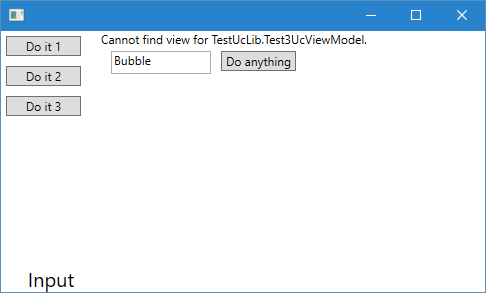
当<TestUcLib:Test3UcView cal:Bind.Model="{Binding Test3}"在dll中时,是否必须使用ContentControl而不是使用UserControl?
回答 1
Stack Overflow用户
发布于 2017-08-25 14:57:00
Caliburn.Micro使用一个简单的命名模式来找到它应该绑定到视图模型和显示的UserControl,它只搜索通过AssemblySource.Instance:http://caliburnmicro.com/documentation/conventions公开为可搜索的任何程序集。
您可以通过设置ViewLocator.LocateForModelType属性并实现自己的属性来覆盖此逻辑。下面的基本示例将给您提供这样的想法:
public class HelloBootstrapper : BootstrapperBase
{
    public HelloBootstrapper()
    {
        Initialize();
    }

    ...

    static Func<Type, DependencyObject, object, UIElement> _func;
    protected override void Configure()
    {
        var assembly = System.Reflection.Assembly.Load("WpfCustomControlLibrary1"); //<-- this is your assembly
        AssemblySource.Instance.Add(assembly);

        _func = ViewLocator.LocateForModelType;
        ViewLocator.LocateForModelType = LocateForModelType;
        ...
    }

    private static Func<Type, DependencyObject, object, UIElement> LocateForModelType = (modelType, displayLocation, context) => {

        //use the default method first:
        UIElement view = _func(modelType, displayLocation, context);
        if (!(view is TextBlock))
            return view;

        var viewTypeName = modelType.Name.Replace("Model", string.Empty);
        var viewType = (from assmebly in AssemblySource.Instance
                        from type in assmebly.GetExportedTypes()
                        where type.Name == viewTypeName
                        select type).FirstOrDefault();

        return viewType == null ? new TextBlock { Text = string.Format("{0} not found.", viewTypeName) }
            : Activator.CreateInstance(viewType) as UIElement;
    };
}https://stackoverflow.com/questions/45883057
复制相似问题
腾讯云开发者

Copyright © 2013 - 2026 Tencent Cloud. All Rights Reserved. 腾讯云 版权所有
深圳市腾讯计算机系统有限公司 ICP备案/许可证号:粤B2-20090059  粤公网安备44030502008569号
腾讯云计算(北京)有限责任公司 京ICP证150476号 | 京ICP备11018762号