
组织数据(熊猫数据)
组织数据(熊猫数据)
提问于 2017-08-23 18:35:16
我有以下形式的数据:
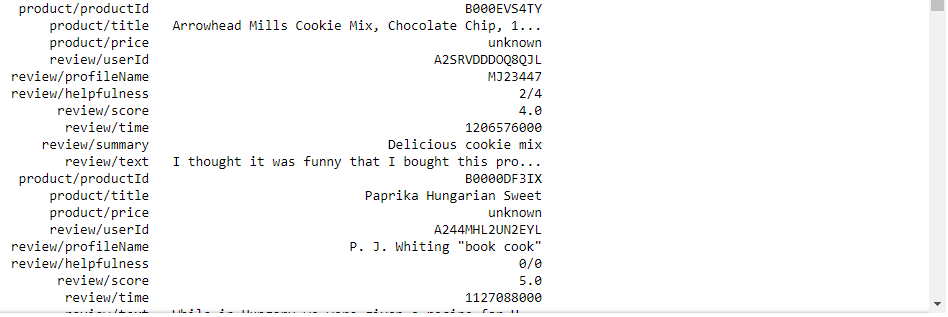
         product/productId                                         B000EVS4TY
1            product/title   Arrowhead Mills Cookie Mix, Chocolate Chip, 1...
2            product/price                                            unknown
3            review/userId                                     A2SRVDDDOQ8QJL
4       review/profileName                                            MJ23447
5       review/helpfulness                                                2/4
6             review/score                                                4.0
7              review/time                                         1206576000
8           review/summary                               Delicious cookie mix
9              review/text   I thought it was funny that I bought this pro...
10       product/productId                                         B0000DF3IX
11           product/title                            Paprika Hungarian Sweet
12           product/price                                            unknown
13           review/userId                                     A244MHL2UN2EYL
14      review/profileName                          P. J. Whiting "book cook"
15      review/helpfulness                                                0/0
16            review/score                                                5.0
17             review/time                                         1127088000
我想把它转换成一个数据格式,以便第一列中的条目
        product/productId
        product/title
       product/price
        review/userId
   review/profileName
   review/helpfulness
        review/score
        review/time
       review/summary
          review/text
列标题,其值与表中的每个标头相对应。
回答 1
Stack Overflow用户
回答已采纳
发布于 2017-08-24 14:27:02
我仍然对您的文件有一个小小的疑问,但由于我的两项建议都非常相似,我将尝试解决您可能遇到的这两种情况。
如果您的文件中实际上没有行号,则应该这样做:
filepath = "./untitled.txt" # you need to change this to your file path
column_separator="\s{3,}" # we'll use a regex, I explain some caveats of this below...

# engine='python' surpresses a warning by pandas
# header=None is that so all lines are considered 'data'
df = pd.read_csv(filepath, sep=column_separator, engine="python", header=None)

df = df.set_index(0)           # this takes column '0' and uses it as the dataframe index
df = df.T                      # this makes the data look like you were asking (goes from multiple rows+1column to multiple columns+1 row)
df = df.reset_index(drop=True) # this is just so the first row starts at index  '0' instead of '1'

# you could just do the last 3 lines with:
# df = df.set_index(0).T.reset_index(drop=True)
如果你有电话号码,我们只需要做一些调整。
filepath = "./untitled1.txt"
column_separator="\s{3,}"

df = pd.read_csv(filepath, sep=column_separator, engine="python", header=None, index_col=0)
df.set_index(1).T.reset_index(drop=True) #I did all the 3 steps in 1 line, for brevity- 在最后一个例子中,我建议您修改它,以便在所有这些代码中都有行号(在您提供的示例中,编号从第二行开始,这可能是在导出您可能使用的任何工具中的数据时如何处理标题的选项)。
- 关于regex,警告是"\s{3,}“查找连续3个或更多空格的任何块来确定列分隔符。这里的问题是,我们将在一定程度上依赖数据来找到列。例如,如果在任何一个值恰好出现连续3个空格,熊猫将提出一个例外,因为这一行将比其他列多一列。解决这一问题的一个解决方案可能是将其增加到任何其他“适当的”数字,但是我们仍然依赖于数据(例如,在您的示例中,"review/text“有足够的空间来识别这两列)。
在意识到“叠层”的含义后进行编辑
无论您有什么“行号方案”,您都需要确保所有寄存器的列数总是相同,并使用类似于以下内容的内容重新构造连续数据帧:
number_of_columns = 10             # you'll need to make sure all "registers" do have the same number of columns otherwise this will break
new_shape = (-1,number_of_columns) # this tuple will mean "whatever number of lines", by 10 columns
final_df = pd.DataFrame(data = df.values.reshape(new_shape)
                    ,columns=df.columns.tolist()[:-10])
同样,请注意确保所有行都有相同数量的列(例如,假设有10列的数据的文件不能工作)。此外,此解决方案假定所有列都具有相同的名称。
页面原文内容由Stack Overflow提供。腾讯云小微IT领域专用引擎提供翻译支持
原文链接:
https://stackoverflow.com/questions/45847101
复制相关文章
相似问题
腾讯云开发者

Copyright © 2013 - 2026 Tencent Cloud. All Rights Reserved. 腾讯云 版权所有
深圳市腾讯计算机系统有限公司 ICP备案/许可证号:粤B2-20090059  粤公网安备44030502008569号
腾讯云计算(北京)有限责任公司 京ICP证150476号 | 京ICP备11018762号