
一旦连接可用,应创建要发送的对象数组。
一旦连接可用,应创建要发送的对象数组。
提问于 2017-08-22 09:52:54
我有以下JSX代码:
import React, { Component } from 'react';

import axios from 'axios';
import serialize from 'form-serialize';

var a = [], b= [];

class Form extends Component {
    constructor(props) {
        super(props);

        this.state = {
            firstName: '',
            email: '',
            university: '',
            degree: '',
            candidates: []
        }

        this.setFirstName = this.setFirstName.bind(this);
        this.setEmail = this.setEmail.bind(this);
        this.setUniversity = this.setUniversity.bind(this);
        this.setDegree = this.setDegree.bind(this);
    }

    setFirstName(name) {
        this.setState({
            firstName: name
        });
    }

    setEmail(email) {
        this.setState({
            email: email
        });
    }

    setUniversity(university) {
        this.setState({
            university: university
        });
    }

    setDegree(degree) {
        this.setState({
            degree: degree
        });
    }

    setCandidates(candidates) {
        this.setState({
            candidates: candiadtes
        })
    }

    getSingleInputValue(e) {

        if(e.target.getAttribute('name') == 'name'){
            this.setFirstName(e.target.value);
        }

        if(e.target.getAttribute('name') == 'email'){
            this.setEmail(e.target.value);
        }

        if(e.target.getAttribute('name') == 'university'){
            this.setUniversity(e.target.value);
        }

        if(e.target.getAttribute('name') == 'degree'){
            this.setDegree(e.target.value);
        }

    }

    submitForm(e) {
        var token = document.getElementsByTagName("meta")[0].getAttribute("content");
        var form = document.querySelector('.form');

        e.preventDefault();

        var singleCandidate = serialize(form, { hash: true });

        if(JSON.parse(localStorage.getItem("candidates"))) { // checks if there is one or more values
            a.length = 0;
            a.push(JSON.parse(localStorage.getItem("candidates")));

            b.push(singleCandidate);

            var temp = a.concat(b);

            // localStorage.setItem("candidates", JSON.stringify(temp));
            // console.log(JSON.parse(localStorage.getItem("candidates")));
        }

        else {
            localStorage.setItem("candidates", JSON.stringify(singleCandidate));
            console.log(JSON.parse(localStorage.getItem("candidates")));
        }


    render() {
        let isVisible = this.props.visibility ? "" : "hide-form";

        return(
            <form className={"form " + isVisible}>
                <input
                    placeholder="John Green"
                    type="text"
                    name="name"
                    onChange={this.getSingleInputValue.bind(this)} />

                <input
                    placeholder="Email"
                    type="text"
                    name="email"
                    onChange={this.getSingleInputValue.bind(this)} />

                <input
                    placeholder="University"
                    type="text"
                    name="university"
                    onChange={this.getSingleInputValue.bind(this)} />

                <input
                    placeholder="Degree"
                    type="text"
                    name="degree"
                    onChange={this.getSingleInputValue.bind(this)} />

                <button onClick={this.submitForm.bind(this)}>enter</button>
            </form>
        );
    }
}

export default Form;
我正在尝试将一些数据保存到本地存储中,并创建某种排队系统,这样一旦连接恢复,我就可以使用AXIOS提交数据。
在“submitForm(E)”内部:
- 如果这是我第一次(在其他地方)使用第一个对象(singleCandidate)填充本地存储
- 否则,我将尝试将数据保存到数组中,并将其与基于本地存储中现有值的新数组组合起来。
但是,我在数组中得到了一个数组:
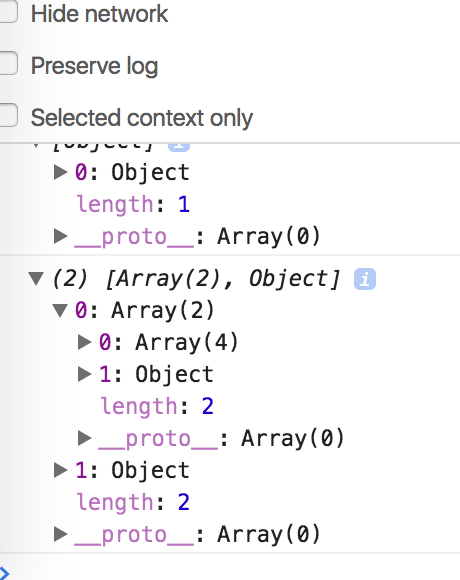
这样做的目的是,如果没有连接,并且用户更新表单,那么对于提交的每个表单,都会使用数据填充数组并将其存储在本地存储中。
对于每个表单提交,如何将数据存储在单个对象中,并更新要推送到本地存储并在连接恢复后被检索的数组?
回答 1
Stack Overflow用户
回答已采纳
发布于 2017-08-22 10:37:02
在进行了一些私人聊天之后,我发布了一个更新的submitForm方法实现,该方法适用于Alex:
submitForm(e) {
  e.preventDefault();
  var token = document.getElementsByTagName("meta")[0].getAttribute("content");
  var form = document.querySelector('.form');

  var singleCandidate = serialize(form, { hash: true });
  var fromStorage = localStorage.getItem("candidates")

  if (fromStorage) {
    var parsedFromStorage = JSON.parse(fromStorage)
    parsedFromStorage.push(singleCandidate)
    localStorage.setItem("candidates", JSON.stringify(parsedFromStorage))
  } else {
    localStorage.setItem("candidates", JSON.stringify([singleCandidate]));
  }
}页面原文内容由Stack Overflow提供。腾讯云小微IT领域专用引擎提供翻译支持
原文链接:
https://stackoverflow.com/questions/45814396
复制相关文章
相似问题
腾讯云开发者

Copyright © 2013 - 2026 Tencent Cloud. All Rights Reserved. 腾讯云 版权所有
深圳市腾讯计算机系统有限公司 ICP备案/许可证号:粤B2-20090059  粤公网安备44030502008569号
腾讯云计算(北京)有限责任公司 京ICP证150476号 | 京ICP备11018762号