
用D3DImage显示SharpDX
我打算开发一个应用程序,从一个文件中获取一个图像并用Directx9显示它。我已经使用了这段代码,但是我得到了SetBackBuffer方法上的错误!!
System.AccessViolationException: 'Attempted to read or write protected memory. This is often an indication that other memory is corrupt.


     private void d3dImage_IsFrontBufferAvailableChanged(object sender, DependencyPropertyChangedEventArgs e)
            {
                if (d3dImage.IsFrontBufferAvailable)
                {

                    // (Re)initialization:
                    Bitmap b = new Bitmap(@"C:\Users\newuser\Desktop\3.jpg");
                    IntPtr Mysurface = b.GetHbitmap();

                    if (Mysurface != IntPtr.Zero)
                    {
                        d3dImage.Lock();
//Error occurred this line
                   d3dImage.SetBackBuffer(D3DResourceType.IDirect3DSurface9, Mysurface);
                        d3dImage.Unlock();
                        CompositionTarget.Rendering += CompositionTarget_Rendering;
                    }
                }
                else
                {
                    // Cleanup:
                    CompositionTarget.Rendering -= CompositionTarget_Rendering;
                    //Sample.Cleanup();
                }
            }


      protected override void OnSourceInitialized(EventArgs e)
            {
                base.OnSourceInitialized(e);
                // Now that we can get an HWND for the Window, force the initialization
                // that is otherwise done when the front buffer becomes available:
                d3dImage_IsFrontBufferAvailableChanged(this,
                new DependencyPropertyChangedEventArgs());
            }


      private void CompositionTarget_Rendering(object sender, EventArgs e)
            {
                if (d3dImage.IsFrontBufferAvailable)
                {
                    d3dImage.Lock();
                    //Sample.Render();
                    // Invalidate the whole area:
                    d3dImage.AddDirtyRect(new Int32Rect(0, 0,
                    d3dImage.PixelWidth, d3dImage.PixelHeight));
                    d3dImage.Unlock();
                }
}实际上,我希望在d3dimage中在WPF项目中显示一个图像。有人能帮我吗?我找不到关于Directx和C#的好资源!
使用Sharpdx编辑并获得新的错误"'HRESULT: [0x8876086C], Module: [SharpDX.Direct3D9], ApiCode: [D3DERR_INVALIDCALL/InvalidCall],“
s = new SharpDX.Direct3D9.Surface(IntPtr.Zero);

SharpDX.Direct3D9.Surface.FromFile(s, @"C:\Users\newuser\Desktop\3.jpg", SharpDX.Direct3D9.Filter.None, 1);回答 1
Stack Overflow用户
发布于 2017-08-21 20:52:28
您正在将后台缓冲区设置为Bitmap。你不能这么做。后台缓冲区必须是IDirect3DSurface9类型的。SetBackBuffer方法的文档中指出了这一点。
为了使用来自DirectX9 (托管)的C# (非托管),您需要使用包装器库。你在用一个吗?如果没有,有几个可用。SlimDX和SharpDX似乎是最受欢迎的。使用任何包装库,您可以创建一个用IDirect3DSurface9呈现到的IDirect3DDevice9,并将该曲面附加到WPF控件。然后,呈现的内容将出现在控件中。
我认为使用DirectX可能会过分满足您的需要,但我不确定项目的整个范围是什么。
使用SharpDX的解决方案
我编写了一个使用SharpDX在D3DImage中显示图像的工作示例。这是非常基本的,不包括正确的错误处理。只是想让你朝正确的方向走。
步骤1-创建D3D9设备
要创建必要的曲面,您需要一个Direct3D 9 Device。下面的代码将使用Device创建一个SharpDX。
//Create the d3d interface.
Direct3D d3d = new Direct3D();

//Get a handle to the WPF window. This is required to create a device.
IntPtr windowHandle = new WindowInteropHelper(this).Handle;

//Create a device. Using standard creation param.
//Width and height have been set to 1 because we wont be using the backbuffer.
//Adapter 0 = default adapter.
PresentParameters presentationParams = new PresentParameters(1,1);
Device d3dDevice = new Device(d3d, 0, DeviceType.Hardware, windowHandle, CreateFlags.HardwareVertexProcessing, presentationParams);
步骤2-创建图像曲面
创建一个表面来保存图像数据。
//Create an empty offscreen surface. Use SystemMemory to allow for surface copying.
Surface imageSurface = Surface.CreateOffscreenPlain(d3dDevice, ImageWidthPixels, ImageHeightPixels, Format.A8R8G8B8, Pool.SystemMemory);

//Fill the surface with the image data.
Surface.FromFile(imageSurface, "dx.jpg", Filter.None, 0);
步骤3-创建呈现目标面
创建用作呈现目标的表面。这是D3DImage所需的曲面类型。
//Create the surface that will act as the render target.
//Set as lockable (required for D3DImage)
Surface target = Surface.CreateRenderTarget(d3dDevice, ImageWidthPixels, ImageHeightPixels, Format.A8R8G8B8, MultisampleType.None, 0, true);
步骤4-将图像表面复制到呈现目标。
可以使用Device.UpdateSurfaces方法将图像表面复制到渲染目标面中。注意,在前面的步骤中,两个曲面都是以相同的格式(A8R8G8B)创建的。小心这个。表面复制件是必要的。
//Copy the image surface contents into the target surface.
d3dDevice.UpdateSurface(imageSurface, target);
步骤5-将曲面附加到D3DImage
您现在有一个包含图像的曲面,可以与‘D3DImage’一起使用。请确保您使用的是目标面,而不是图像源面。
this.wpfImageSource.Lock();
this.wpfImageSource.SetBackBuffer(D3DResourceType.IDirect3DSurface9, target.NativePointer);
this.wpfImageSource.AddDirtyRect(new Int32Rect(0, 0, wpfImageSource.PixelWidth, wpfImageSource.PixelHeight));
this.wpfImageSource.Unlock();
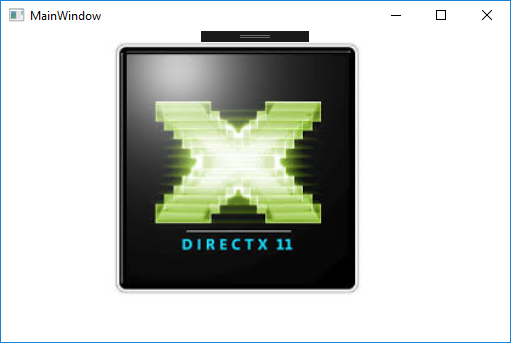
结果
图像出现了!
https://stackoverflow.com/questions/45802931
复制相似问题
腾讯云开发者

Copyright © 2013 - 2026 Tencent Cloud. All Rights Reserved. 腾讯云 版权所有
深圳市腾讯计算机系统有限公司 ICP备案/许可证号:粤B2-20090059  粤公网安备44030502008569号
腾讯云计算(北京)有限责任公司 京ICP证150476号 | 京ICP备11018762号