
如何在angular2中访问父组件中的子组件HTML元素值?
在父组件的按钮单击期间,我使用下面的代码访问父组件中的子组件HTML元素值。
子组件:-
@Component({
  selector: 'child-component',
  template: `<md-input-container><label>Title</label><input [(ngModel)]="Title" #Title></md-input-container><md-input-container><label>Name</label><input [(ngModel)]="name" #Name></md-input-container><md-input-container class="md-block" flex-gt-sm><label>State</label><md-select [(ngModel)]="user.state" #State><md-option *ngFor="let state in states" value="{{state.abbrev}}">{{state.abbrev}}</md-option></md-select></md-input-container>`
})

export class ChildComponent {
  // some code here
}
父组件.:-
import {
    Directive,
    EventEmitter,
    Output,
    OnInit,
    ElementRef
} from '@angular/core';

@Component({
  selector: 'parent-component',
  template: `<child-component></child-component><button class="md-button md-ink-ripple" type="submit" (click)="SaveCustomerDetails()"><span class="ng-scope">Submit</span></button>`
})

export class ParentComponent {
   @ViewChild('Title') title:ElementRef;
   @ViewChild('State') state:ElementRef;
   Title: string;
   State: string;
   SaveCustomerDetails() {
     this.Title = this.title.nativeElement.value; // undefined
     this.State= this.state.nativeElement.innerHTML; // undefined
   }
}
柱塞:- https://plnkr.co/edit/r3237ta1XzhM2PX09pMl?p=preview
但是我无法在SaveCustomerDetails函数中获得子组件的HTML元素值。如何使用ViewChild方法获取父组件中输入的值?
回答 2
Stack Overflow用户
发布于 2017-08-17 18:34:55
如果您的组件具有真正的父/子关系(其中一个嵌套在另一个组件中),那么您可以使用属性上的@Input和@Output装饰器在这两个组件之间进行通信。
我在这里有一篇关于这个的博文:https://blogs.msmvps.com/deborahk/passing-data-to-and-raising-an-event-from-a-nested-component/
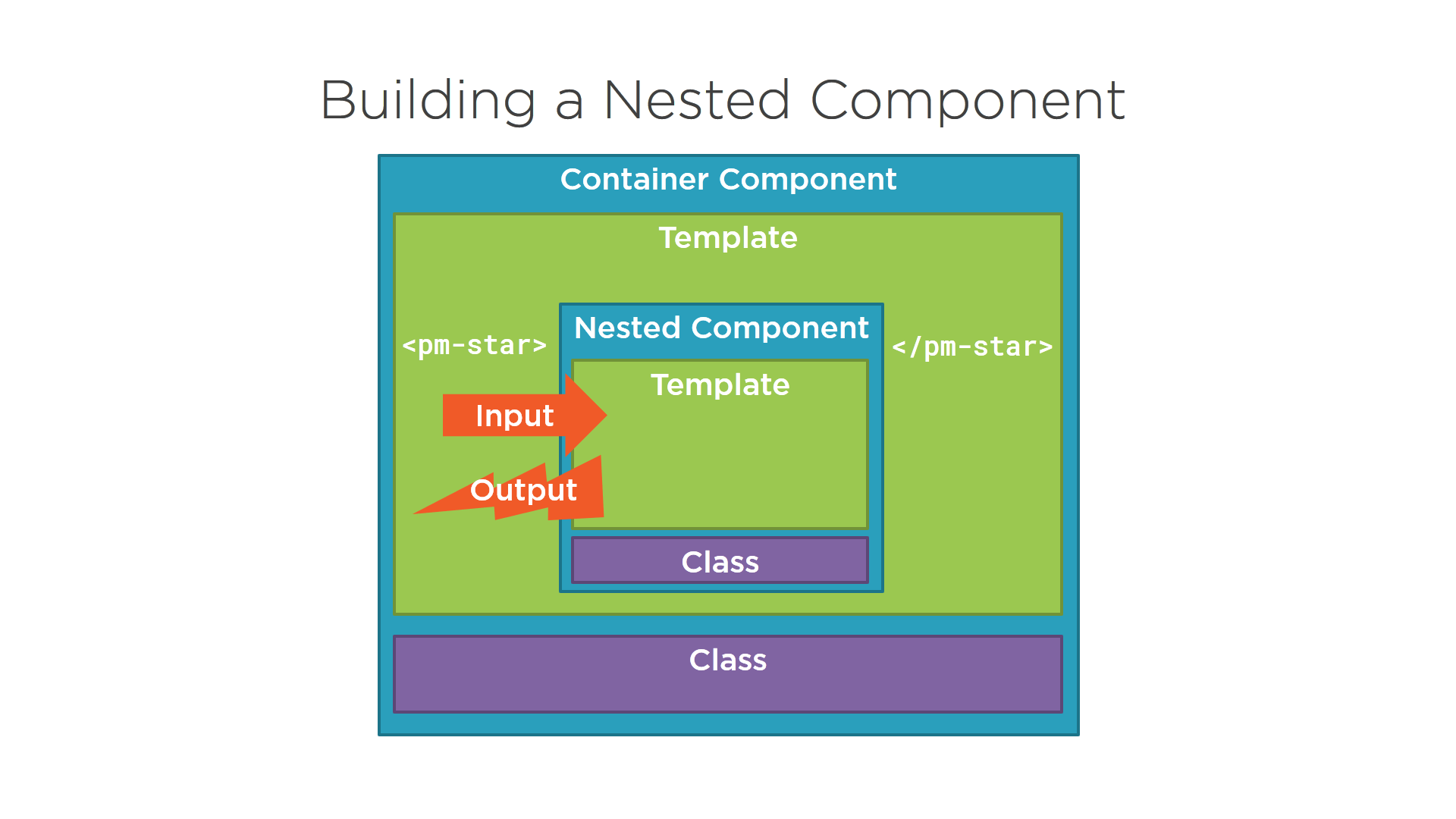
下面是一个具有@Input和@Output装饰符的子组件的示例:
import { Component, OnChanges, Input, EventEmitter, Output } from '@angular/core';

@Component({
    selector: 'pm-star',
    templateUrl: './star.component.html',
    styleUrls: ['./star.component.css']
})
export class StarComponent implements OnChanges {
    @Input() rating: number;
    starWidth: number;
    @Output() ratingClicked: EventEmitter<string> =
            new EventEmitter<string>();

    ngOnChanges(): void {
        this.starWidth = this.rating * 86 / 5;
    }

    onClick(): void {
        this.ratingClicked.emit(`The rating ${this.rating} was clicked!`);
    }
}您可以在这里找到完整的示例:https://github.com/DeborahK/Angular-GettingStarted
在任何其他场景中,您都可以构建一个在组件之间进行通信的服务,如下所示:
@Injectable()
export class ChildDataService {
  title: string;
  name: string;
}有关更多信息,请参见此柱塞:https://plnkr.co/edit/iODMVQzYwXcf5qJRR1El?p=preview
Stack Overflow用户
发布于 2017-08-17 20:11:16
我并不是在这里提倡使用@ViewChild (这是一个紧密耦合的解决方案),但是如果您想在不使用@Output属性的情况下这样做,则有可能:
@Component({
  selector: 'child-component',
  template: `<input (change)='title=$event.target.value'>
             <input (change)='name=$event.target.value'>`
})

export class ChildComponent {
  title = "";
  name = "";
}

@Component({
  selector: 'parent-component',
  template: `<child-component #child></child-component><button type="submit" (click)="SaveCustomerDetails()">Submit</button>`,
})
export class ParentComponent {

  @ViewChild('child') myChild: ChildComponent;

  SaveCustomerDetails(){

    console.log(this.myChild.title + "" + this.myChild.name);
  }
}
}我在这里修改了你的柱塞:https://plnkr.co/edit/mCGcIW1AVX2e9gEBzeC0?p=preview
https://stackoverflow.com/questions/45742655
复制相似问题
腾讯云开发者

Copyright © 2013 - 2026 Tencent Cloud. All Rights Reserved. 腾讯云 版权所有
深圳市腾讯计算机系统有限公司 ICP备案/许可证号:粤B2-20090059  粤公网安备44030502008569号
腾讯云计算(北京)有限责任公司 京ICP证150476号 | 京ICP备11018762号