
在WooCommerce中用自定义数量输入字段替换“添加到购物车”
在WooCommerce中用自定义数量输入字段替换“添加到购物车”
提问于 2017-08-16 09:53:48
我正在使用WooCommerce与店面主题,以建立一个eCommerce网站,将主要用于智能手机。因此,我试图减少点击和按钮的数量,使其尽可能简单。
我想将“添加到购物车”按钮改为数量选择器:
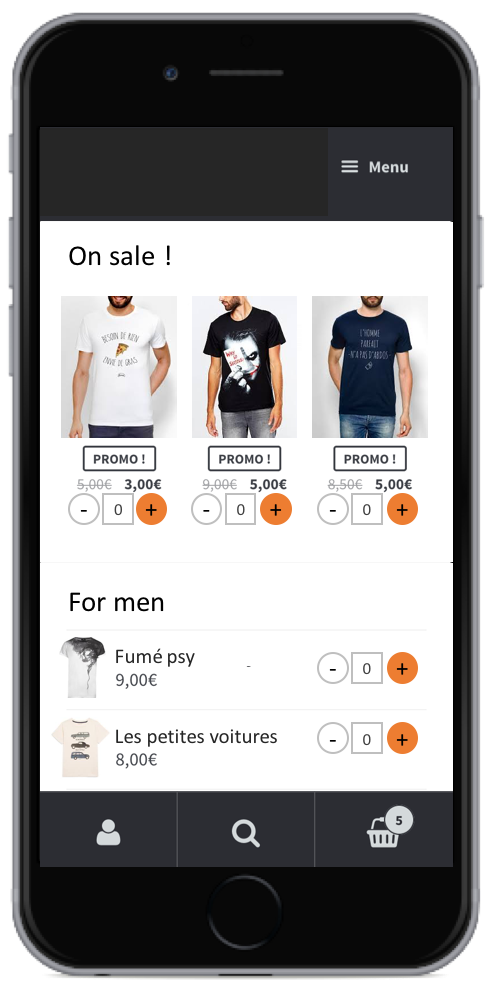
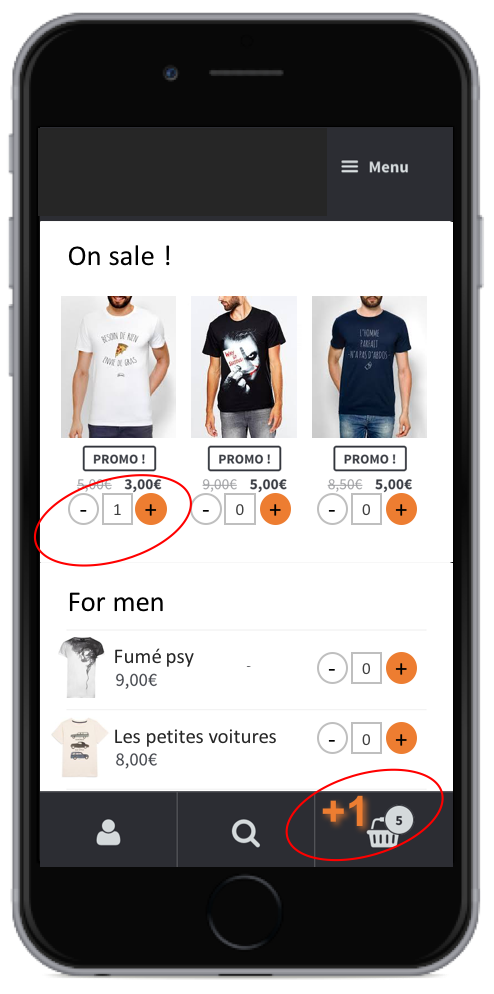
我找到了一种在“添加到购物车”按钮(例如插件WooCommerce高级产品数量)旁边添加一个数量选择器的方法,但是我想去掉"add“按钮。因此,当客户单击"+“时,它应该向购物车中添加一个元素,并且数字应该显示购物车中的数量。
此外(不知道这是否可能.),我想要一个动画通知客户,产品已经很好地添加到购物车。例如,在购物车图标附近显示"+1“几秒钟,
回答 1
Stack Overflow用户
发布于 2018-08-07 19:56:45
给你,这将是很长的一段:
首先让我们移除添加到购物车按钮:
// Remove Add To cart Button
remove_action('woocommerce_after_shop_loop_item', 'woocommerce_template_loop_add_to_cart', 10);现在允许创建我们的输入并将其添加到商店页面中。
// Add our Quanity Input
add_action('woocommerce_after_shop_loop_item', 'QTY');
function QTY()
{
    global $product;
    ?>
    <div class="shopAddToCart">
    <button  value="-" class="minus"  >-</button>
    <input type="text"
    disabled="disabled"
    size="2"
    value="<?php echo (Check_if_product_in_cart($product->get_id())) ? Check_if_product_in_cart($product->get_id())['QTY'] : 0;
    ?>"
    id="count"
    data-product-id= "<?php echo $product->get_id() ?>"
    data-in-cart="<?php echo (Check_if_product_in_cart($product->get_id())) ? Check_if_product_in_cart($product->get_id())['in_cart'] : 0;
    ?>"
    data-in-cart-qty="<?php echo (Check_if_product_in_cart($product->get_id())) ? Check_if_product_in_cart($product->get_id())['QTY'] : 0;
    ?>"
    class="quantity  qty"
    max_value = <?php echo ($product->get_max_purchase_quantity() == -1) ? 1000 : $product->get_max_purchase_quantity(); ?>
    min_value = <?php echo $product->get_min_purchase_quantity(); ?>
    >

    <button type="button" value="+" class="plus"  >+</button>

    </div>
                          <?php
}
我们需要功能来检查产品是否已经在购物车中,所以可以修改数量:
//Check if Product in Cart Already
function Check_if_product_in_cart($product_ids)
 {

foreach (WC()->cart->get_cart() as $cart_item):

    $items_id = $cart_item['product_id'];
    $QTY = $cart_item['quantity'];

    // for a unique product ID (integer or string value)
    if ($product_ids == $items_id):
        return ['in_cart' => true, 'QTY' => $QTY];

    endif;

endforeach;
}
我们需要添加自定义事件以减少数量:
//Add Event Handler To update QTY
add_action('wc_ajax_update_qty', 'update_qty');

function update_qty()
{
    ob_start();
    $product_id = absint($_POST['product_id']);
    $product = wc_get_product($product_id);
    $quantity = $_POST['quantity'];

    foreach (WC()->cart->get_cart() as $cart_item_key => $cart_item):

        if ($cart_item['product_id'] == $product_id) {
            WC()->cart->set_quantity($cart_item_key, $quantity, true);
        }

    endforeach;

    wp_send_json('done');
}
最后我们需要Javascript来处理事件操作:
jQuery(document).ready(function ($) {
  "use strict";

  // Add Event Listner on the Plush button
  $('.plus').click(function () {

    if (parseInt($(this).prev().val()) < parseInt($(this).prev().attr('max_value'))) {
      $(this).prev().val(+$(this).prev().val() + 1);

      var currentqty = parseInt($(this).prev().attr('data-in-cart-qty')) + 1;

      var id = $(this).prev().attr('data-product-id');

      var data = {
        product_id: id,
        quantity: 1
      };
      $(this).prev().attr('data-in-cart-qty', currentqty);
      $(this).parent().addClass('loading');
      $.post(wc_add_to_cart_params.wc_ajax_url.toString().replace('%%endpoint%%', 'add_to_cart'), data, function (response) {

        if (!response) {
          return;
        }

        if (response) {

          var url = woocommerce_params.wc_ajax_url;
          url = url.replace("%%endpoint%%", "get_refreshed_fragments");
          $.post(url, function (data, status) {
            $(".woocommerce.widget_shopping_cart").html(data.fragments["div.widget_shopping_cart_content"]);
            if (data.fragments) {
              jQuery.each(data.fragments, function (key, value) {

                jQuery(key).replaceWith(value);
              });
            }
            jQuery("body").trigger("wc_fragments_refreshed");
          });
          $('.plus').parent().removeClass('loading');

        }

      });


    }


  });


  $('.minus').click(function () {

    $(this).next().val(+$(this).next().val() - 1);


    var currentqty = parseInt($(this).next().val());

    var id = $(this).next().attr('data-product-id');

    var data = {
      product_id: id,
      quantity: currentqty
    };
    $(this).parent().addClass('loading');
    $.post(wc_add_to_cart_params.wc_ajax_url.toString().replace('%%endpoint%%', 'update_qty'), data, function (response) {

      if (!response) {
        return;
      }

      if (response) {
        var url = woocommerce_params.wc_ajax_url;
        url = url.replace("%%endpoint%%", "get_refreshed_fragments");
        $.post(url, function (data, status) {
          $(".woocommerce.widget_shopping_cart").html(data.fragments["div.widget_shopping_cart_content"]);
          if (data.fragments) {
            jQuery.each(data.fragments, function (key, value) {

              jQuery(key).replaceWith(value);
            });
          }
          jQuery("body").trigger("wc_fragments_refreshed");
        });
        $('.plus').parent().removeClass('loading');
      }

    });


  });


});注意:这段代码是经过测试的,您可以在
http://dev-ak.com/woocommerce-dev/shop/
您可以从:下载整个文件
关于手推车中的动画部分,当然可以做到,如果我有一些空闲时间,我也会这样做的。
页面原文内容由Stack Overflow提供。腾讯云小微IT领域专用引擎提供翻译支持
原文链接:
https://stackoverflow.com/questions/45710409
复制相关文章
相似问题
腾讯云开发者

Copyright © 2013 - 2026 Tencent Cloud. All Rights Reserved. 腾讯云 版权所有
深圳市腾讯计算机系统有限公司 ICP备案/许可证号:粤B2-20090059  粤公网安备44030502008569号
腾讯云计算(北京)有限责任公司 京ICP证150476号 | 京ICP备11018762号