
在ListView.Header的底部添加一个寄宿者
在ListView.Header的底部添加一个寄宿者
提问于 2017-08-15 23:19:21
到目前为止,我尝试过的是:
<ListView RowHeight="50">
   <ListView.Header>
      <Grid>
         <Grid.RowDefinitions>
            <RowDefinition Height="49" />
            <RowDefinition Height="1" />
         </Grid.RowDefinitions>
         <Label Grid.Row="0" BackgroundColor="#EEEEEE" Text="ABC" />
         <BoxView Grid.Row="1" BackgroundColor="#999" HeightRequest="1" />
      </Grid>
   </ListView.Header>
   <ListView.ItemTemplate>
我本以为会看到一个顶级区域的颜色EEE和低于1和999颜色的线条。
然而,在EEE颜色和999线之间有一个白色区域,大约3-4 px高。
有人知道为什么会出现这种情况吗?我怎样才能改变它,使999线直接出现在EEE颜色区域的下方?
回答 2
Stack Overflow用户
回答已采纳
发布于 2017-08-15 23:30:56
我认为这是因为网格(6)的默认RowSpacing值*。设置<Grid RowSpacing="0">来摆脱它。
*见更多https://github.com/xamarin/Xamarin.Forms/blob/master/Xamarin.Forms.Core/Grid.cs。
尽管如此,如果您的布局与所显示的完全相同,我建议您使用StackLayout (与Spacing="0"一起使用)而不是网格。如下所示:
<StackLayout Spacing="0">
    <Label BackgroundColor="#EEEEEE"
           Text="ABC"
           HeightRequest="49"/>
    <BoxView BackgroundColor="#999"
             HeightRequest="1" />
</StackLayout>
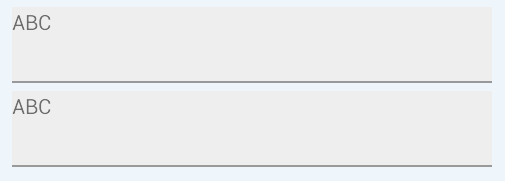
结果(第一次是网格,第二次是StackLayout):
Stack Overflow用户
发布于 2017-08-15 23:40:45
在上面的行上使用负边距,因此您的"ABC“行使用-6的底部边距。
<Grid>
    <Grid.RowDefinitions>
        <RowDefinition Height="49" />
        <RowDefinition Height="1" />
    </Grid.RowDefinitions>
    <Label Grid.Row="0" BackgroundColor="#EEEEEE" Text="ABC" Margin="0,0,0,-6" />
    <BoxView Grid.Row="1" BackgroundColor="#999" HeightRequest="1" />
</Grid>页面原文内容由Stack Overflow提供。腾讯云小微IT领域专用引擎提供翻译支持
原文链接:
https://stackoverflow.com/questions/45702901
复制相关文章
相似问题
腾讯云开发者

Copyright © 2013 - 2026 Tencent Cloud. All Rights Reserved. 腾讯云 版权所有
深圳市腾讯计算机系统有限公司 ICP备案/许可证号:粤B2-20090059  粤公网安备44030502008569号
腾讯云计算(北京)有限责任公司 京ICP证150476号 | 京ICP备11018762号