
在每个页面重新加载时重新设置会话
我在我的windows机器上开发了一个laravel应用程序,项目在那里运行得很好。这个项目与dropbox同步,当我搬到mac时,我的laravel项目在macos上不起作用。
我面临的问题是,它在每个页面重新加载时重新生成会话id。我使用数据库作为会话存储,它在数据库中添加了一个新条目。
我尝试使用文件驱动程序作为会话存储,同样的情况是,它在存储/框架/会话中创建了一个新文件,这证明文件权限是正常的和可写的。
我所有的表格都停止工作了
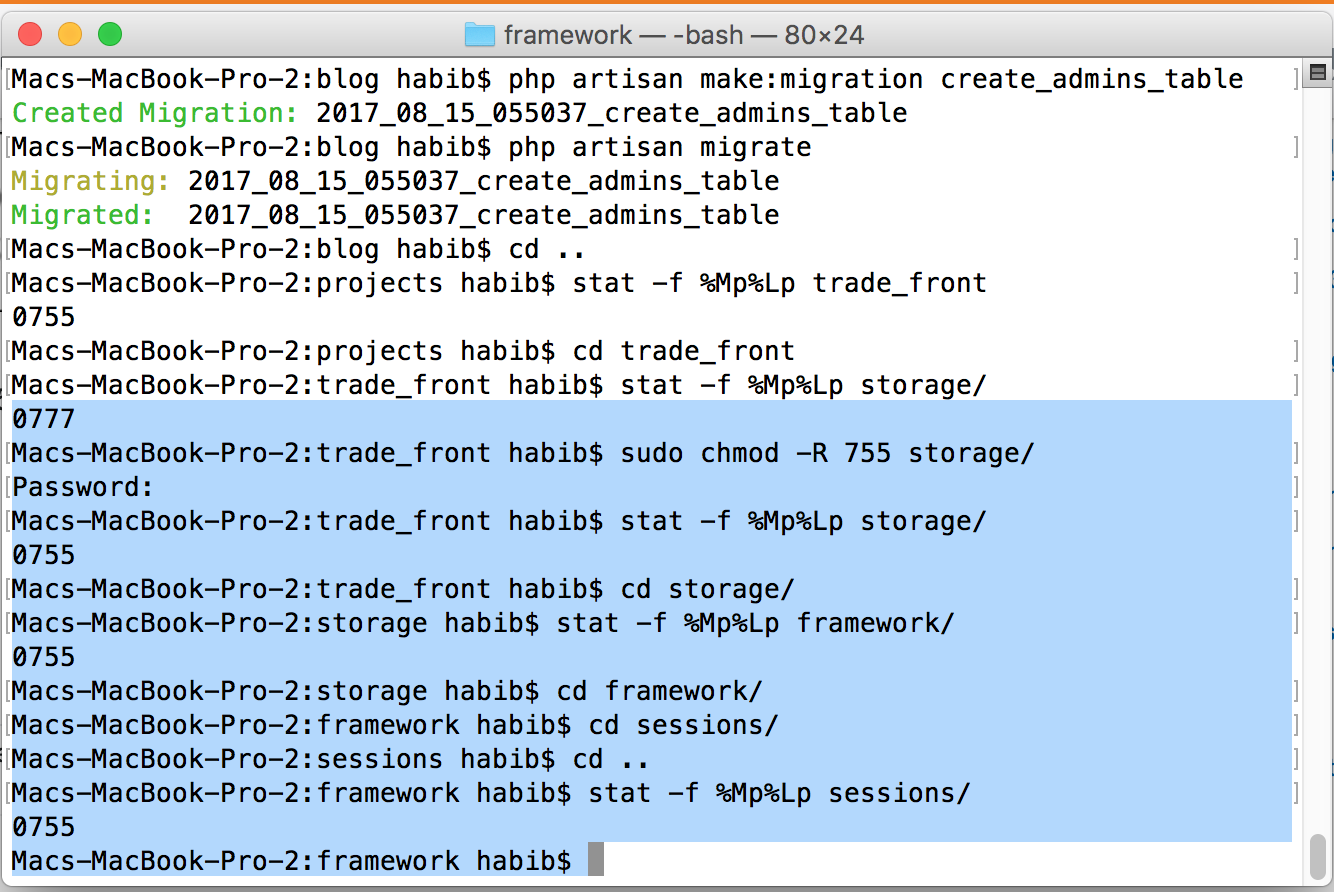
TokenMismatchException in VerifyCsrfToken.php存储文件夹和会话文件夹的权限为755。
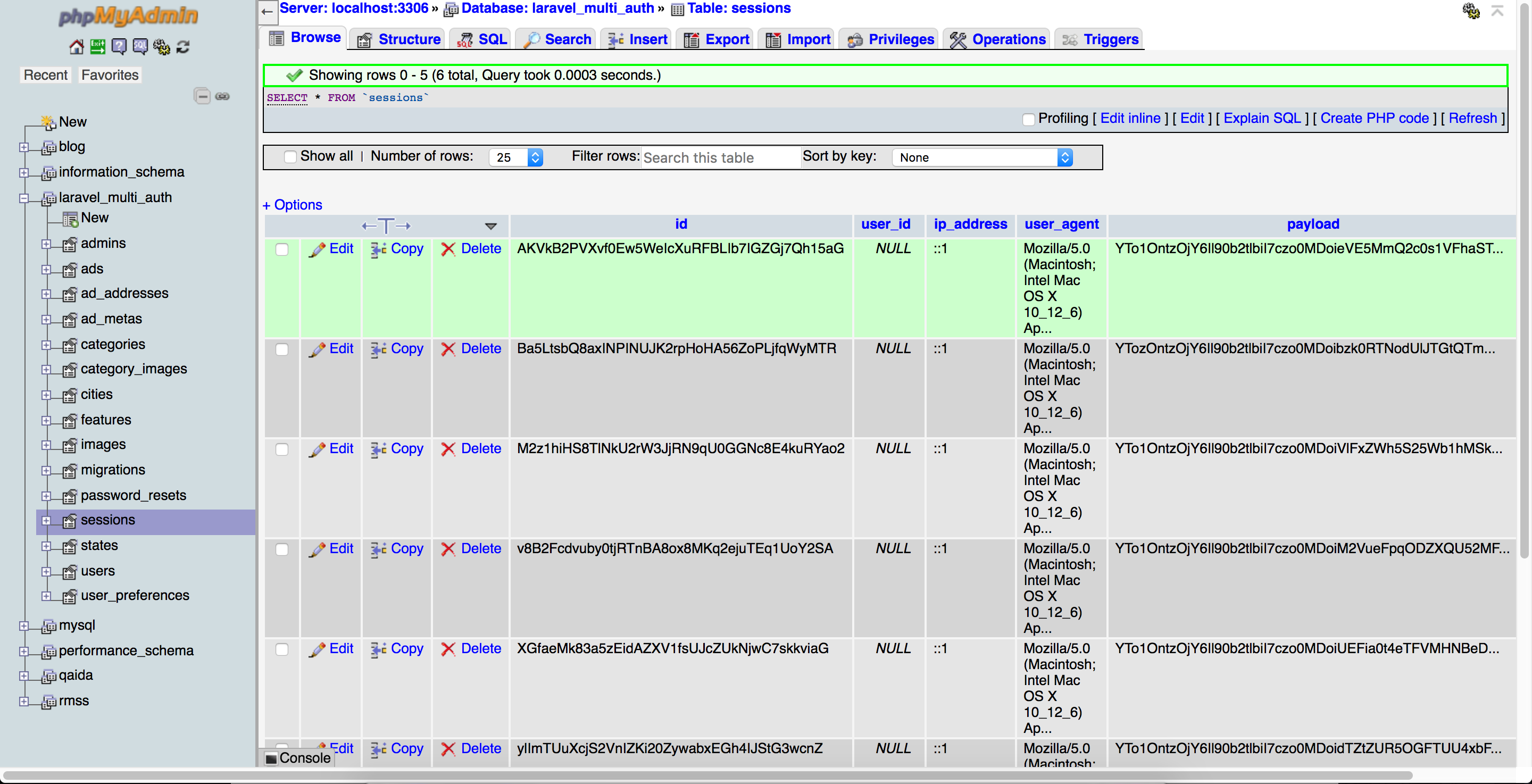
应用程序上的每次重新加载都会在db中添加一个新条目,因为我使用数据库驱动程序保存会话。
下面是我的会话文件
<?php
return [

    /*
    |--------------------------------------------------------------------------
    | Default Session Driver
    |--------------------------------------------------------------------------
    |
    | This option controls the default session "driver" that will be used on
    | requests. By default, we will use the lightweight native driver but
    | you may specify any of the other wonderful drivers provided here.
    |
    | Supported: "file", "cookie", "database", "apc",
    |            "memcached", "redis", "array"
    |
    */

    'driver' => env('SESSION_DRIVER', 'file'),

    /*
    |--------------------------------------------------------------------------
    | Session Lifetime
    |--------------------------------------------------------------------------
    |
    | Here you may specify the number of minutes that you wish the session
    | to be allowed to remain idle before it expires. If you want them
    | to immediately expire on the browser closing, set that option.
    |
    */

    'lifetime' => 120,

    'expire_on_close' => false,

    /*
    |--------------------------------------------------------------------------
    | Session Encryption
    |--------------------------------------------------------------------------
    |
    | This option allows you to easily specify that all of your session data
    | should be encrypted before it is stored. All encryption will be run
    | automatically by Laravel and you can use the Session like normal.
    |
    */

    'encrypt' => false,

    /*
    |--------------------------------------------------------------------------
    | Session File Location
    |--------------------------------------------------------------------------
    |
    | When using the native session driver, we need a location where session
    | files may be stored. A default has been set for you but a different
    | location may be specified. This is only needed for file sessions.
    |
    */

    'files' => storage_path('framework/sessions'),

    /*
    |--------------------------------------------------------------------------
    | Session Database Connection
    |--------------------------------------------------------------------------
    |
    | When using the "database" or "redis" session drivers, you may specify a
    | connection that should be used to manage these sessions. This should
    | correspond to a connection in your database configuration options.
    |
    */

    'connection' => null,

    /*
    |--------------------------------------------------------------------------
    | Session Database Table
    |--------------------------------------------------------------------------
    |
    | When using the "database" session driver, you may specify the table we
    | should use to manage the sessions. Of course, a sensible default is
    | provided for you; however, you are free to change this as needed.
    |
    */

    'table' => 'sessions',

    /*
    |--------------------------------------------------------------------------
    | Session Cache Store
    |--------------------------------------------------------------------------
    |
    | When using the "apc" or "memcached" session drivers, you may specify a
    | cache store that should be used for these sessions. This value must
    | correspond with one of the application's configured cache stores.
    |
    */

    'store' => null,

    /*
    |--------------------------------------------------------------------------
    | Session Sweeping Lottery
    |--------------------------------------------------------------------------
    |
    | Some session drivers must manually sweep their storage location to get
    | rid of old sessions from storage. Here are the chances that it will
    | happen on a given request. By default, the odds are 2 out of 100.
    |
    */

    'lottery' => [2, 100],

    /*
    |--------------------------------------------------------------------------
    | Session Cookie Name
    |--------------------------------------------------------------------------
    |
    | Here you may change the name of the cookie used to identify a session
    | instance by ID. The name specified here will get used every time a
    | new session cookie is created by the framework for every driver.
    |
    */

    'cookie' => 'laravel_session',

    /*
    |--------------------------------------------------------------------------
    | Session Cookie Path
    |--------------------------------------------------------------------------
    |
    | The session cookie path determines the path for which the cookie will
    | be regarded as available. Typically, this will be the root path of
    | your application but you are free to change this when necessary.
    |
    */

    'path' => '/',

    /*
    |--------------------------------------------------------------------------
    | Session Cookie Domain
    |--------------------------------------------------------------------------
    |
    | Here you may change the domain of the cookie used to identify a session
    | in your application. This will determine which domains the cookie is
    | available to in your application. A sensible default has been set.
    |
    */

    'domain' => env('SESSION_DOMAIN', null),

    /*
    |--------------------------------------------------------------------------
    | HTTPS Only Cookies
    |--------------------------------------------------------------------------
    |
    | By setting this option to true, session cookies will only be sent back
    | to the server if the browser has a HTTPS connection. This will keep
    | the cookie from being sent to you if it can not be done securely.
    |
    */

    'secure' => env('SESSION_SECURE_COOKIE', false),

    /*
    |--------------------------------------------------------------------------
    | HTTP Access Only
    |--------------------------------------------------------------------------
    |
    | Setting this value to true will prevent JavaScript from accessing the
    | value of the cookie and the cookie will only be accessible through
    | the HTTP protocol. You are free to modify this option if needed.
    |
    */

    'http_only' => true,

];
正如我前面提到的,由于会话问题,同一项目在我的windows机器上运行良好,没有在我的macos上工作。我在网上尝试了很多解决方案,但对我来说没有什么效果。
回答 1
Stack Overflow用户
发布于 2017-08-15 07:27:11
在我看来,当使用带有本地主机的cookie作为域时,这是一个长期问题的变体。简而言之,你不能这么做,因为在许多浏览器中,域名需要2‘’。域名中的字符最少。
这些都可以:
www.domain.com
.domain.com这个问题已经在许多地方进行了讨论,特别是设定曲奇手册和评论中提到的php ( Laravel应该遵守的),特别是关于“域”的部分:
cookie可用的(子)域。将其设置为子域(如'www.example.com')将使cookie可用于该子域和其子域的所有其他子域(即w2.www.example.com)。要使cookie对整个域可用(包括它的所有子域),只需将值设置为域名(在本例中为‘example.com’)。 较旧的浏览器仍然实现不推荐的? RFC 2109可能需要领先。匹配所有子域。
解决这个问题的一个简单方法是在您所选择的域的/etc/host文件中放置一个别名。根据rfc2606的说法,最好的选择是在TLD使用.test。
// /etc/hosts
127.0.0.1   localhost www.yourbogusdomain.test
顺便说一句,像这样的原因是为什么我使用Vagrant/virtualbox/docker。您可能会托管在linux服务器上,那么为什么要在Windows/Mac上开发,使用一系列的解决方案,以及WAMP/MAMP/任何阻塞您的机器的服务,而这些服务您必须一直启动/停止,更不用说安装/升级了?
最后但并非最不重要的一点是,虚拟化及其提供的网络选项允许您设置集群,并测试高级多主机配置,这些配置最多只能在工作站上作为一系列相互关联的进程进行配置。
https://stackoverflow.com/questions/45687460
复制相似问题
腾讯云开发者

Copyright © 2013 - 2026 Tencent Cloud. All Rights Reserved. 腾讯云 版权所有
深圳市腾讯计算机系统有限公司 ICP备案/许可证号:粤B2-20090059  粤公网安备44030502008569号
腾讯云计算(北京)有限责任公司 京ICP证150476号 | 京ICP备11018762号