
如何在应用程序返回到前台时恢复核心动画
我有一个imageView,希望它一直旋转360°,但我发现了一个问题,当应用程序进入background,然后返回到foreground,旋转动画将停止。我不想在应用程序返回到前台时重新调用函数rotate360Degree(),原因是我希望旋转动画将从输入背景时离开的位置开始,而不是再次从0开始旋转。但是当我调用函数resumeRotate()时,它不起作用。
延期如下:
extension UIImageView {
    // 360度旋转图片
    func rotate360Degree() {
        let rotationAnimation = CABasicAnimation(keyPath: "transform.rotation.z") // 让其在z轴旋转
        rotationAnimation.toValue = NSNumber(value: .pi * 2.0) // 旋转角度
        rotationAnimation.duration = 20 // 旋转周期
        rotationAnimation.isCumulative = true // 旋转累加角度
        rotationAnimation.repeatCount = MAXFLOAT // 旋转次数
        rotationAnimation.autoreverses = false
        layer.add(rotationAnimation, forKey: "rotationAnimation")
    }

    // 暂停旋转
    func pauseRotate() {

        layer.pauseAnimation()
    }

    // 恢复旋转
    func resumeRotate() {

        layer.resumeAnimation()


    }

}
下面是层扩展:
var pauseTime:CFTimeInterval!

extension CALayer {
    //暂停动画
    func pauseAnimation() {
        pauseTime = convertTime(CACurrentMediaTime(), from: nil)
        speed = 0.0
        timeOffset = pauseTime
    }
    //恢复动画
    func resumeAnimation() {
        // 1.取出时间
         pauseTime = timeOffset
        // 2.设置动画的属性
        speed = 1.0
        timeOffset = 0.0
        beginTime = 0.0
        // 3.设置开始动画
        let startTime = convertTime(CACurrentMediaTime(), from: nil) - pauseTime
        beginTime = startTime
    }
}
我可以用CADisplayLink解决上面的“停止”问题,但是动画不会从它离开的位置旋转(一直旋转)。我想知道如何用CADisplayLink来解决这个问题?以及如何处理上面的核心动画?
displayLink = CADisplayLink(target: self, selector: #selector(rotateImage))
displayLink.add(to: .current, forMode: .commonModes)

 func rotateImage(){

         let angle =  CGFloat(displayLink.duration * Double.pi / 18)

         artworkImageView.transform = artworkImageView.transform.rotated(by: angle)

}回答 1
Stack Overflow用户
发布于 2017-08-15 15:47:29
您可以使用UIKit的更高级的基于块的动画api来实现这一点。如果您想要一个持续旋转的视图,持续时间为20.0秒。您可以使用如下函数:
    func animateImageView()
    {
        UIView.animate(withDuration: 10.0, delay: 0.0, options: [.beginFromCurrentState, .repeat, .curveLinear], animations:
        { [unowned self] in
            var transform = self.imageView.transform
            transform = transform.concatenating(CGAffineTransform(rotationAngle: CGFloat.pi))
            self.imageView.transform = transform
        },
        completion:
        { _ in
            UIView.animate(withDuration: 10.0, delay: 0.0, options: [.beginFromCurrentState, .curveLinear], animations:
            { [unowned self] in
                var transform = self.imageView.transform
                transform = transform.concatenating(CGAffineTransform(rotationAngle: CGFloat.pi / 2.0))
                self.imageView.transform = transform
            })
        })
}这将只是旋转180度,然后一旦完成,再旋转180度360度旋转。.repeat选项将导致它无限期地重复。然而,当应用程序处于后台时,动画就会停止。为此,我们需要保存正在旋转的视图的表示层的状态。我们可以通过存储表示层的CGAffineTransform,然后将转换设置为应用程序返回到前台时被动画化的视图。下面是一个使用UIImageView的示例
class ViewController: UIViewController
{

    @IBOutlet weak var imageView: UIImageView!
    var imageViewTransform = CGAffineTransform.identity

    override func viewDidLoad()
    {
        super.viewDidLoad()
        NotificationCenter.default.addObserver(self, selector: #selector(self.didEnterBackground), name: .UIApplicationDidEnterBackground, object: nil)
        NotificationCenter.default.addObserver(self, selector: #selector(self.willEnterForeground), name: .UIApplicationWillEnterForeground, object: nil)
    }

    override func viewDidAppear(_ animated: Bool)
    {
        super.viewDidAppear(animated)
        animateImageView()
    }

    deinit
    {
        NotificationCenter.default.removeObserver(self)
    }

    func didEnterBackground()
    {
        imageViewTransform = imageView.layer.presentation()?.affineTransform() ?? .identity
    }

    func willEnterForeground()
    {
        imageView.transform = imageViewTransform
        animateImageView()
    }

    func animateImageView()
    {
        UIView.animate(withDuration: 10.0, delay: 0.0, options: [.beginFromCurrentState, .repeat, .curveLinear], animations:
        { [unowned self] in
            var transform = self.imageView.transform
            transform = transform.concatenating(CGAffineTransform(rotationAngle: CGFloat.pi))
            self.imageView.transform = transform
        },
        completion:
        { _ in
            UIView.animate(withDuration: 10.0, delay: 0.0, options: [.beginFromCurrentState, .curveLinear], animations:
            { [unowned self] in
                var transform = self.imageView.transform
                transform = transform.concatenating(CGAffineTransform(rotationAngle: CGFloat.pi / 2.0))
                self.imageView.transform = transform
            })
        })
    }
}
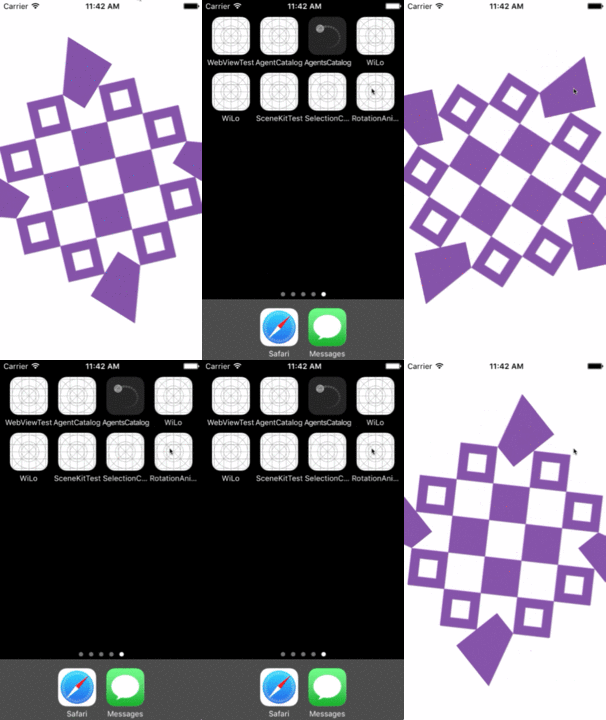
其结果是:
https://stackoverflow.com/questions/45679163
复制相似问题
腾讯云开发者

Copyright © 2013 - 2026 Tencent Cloud. All Rights Reserved. 腾讯云 版权所有
深圳市腾讯计算机系统有限公司 ICP备案/许可证号:粤B2-20090059  粤公网安备44030502008569号
腾讯云计算(北京)有限责任公司 京ICP证150476号 | 京ICP备11018762号