
Swift 3 GCD锁变量与block_and_release误差
为了在我的代码中执行一些操作,我使用Swift 3 GCD。但我经常会遇到_dispatch_call_block_and_release错误。我想这个错误背后的原因是因为不同的线程修改了相同的变量,但是我不知道如何修复问题。下面是我的代码和解释:
我有一个在不同线程中访问和修改的变量:
var queueMsgSent: Dictionary<Date,BTCommand>? = nil


func lock(obj: AnyObject, blk:() -> ()) {
    objc_sync_enter(obj)
    blk()
    objc_sync_exit(obj)
}

func addMsgSentToQueue(msg: BTCommands) {

    if queueMsgSent == nil {
        queueMsgSent = Dictionary.init()
    }
    let currentDate = Date()
    lock(obj: queueMsgSent as AnyObject) {
        queueMsgSent?.updateValue(msg, forKey: currentDate)
    }
}

func deleteMsgSentWithId(id: Int) {

    if queueMsgSent == nil { return }

    for (date, msg) in queueMsgSent! {


        if msg.isAck() == false && msg.getId()! == id {
            lock(obj: queueMsgSent as AnyObject) {
                queueMsgSent?.removeValue(forKey: date)
            }
        }
   }
}

func runSent() -> Void {


    while(true) {
        if queueMsgSent == nil { continue }

        for (date, msg) in queueMsgSent! {

            if msg.isSent() == false {
                 mainSearchView?.btCom?.write(str: msg.getCommand()!)
                 msg.setSent(val: true)
                lastMsgSent = Date()
                continue
            }

            if msg.isAck() == true {
                lock(obj: queueMsgSent as AnyObject) {
                    queueMsgSent?.removeValue(forKey: date)
                }
                continue
            }


        }
   }

}
我将runSent方法启动为:
DispatchQueue.global().async(execute: runSent)我需要runSent用queueMsgSent不断地检查某些条件,并在主线程id中调用其他函数addMsgSentToQueueue和deleteMsgSentWithId。我正在使用一些锁定机制,但它不能正常工作。
回答 2
Stack Overflow用户
发布于 2017-12-07 18:34:15
我强烈建议您使用DispatchQueue(s)由Grand Central Dispatch提供,它们使多线程管理更加容易。
命令
让我们从命令类开始
class Command {
    let id: String
    var isAck = false
    var isSent = false

    init(id:String) {
        self.id = id
    }
}
队列
现在我们可以构建我们的Queue类了,它将提供以下功能
这是我们班不应该混淆的概念DispatchQueue!
- 将
Command推入队列 - 从队列中删除
Command - 启动队列中所有元素的处理
现在密码是:
class Queue {
    typealias Element = (date:Date, command:Command)
    private var storage: [Element] = []
    private let serialQueue = DispatchQueue(label: "serialQueue")

    func push(command:Command) {
        serialQueue.async {
            let newElement = (Date(), command)
            self.storage.append(newElement)
        }
    }

    func delete(by id: String) {
        serialQueue.async {
            guard let index = self.storage.index(where: { $0.command.id == id }) else { return }
            self.storage.remove(at: index)
        }
    }

    func startProcessing() {
        Timer.scheduledTimer(withTimeInterval: 10, repeats: true) { timer in
            self.processElements()
        }
    }

    private func processElements() {
        serialQueue.async {
            // send messages where isSent == false
            let shouldBeSent = self.storage.filter { !$0.command.isSent }
            for elm in shouldBeSent {
                // TODO: add here code to send message
                elm.command.isSent = true
            }

            // remove from storage message where isAck == true
            self.storage = self.storage.filter { !$0.command.isAck }
        }
    }
}
它怎麽工作?
如您所见,storage属性是一个包含元组列表的数组,每个元组有两个组件:Date和Command。
由于storage数组是由多个线程访问的,所以我们需要确保以线程安全的方式访问它。
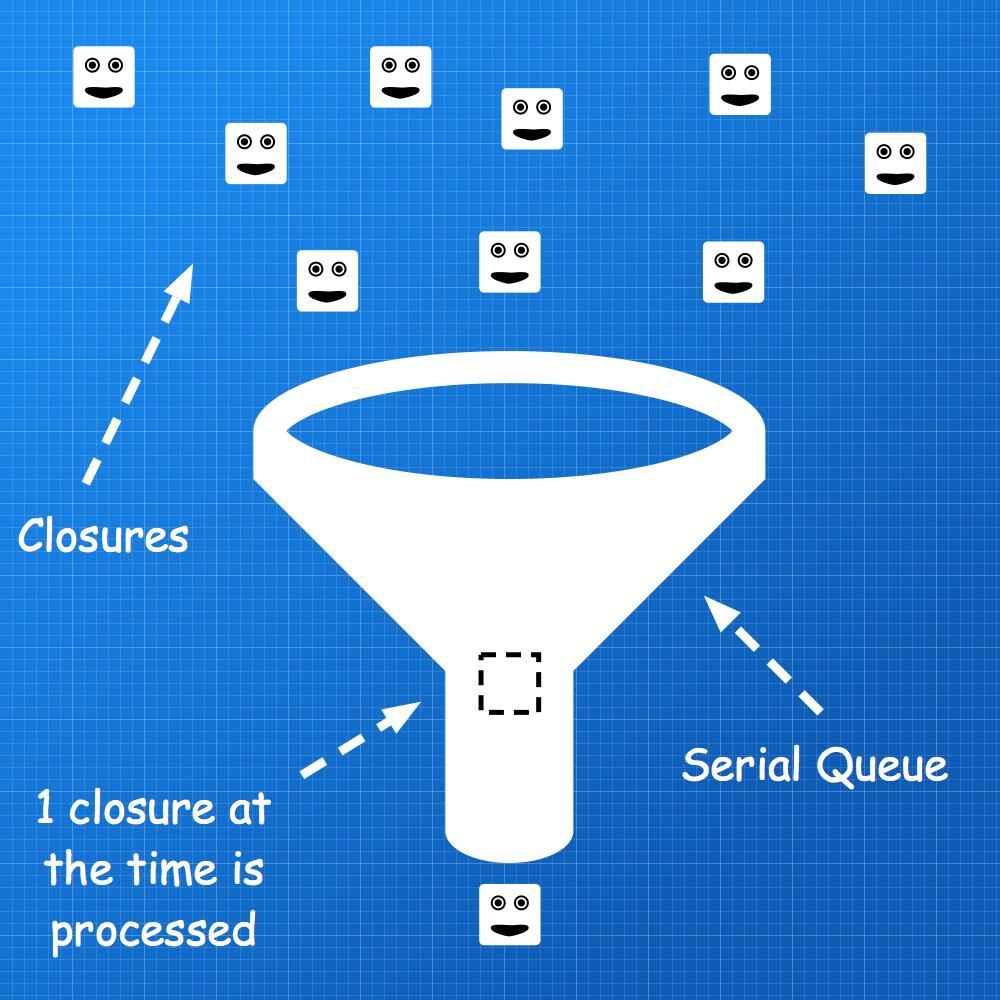
因此,每次我们访问storage时,我们都会将代码打包到下面
serialQueue.async {
    // access self.storage safely
}我们写入到上述闭包中的每一段代码都添加到我们的串行调度队列中。
Serial在同一时间处理1闭包。这就是为什么我们的存储属性是以线程安全的方式访问的!
最后考虑
下面的代码块是邪恶的
while true {
    ...
}
它确实使用了所有可用的CPU时间,它确实冻结UI (在主线程上执行时)并释放电池。
如你所见,我用
Timer.scheduledTimer(withTimeInterval: 10, repeats: true) { timer in
    self.processElements()
}它每10秒调用一次self.processElements(),留给CPU足够的时间来处理其他线程。
当然,这取决于您更改秒数以更好地适应您的场景。
Stack Overflow用户
发布于 2017-12-07 02:36:15
如果您对objc机制感到不舒服,可以查看一下这里。使用该方法,您可以为要协调的特定同步创建一个PThreadMutex,然后使用mutex.fastsync{ *your code* }来隔离访问。这是一种简单的、非常轻量级的机制,使用OS级别的调用,但是您必须小心创建死锁。
您提供的示例依赖于对象始终是同一个物理实体,因为objc锁使用地址作为同步对象的ID。因为您似乎必须在任何地方检查queueMsgSent的存在,所以我想知道更新值例程正在做什么--如果它删除了字典,期望稍后创建它,那么您将面临一个潜在的竞争,因为不同的线程可以查看不同的同步器。
另外,runSent中的循环是一个自旋循环--如果没有什么可做的,它只会消耗CPU而不是等待工作。也许您可以考虑修改它,以使用信号量或一些更合适的机制,允许工人在没有事情可做的情况下阻塞?
https://stackoverflow.com/questions/45640868
复制相似问题
腾讯云开发者

Copyright © 2013 - 2026 Tencent Cloud. All Rights Reserved. 腾讯云 版权所有
深圳市腾讯计算机系统有限公司 ICP备案/许可证号:粤B2-20090059  粤公网安备44030502008569号
腾讯云计算(北京)有限责任公司 京ICP证150476号 | 京ICP备11018762号