
将清单文件添加到我的应用程序仍然没有赋予它提升的特权
将清单文件添加到我的应用程序仍然没有赋予它提升的特权
提问于 2017-08-11 08:46:27
正如在this question的回答中所描述的,我向我的.NET核心应用程序添加了一个清单文件,我稍后将通过调用dotnet.exe run application.dll来运行该应用程序。我没有使用mt.exe --根据我的理解,它不适用于我的目标框架,而且只为“正常”的.NET应用程序设计。
我的清单文件如下:
<?xml version="1.0" encoding="utf-8"?>
<assembly manifestVersion="1.0" xmlns="urn:schemas-microsoft-com:asm.v1">
  <assemblyIdentity version="1.0.0.0" name="MyApplication.app"/>
  <trustInfo xmlns="urn:schemas-microsoft-com:asm.v2">
    <security>
      <requestedPrivileges xmlns="urn:schemas-microsoft-com:asm.v3">
        <!-- UAC Manifest Options
             If you want to change the Windows User Account Control level replace the
             requestedExecutionLevel node with one of the following.

        <requestedExecutionLevel  level="asInvoker" uiAccess="false" />
        <requestedExecutionLevel  level="requireAdministrator" uiAccess="false" />
        <requestedExecutionLevel  level="highestAvailable" uiAccess="false" />

            Specifying requestedExecutionLevel element will disable file and registry virtualization.
            Remove this element if your application requires this virtualization for backwards
            compatibility.
        -->
        <requestedExecutionLevel level="requireAdministrator" uiAccess="false" />
      </requestedPrivileges>
    </security>
  </trustInfo>

  <compatibility xmlns="urn:schemas-microsoft-com:compatibility.v1">
    <application>
      <!-- A list of the Windows versions that this application has been tested on and is
           is designed to work with. Uncomment the appropriate elements and Windows will
           automatically selected the most compatible environment. -->

      <!-- Windows Vista -->
      <!--<supportedOS Id="{e2011457-1546-43c5-a5fe-008deee3d3f0}" />-->

      <!-- Windows 7 -->
      <!--<supportedOS Id="{35138b9a-5d96-4fbd-8e2d-a2440225f93a}" />-->

      <!-- Windows 8 -->
      <!--<supportedOS Id="{4a2f28e3-53b9-4441-ba9c-d69d4a4a6e38}" />-->

      <!-- Windows 8.1 -->
      <!--<supportedOS Id="{1f676c76-80e1-4239-95bb-83d0f6d0da78}" />-->

      <!-- Windows 10 -->
      <!--<supportedOS Id="{8e0f7a12-bfb3-4fe8-b9a5-48fd50a15a9a}" />-->

    </application>
  </compatibility>

  <!-- Indicates that the application is DPI-aware and will not be automatically scaled by Windows at higher
       DPIs. Windows Presentation Foundation (WPF) applications are automatically DPI-aware and do not need
       to opt in. Windows Forms applications targeting .NET Framework 4.6 that opt into this setting, should
       also set the 'EnableWindowsFormsHighDpiAutoResizing' setting to 'true' in their app.config. -->
  <!--
  <application xmlns="urn:schemas-microsoft-com:asm.v3">
    <windowsSettings>
      <dpiAware xmlns="http://schemas.microsoft.com/SMI/2005/WindowsSettings">true</dpiAware>
    </windowsSettings>
  </application>
  -->

  <!-- Enable themes for Windows common controls and dialogs (Windows XP and later) -->
  <!--
  <dependency>
    <dependentAssembly>
      <assemblyIdentity
          type="win32"
          name="Microsoft.Windows.Common-Controls"
          version="6.0.0.0"
          processorArchitecture="*"
          publicKeyToken="6595b64144ccf1df"
          language="*"
        />
    </dependentAssembly>
  </dependency>
  -->

</assembly>如您所见,我请求提升特权--在我的例子中,是为了导出一些注册表项。在使用.dll运行dotnet.exe run application.dll时,应用程序本身可以工作,但我仍然收到一个错误,即访问被拒绝。除此之外,通常应该有一个UAC提示,不是吗?
为什么不起作用?我做错什么了吗?我是不是忘了什么?也许有人知道这是不是因为.NET核心?由于.NET核心,我已经有了一些关于一些库和包的其他问题。
回答 1
Stack Overflow用户
发布于 2021-04-02 19:50:40
使用类似于Resource的工具来确保您的RT_MANIFEST实际上是作为资源嵌入的:
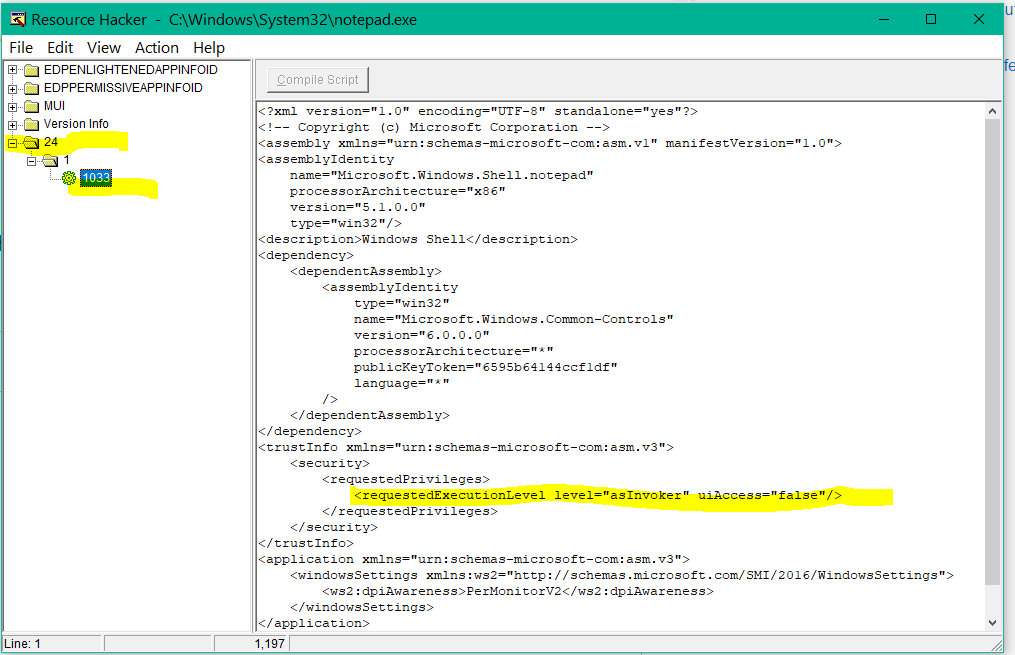
如果您的编译器/链接器没有将RT_MANIFEST资源添加到您的.exe (如jjxtra建议的那样),那么将获得一个不同的开发环境。
或者将清单放在与可执行文件相同的文件夹中:
- MyApplication.exe
- MyApplication.exe.manifest
页面原文内容由Stack Overflow提供。腾讯云小微IT领域专用引擎提供翻译支持
原文链接:
https://stackoverflow.com/questions/45630762
复制相关文章
相似问题
腾讯云开发者

Copyright © 2013 - 2026 Tencent Cloud. All Rights Reserved. 腾讯云 版权所有
深圳市腾讯计算机系统有限公司 ICP备案/许可证号:粤B2-20090059  粤公网安备44030502008569号
腾讯云计算(北京)有限责任公司 京ICP证150476号 | 京ICP备11018762号