
使用ZXing.Net生成GS1-128
使用ZXing.Net生成GS1-128
提问于 2017-08-10 01:32:24
我们使用ZXing.Net生成代码128个条形码,一切都很好。
BarcodeWriter writer = new BarcodeWriter { Format = BarcodeFormat.CODE_128 };
writer.Write("01950123456789031000012317150801").Save("code128.png", ImageFormat.Png);
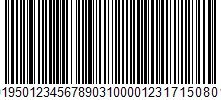
最近,我们被要求将格式更改为GS1-128,经过一些研究,我们找到了使用FNC1 (ASCII 29)编写DataMatrix GS1的解决方案。https://stackoverflow.com/a/43575418/823247
BarcodeWriter writer = new BarcodeWriter { Format = BarcodeFormat.DATA_MATRIX };
writer.Write($"{(char)29}019501234567890310000123{(char)29}17150801").Save("gs1datamatrix.png", ImageFormat.Png);
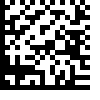
但是,如果我们将条形码格式更改为BarcodeFormat.CODE_128,程序将抛出显示Bad character in input:的异常
BarcodeWriter writer = new BarcodeWriter { Format = BarcodeFormat.CODE_128 };
writer.Write($"{(char)29}019501234567890310000123{(char)29}17150801").Save("gs1code128.png", ImageFormat.Png);
如有任何建议,将不胜感激。
回答 2
Stack Overflow用户
回答已采纳
发布于 2017-08-10 07:09:28
而不是"(char)29“,您必须使用值"(char)0x00F1”作为组分隔符。
Stack Overflow用户
发布于 2021-03-16 10:17:35
有一种简单的方法可以通过Zxing.Net生成GS1-128条形码,而无需手动将字符FNC1添加到内容中。
只应设置标志GS1Format = true
barcodeWriterSvg.Format = BarcodeFormat.CODE_128;
barcodeWriterSvg.Options.GS1Format = true;
barcodeWriterSvg.Options.Margin = 64;

var svgImage = barcodeWriterSvg.Write(content);
return svgImage.Content;但是,最初的解决方案是将FNC1字符手动添加到字符串https://github.com/micjahn/ZXing.Net/wiki/Generating-GS1-DataMatrix-and-GS1-Code128-barcodes的开头。
页面原文内容由Stack Overflow提供。腾讯云小微IT领域专用引擎提供翻译支持
原文链接:
https://stackoverflow.com/questions/45603051
复制相关文章
相似问题
腾讯云开发者

Copyright © 2013 - 2026 Tencent Cloud. All Rights Reserved. 腾讯云 版权所有
深圳市腾讯计算机系统有限公司 ICP备案/许可证号:粤B2-20090059  粤公网安备44030502008569号
腾讯云计算(北京)有限责任公司 京ICP证150476号 | 京ICP备11018762号