
反应-本机:挠曲盒对齐
反应-本机:挠曲盒对齐
提问于 2017-08-08 16:38:10
我有一个相对简单的布局,我不知道为什么绿色呼叫按钮不会对齐右边的容器。(绿色按钮的右边框应与蓝色铅笔图标的右侧对齐)。
我的柔性盒配置不正确吗?
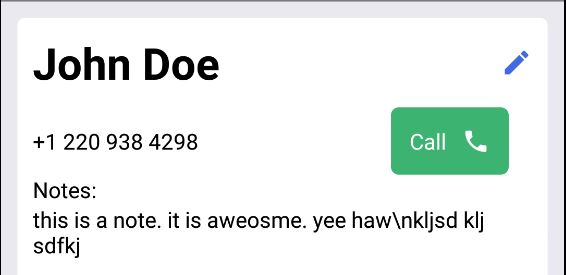
这是密码
<View style={styles.container}>
    <View style={styles.rowContainer}>
        <Text h3 style={{ flex: 1 }}>{contact.name}</Text>
        <Icon
                style={{ flex: 0 }}
                name="edit"
                onPress={this.handleEditContact}
                color="royalblue"
                size={20}
                underlayColor="whitesmoke"
                />

    </View>
    <View style={[styles.rowContainer, {marginTop: 10}]}>
        <PhoneText  style={{ flex:1 }}
                    phone={contact.phone} />
        <Button buttonStyle={{ flex: 0 }}
                title="Call"
                iconRight
                icon={{name:'phone'}}
                backgroundColor='mediumseagreen'
                borderRadius={5}
                underlayColor='whitesmoke'/>

    </View>
    <Text>Notes:</Text>
    <Text style={{ flexWrap: 'wrap' }}>{contact.notes}</Text>
</View>
以下是样式定义:
const styles = StyleSheet.create({
    container:{
        flex: 1,
        margin: 10,
        padding: 10,
        borderWidth: StyleSheet.hairlineWidth,
        borderRadius: 5,
        borderColor: 'gainsboro',
        backgroundColor: 'white',
    },
    rowContainer:{
        flex: 0,
        flexDirection: 'row',
        alignItems: 'center',
    },
});回答 2
Stack Overflow用户
回答已采纳
发布于 2017-08-11 10:43:30
感谢@TimH,我查看了源代码,发现我想要的支柱是containerViewStyle,而不是buttonStyle。呃..。对吗?
<Button containerViewStyle={{ marginRight: 0 }} .... />Stack Overflow用户
发布于 2017-08-08 18:34:24
这个边距是由react本机元素的Button组件造成的。如果您查看源代码,您将发现一个带有指定容器的styleObject。
container: {
    backgroundColor: 'transparent',
    marginLeft: 15,
    marginRight: 15,
},
只要移除marginRight属性,您就会得到您希望的对齐方式。这将是一个快速而肮脏的解决方案。也许您应该为Button组件创建自己的分叉。我希望我能帮你。
页面原文内容由Stack Overflow提供。腾讯云小微IT领域专用引擎提供翻译支持
原文链接:
https://stackoverflow.com/questions/45573705
复制相关文章
相似问题
腾讯云开发者

Copyright © 2013 - 2026 Tencent Cloud. All Rights Reserved. 腾讯云 版权所有
深圳市腾讯计算机系统有限公司 ICP备案/许可证号:粤B2-20090059  粤公网安备44030502008569号
腾讯云计算(北京)有限责任公司 京ICP证150476号 | 京ICP备11018762号