
如何在Odoo 10中向POS收据添加自定义按钮
如何在Odoo 10中向POS收据添加自定义按钮
提问于 2017-08-03 02:27:57
我使用的是Odoo10,我想在POS接收程序中添加一个产品明细表,并添加另一个打印按钮来打印细节表。我有一个麻烦,我不知道如何添加一个事件到我的按钮。这是我的模块,请帮我检查一下。
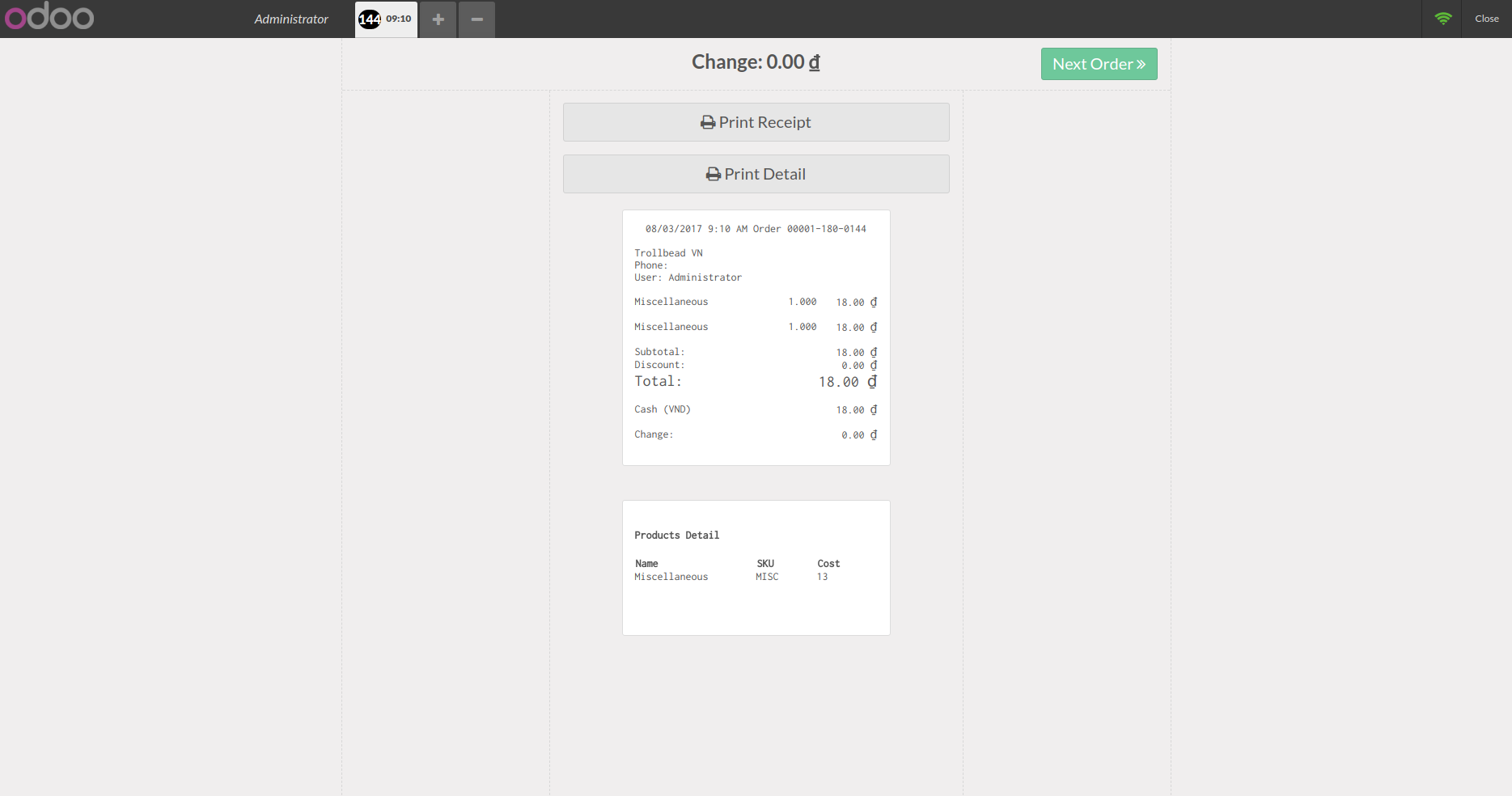
Qweb:
<?xml version="1.0" encoding="UTF-8"?>
<templates id="point_of_sale_template" xml:space="preserve">
    <t t-extend="PosTicket">
        <t t-jquery='.pos-sale-ticket' t-operation='after'>
            <div class="pos-sale-ticket-appended" style="clear:both; text-align: left; width: 300px; background-color: white; margin: 20px; padding: 15px; font-size: 14px;padding-bottom: 30px; display: inline-block;font-family: 'Inconsolata'; border: solid 1px rgb(220,220,220); border-radius: 3px; overflow: hidden;">
                <div style="background: white; margin: 20px auto;">
                    <h4>Products Detail</h4>
                <div style="display: inline-block">
                    <table class='receipt-orderlines' style="width: 300px; border">
                        <colgroup>
                            <col width='50%' />
                            <col width='25%' />
                            <col width='25%' />
                        </colgroup>
                        <tr>
                            <th>Name</th>
                            <th>SKU</th>
                            <th>Cost</th>
                        </tr>
                        <tr t-foreach="orderlines" t-as="orderline">
                            <t t-log="orderline.get_product().cost_method" />
                            <t t-log="orderline.get_product().property_cost_method" />
                            <td>
                                <t t-esc="orderline.get_product().display_name"/>
                            </td>
                            <td>
                                <t t-esc="orderline.get_product().default_code"/>
                            </td>
                            <td>
                                <t t-esc="orderline.get_product().standard_price"/>
                            </td>
                        </tr>
                    </table>
                    <br />
                </div>
                </div>
            </div>
        </t>
    </t>
    <t t-extend="ReceiptScreenWidget">
        <t t-jquery='div.receipt-screen.screen > div > div.centered-content.touch-scrollable > div.button.print' t-operation="after">
            <div class="button print-detail">
                <i class='fa fa-print'></i> Print Detail
            </div>
        </t>
    </t>
</templates>
JS:我只是扩展了pos模型并添加了standard_price字段
odoo.define('pos_receipt_extend', function (require) {
    "use strict";
    var $ = require('jquery');
    // Add cost field to product model
    var models = require('point_of_sale.models');
    models.load_fields('product.product', 'standard_price');

    var screens = require('point_of_sale.screens');

});清单.py
# -*- coding: utf-8 -*-

{
    "name": "Pos extend Receipt",
    "summary": "pos_es_receipt",
    "version": "8.0.1.0",
    "category": "Point Of Sale",
    "website": "http://www.difusionvisual.com",
    "author": "Difusión Visual",
    "license": "AGPL-3",
    "application": False,
    "installable": True,
    "depends": [
        "base",
        "point_of_sale",
    ],
    "qweb": [
        'static/src/xml/receipt.xml'
    ],
    "data":["views/pos_es_receipt.xml"]

}
请告诉我如何在“打印细节”按钮上添加操作onClick。
回答 1
Stack Overflow用户
发布于 2017-08-03 04:57:35
在定义qwerb的xml文件中,尝试在j-query中使用第一/最后一种单词,而不是这个层次结构。可能有可能,jquery找不到这条路径。确保您添加了正确的路径。
在js文件中,您需要扩展"export_for_printing“方法。通常,这种方法中的数据写入是打印的返回。
在明显的文件中,参数的偏好也是这样的:“依赖”、“数据”、“qweb”。在您看来,不要忘记添加js文件的路径。在此之后,尝试加载pos会话,并通过设置“警告”来检查代码是否成功工作。
页面原文内容由Stack Overflow提供。腾讯云小微IT领域专用引擎提供翻译支持
原文链接:
https://stackoverflow.com/questions/45473832
复制相关文章
相似问题
腾讯云开发者

Copyright © 2013 - 2026 Tencent Cloud. All Rights Reserved. 腾讯云 版权所有
深圳市腾讯计算机系统有限公司 ICP备案/许可证号:粤B2-20090059  粤公网安备44030502008569号
腾讯云计算(北京)有限责任公司 京ICP证150476号 | 京ICP备11018762号