
反应本机-无法读取未定义的属性[属性](点燃2,还原沙司)
反应本机-无法读取未定义的属性[属性](点燃2,还原沙司)
提问于 2017-08-01 00:28:06
在我的react本地应用程序中使用redux是有困难的。我不能在我的组件中调用一个动作。我得到以下错误:
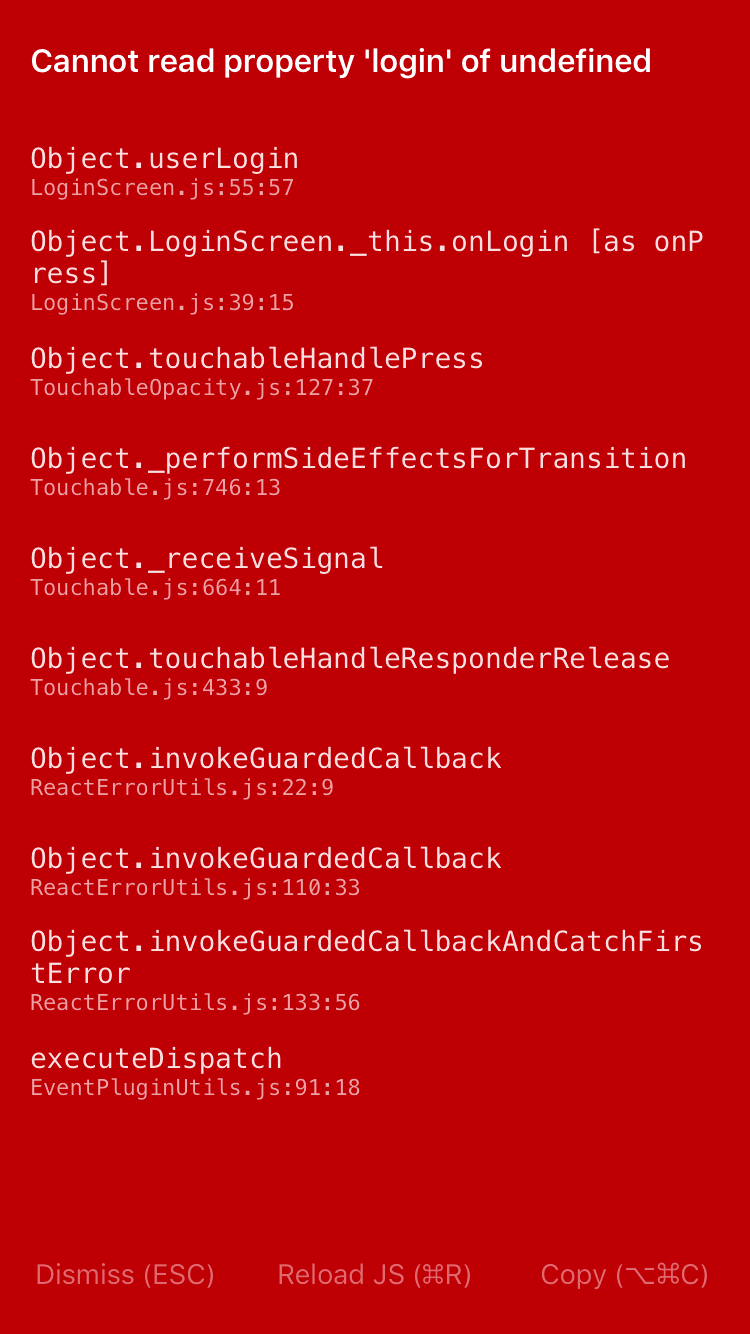
这是我的AuthRedux.js
import { createReducer, createActions } from 'reduxsauce'
import Immutable from 'seamless-immutable'

const { Types, Creators } = createActions({
    login: ['email', 'password'],
    logout: null
})

export const AuthTypes = Types
export default Creators

export const INITIAL_STATE = Immutable({
    isLoggedIn: false,
    email: null,
    password: null
})

export const userLogin = (state, {email, password}) => {
    return Object.assign({}, state, {
        isLoggedIn: true
    });//state.merge({ isLoggedIn: true, email, password})
}

export const userLogout = (state) => {
    return state.merge({ isLoggedIn: false, email: null, password: null })
}

export const reducer = createReducer(INITIAL_STATE, {
    [Types.USER_LOGIN]: userLogin,
    [Types.USER_LOGOUT]: userLogout
})
这是我的组件LoginScreen.js
import React, { Component } from 'react'
import { ScrollView, Text, KeyboardAvoidingView, TextInput, TouchableOpacity, Button } from 'react-native'
import { connect } from 'react-redux'
import { AuthActions } from '../Redux/AuthRedux'
// Add Actions - replace 'Your' with whatever your reducer is called :)
// import YourActions from '../Redux/YourRedux'

// Styles
import styles from './Styles/LoginScreenStyle'

class LoginScreen extends Component {

  constructor(props) {
    super(props);
    this.state = {
      email: '',
      password: '',
      opacity: 1.0,
      isLoggedIn: false
    }
  }

  render () {
    return (
      <ScrollView style={styles.container}>
        <KeyboardAvoidingView behavior='position'>
          <Text>LoginScreen</Text>
          <TextInput style={{width: 100, backgroundColor: 'red', height: 50, marginTop: 10}} onChangeText={(text) => this.setState({email : text})}/>
          <TextInput style={{width: 100, backgroundColor: 'yellow', height: 50, marginTop: 10}} onChangeText={(text) => this.setState({password : text})}/>
          <Button title='Hola' onPress={this.onLogin}/>
        </KeyboardAvoidingView>
      </ScrollView>
    )
  }

  onLogin = () => {
    console.log(this.state.email);
    this.setState({opacity: 0.5})
    this.props.userLogin(this.state.email, this.state.password);
  }

  handleOnPress = () => {
    this.setState({opacity: 0.5})
  }
}

const mapStateToProps = (state) => {
  return {
    isLoggedIn: state.auth.isLoggedIn
  }
}

const mapDispatchToProps = (dispatch) => {
  return {
    userLogin: (email, password) => dispatch(AuthActions.login(email, password))
  }
}

export default connect(mapStateToProps, mapDispatchToProps)(LoginScreen)
我正在尝试从userLogin按钮调用mapDispatchToProps函数,该按钮在mapDispatchToProps中分配。我的rootReducer也是这样配置的:
const rootReducer = combineReducers({
    nav: require('./NavigationRedux').reducer,
    github: require('./GithubRedux').reducer,
    search: require('./SearchRedux').reducer,
    auth: require('./AuthRedux').reducer
  })
在App.js中,该商店也提供给供应商。
class App extends Component {
  render () {
    return (
      <Provider store={store}>
        <RootContainer />
      </Provider>
    )
  }
}
我不知道为什么没有检测到登录操作。
回答 1
Stack Overflow用户
回答已采纳
发布于 2017-08-01 01:24:58
不要使用import { AuthActions } from '../Redux/AuthRedux',而要执行import AuthActions from '../Redux/AuthRedux',因为您要在actionCreators上执行export default,这是您现在要导入的。
您还可以在执行export const AuthActions = Creators的地方执行export default Creators,并且可以按照现在的方式保持import语句不变。
页面原文内容由Stack Overflow提供。腾讯云小微IT领域专用引擎提供翻译支持
原文链接:
https://stackoverflow.com/questions/45427186
复制相关文章
相似问题
腾讯云开发者

Copyright © 2013 - 2026 Tencent Cloud. All Rights Reserved. 腾讯云 版权所有
深圳市腾讯计算机系统有限公司 ICP备案/许可证号:粤B2-20090059  粤公网安备44030502008569号
腾讯云计算(北京)有限责任公司 京ICP证150476号 | 京ICP备11018762号