
QML SwipeView覆盖整个窗口
QML SwipeView覆盖整个窗口
提问于 2017-07-26 07:08:16
如果我使用swipe视图,并且我编写了以下代码,我会遇到一些问题:
import QtQuick 2.6
import QtQuick.Window 2.2
import QtQuick.Controls 2.2

Window {
    visible: true
    width: 640
    height: 480
    title: qsTr("Swipe View")

    MainForm {
        anchors.fill:parent

        Rectangle{
            id:rightRect
            anchors.right:parent.right
            width: parent.width*0.50
            height:parent.height
            color:"yellow"
        }

        Rectangle{
            id:leftRect
            width:parent.width*0.50
            height:parent.height
            color:"lightgreen"
            border.color:"red"
            anchors.right:rightRect.left
            SwipeView{
                id:swipeView
                anchors.fill : leftRect
                //Layout.fillWidth: true
                currentIndex: 0
                interactive: false
                Page{
                    id:page1

                    Rectangle{
                        width:parent.width
                        height:parent.height
                        color:"lightgreen"
                        Button{
                            text:"move to 2"
                            onClicked: swipeView.currentIndex = 1
                        }
                    }
                }

                Page{
                    id:page2
                    Rectangle{
                        width:parent.width
                        height:parent.height
                        color:"lightblue"
                        Button{
                            text:"move to 1"
                            onClicked: swipeView.currentIndex = 0
                        }
                    }
                }
            }
        }
    }
}
以下是屏幕截图:
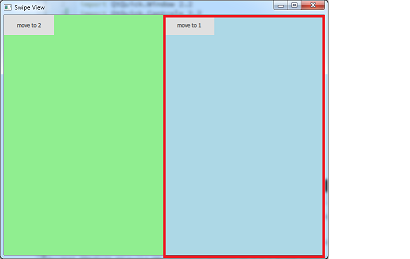
1)最初,我已经将当前索引设置为"0",但是索引"1“蓝色区域是可见的,它覆盖了正确的区域(黄色矩形):
2)如果我单击移动到2按钮,那么黄色的rect就会如预期的那样可见。
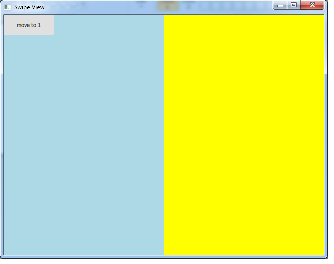
现在,即使我点击移动到1按钮,我也需要同样的行为
回答 1
Stack Overflow用户
回答已采纳
发布于 2017-07-26 08:04:11
将clip:true添加到SwipeView的父级,这将是很好的。
Rectangle{
            id:leftRect
            width:parent.width*0.50
            height:parent.height
            color:"lightgreen"
            border.color:"red"
            anchors.right:rightRect.left
            clip:true    //add this
SwipeView{根据Qt文档
如果启用了裁剪,则项目将将自己的绘画以及其子绘图剪辑到其边框中。
默认情况下,此值为false,因此您的SwipeView将退出矩形区域。
页面原文内容由Stack Overflow提供。腾讯云小微IT领域专用引擎提供翻译支持
原文链接:
https://stackoverflow.com/questions/45319828
复制相关文章
相似问题
腾讯云开发者

Copyright © 2013 - 2026 Tencent Cloud. All Rights Reserved. 腾讯云 版权所有
深圳市腾讯计算机系统有限公司 ICP备案/许可证号:粤B2-20090059  粤公网安备44030502008569号
腾讯云计算(北京)有限责任公司 京ICP证150476号 | 京ICP备11018762号