
Android在活动中自动保存和还原的内容
我是Android的初学者。
在Android中,可以在onSaveInstanceState/onRestoreInstanceState中自动保存/还原一些通用元素。
例如,EditText保存/还原Text属性,RatingBar保存/还原Rating属性.
我从一些测试中看到,但我在文档中找不到任何关于这个的东西。
,我如何知道什么是隐式保存/恢复的,而不需要我的干预?
例如,在哪里可以发现EditText.Text是自动保存/还原的?
我不想测试所有的属性。
编辑来自JRG的答案:
https://developer.android.com/guide/components/activities/activity-lifecycle.html
在活动开始停止时,保存活动状态,系统调用onSaveInstanceState() method<...>该方法的默认实现保存有关活动视图层次结构状态的瞬态信息,例如EditText小部件中的文本或ListView小部件的滚动位置。
我如何知道保存/还原的默认实现是什么?
重读JRG后的第二次编辑答案:
默认情况下,系统使用Bundle实例状态保存有关活动布局中的>每个View对象的信息(例如输入到>一个EditText小部件中的文本值)。
默认实现保存/恢复元素视图的所有状态。
回答 2
Stack Overflow用户
发布于 2017-07-25 22:22:03
Android文档解释了如何保存状态,以及一篇很好的关于在活动和片段中保存状态的文章。
Android Documentation:https://developer.android.com/guide/components/activities/activity-lifecycle.htmlAdditional Article:https://inthecheesefactory.com/blog/fragment-state-saving-best-practices/en
保存和还原活动状态在一些场景中,您的活动由于正常的应用程序行为而被破坏,例如当用户按后退按钮时,或者您的活动通过调用
finish()方法来表示自己的破坏。如果活动处于停止状态,并且很长时间没有使用,或者前台活动需要更多资源,系统还可能破坏包含活动的进程以恢复内存。当您的活动因用户按下“后退”或活动完成而被破坏时,系统的Activity实例的概念就永远消失了,因为该行为表明不再需要该活动。但是,如果系统由于系统约束(而不是正常的应用程序行为)而破坏活动,那么尽管实际的Activity实例已经消失,但系统会记住它的存在,即如果用户导航回它,系统将使用一组保存的数据创建该活动的新实例,该数据描述活动被销毁时的状态。系统用于恢复以前状态的保存的数据称为实例状态,是存储在Bundle对象中的键值对的集合。默认情况下,系统使用Bundle实例状态保存活动布局中每个View对象的信息(例如输入到EditText小部件中的文本值)。因此,如果您的活动实例被销毁和重新创建,布局的状态将恢复到以前的状态,而不需要代码。但是,您的活动可能有更多要还原的状态信息,例如跟踪用户在活动中进度的成员变量。保存您的活动状态,当您的活动开始停止时,系统将调用onSaveInstanceState()方法,以便您的活动可以通过一组键值对来保存状态信息。该方法的默认实现保存有关活动的视图层次结构状态的瞬态信息,例如EditText小部件中的文本或ListView小部件的滚动位置。警告:您必须始终调用onSaveInstanceState()的超类实现,以便默认实现可以保存视图层次结构的状态。若要保存活动的其他状态信息,必须重写onSaveInstanceState(),并向在活动意外破坏时保存的Bundle对象添加键值对。例如:
static final String STATE_SCORE = "playerScore";
static final String STATE_LEVEL = "playerLevel";
...


@Override
public void onSaveInstanceState(Bundle savedInstanceState) {
    // Save the user's current game state
    savedInstanceState.putInt(STATE_SCORE, mCurrentScore);
    savedInstanceState.putInt(STATE_LEVEL, mCurrentLevel);


    // Always call the superclass so it can save the view hierarchy state
    super.onSaveInstanceState(savedInstanceState);
}
注意:为了使Android系统恢复活动中视图的状态,每个视图都必须有一个由
android:id属性提供的唯一ID。若要保存持久数据(如用户首选项或数据库数据),应在活动处于前台时采取适当的机会。如果没有这样的机会,您应该在onStop()方法期间保存这些数据。还原您的活动状态当您的活动在先前被销毁后重新创建时,您可以从系统传递给您的活动的绑定中恢复您保存的状态。onCreate()和onRestoreInstanceState()回调方法都接收包含实例状态信息的相同绑定。因为调用onCreate()方法是要系统创建活动的新实例还是重新创建上一个实例,所以在尝试读取状态Bundle之前,必须检查状态Bundle是否为null。如果为null,则系统将创建该活动的新实例,而不是还原先前被销毁的实例。例如,下面的代码片段展示了如何在onCreate()中恢复某些状态数据:
@Override
protected void onCreate(Bundle savedInstanceState) {
    super.onCreate(savedInstanceState); // Always call the superclass first


    // Check whether we're recreating a previously destroyed instance
    if (savedInstanceState != null) {
        // Restore value of members from saved state
        mCurrentScore = savedInstanceState.getInt(STATE_SCORE);
        mCurrentLevel = savedInstanceState.getInt(STATE_LEVEL);
    } else {
        // Probably initialize members with default values for a new instance
    }
    ...
}
在
onCreate()期间,您可以选择实现onRestoreInstanceState(),系统在onStart()方法之后调用它,而不是恢复状态。只有在存在要恢复的保存状态时,系统才调用onRestoreInstanceState(),因此不需要检查Bundle是否为null:
public void onRestoreInstanceState(Bundle savedInstanceState) {
    // Always call the superclass so it can restore the view hierarchy
    super.onRestoreInstanceState(savedInstanceState);


    // Restore state members from saved instance
    mCurrentScore = savedInstanceState.getInt(STATE_SCORE);
    mCurrentLevel = savedInstanceState.getInt(STATE_LEVEL);
}
注意:始终调用
onRestoreInstanceState()的超类实现,以便默认实现可以恢复视图层次结构的状态。
Stack Overflow用户
发布于 2017-07-26 18:08:32
这里有一个例子来解释你..。
- 默认情况下保存什么以及如何保存?
- 为了保存代码,需要添加哪些数据?
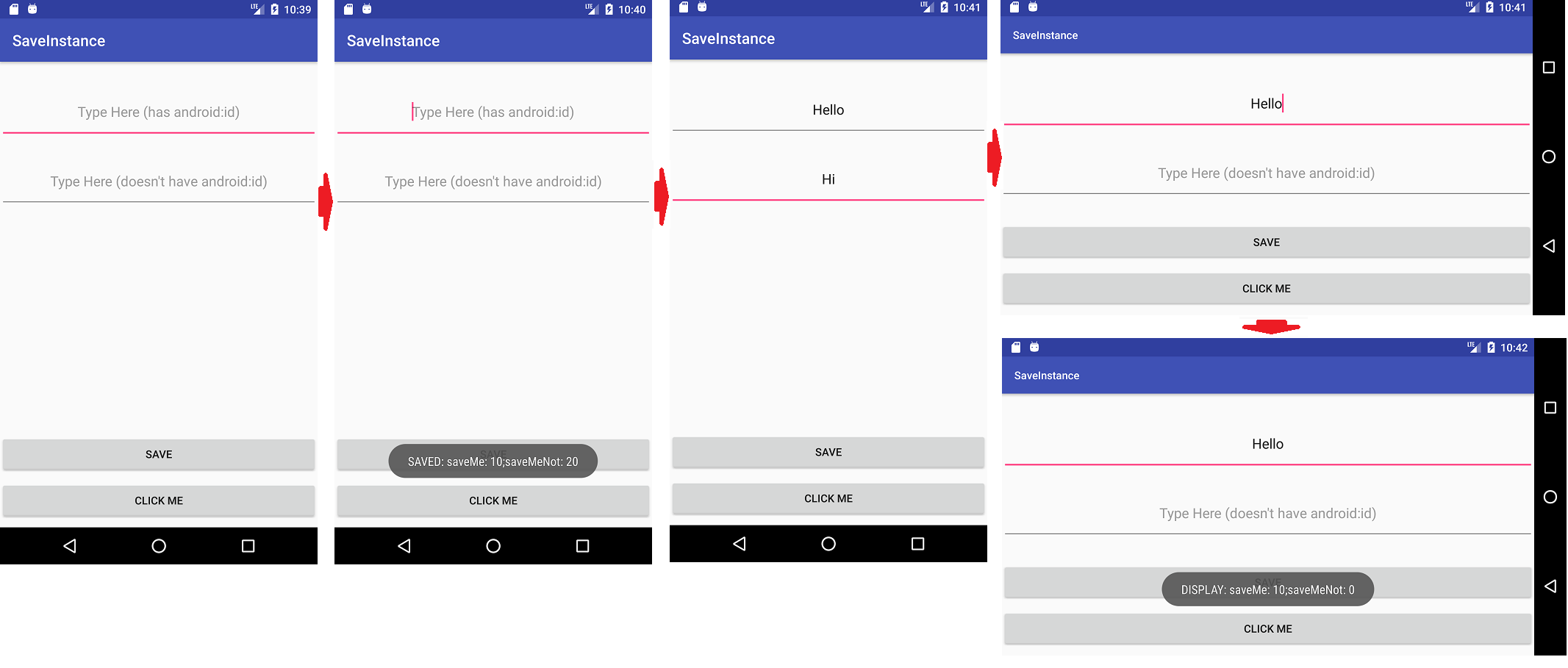
我创建了一个简单的android项目,它总共有4个数据点,在应用程序生命周期的某个时候会有一定的价值。
- 活动内变量
saveMe - 活动内变量
saveMeNot - 视图的EditText
withid(有android:id) - 视图的EditText (没有android:id)
下面是屏幕截图中的事件序列。
- 启动Android应用程序
- 单击
SAVE按钮设置内部变量saveMe和saveMeNot的值。将显示一个Toast,它保存了这两个变量的值。 - 在诸如Hello和Hi这样的编辑文本中键入一些文本。这将在两个编辑文本中设置文本。
- 旋转屏幕,即改变方向。接下来会发生..。
- Android将保存在
activity_main.xml中定义了activity_main.xml的所有视图的值。在这里,只有Hello会被保存,因为输入Hello的EditText有一个android:id=@+id/withId。另一个带有文本Hi的EditText不会被Android自动保存,因为它没有任何android:id。这是免费获得的(只要您的所有视图都定义了android:id)。如果您有扩展视图的自定义视图,那么它们也定义了android:id。 - Android还调用onSaveInstanceState和onRestoreInstanceState,这使您能够存储活动的所有内部变量(即
saveMe和saveMeNot)的状态。你必须为它编码,否则国家就失去了。与我的示例一样,我保存了saveMe的状态,而不是saveMeNot的状态。这是你不能免费得到的东西,也就是说,你必须为它编码。
- Android将保存在
- 单击
CLICK ME按钮查看saveMe和saveMeNot的值,您将看到只显示saveMe值,因为它是由您在onSaveInstanceState中保存并在onRestoreInstanceState中检索的。
步骤顺序
代码
AndroidManifest.xml
<?xml version="1.0" encoding="utf-8"?>
<manifest xmlns:android="http://schemas.android.com/apk/res/android"
    package="test.saveinstance">

    <application
        android:allowBackup="true"
        android:icon="@mipmap/ic_launcher"
        android:label="@string/app_name"
        android:roundIcon="@mipmap/ic_launcher_round"
        android:supportsRtl="true"
        android:theme="@style/AppTheme">
        <activity android:name=".MainActivity">
            <intent-filter>
                <action android:name="android.intent.action.MAIN" />

                <category android:name="android.intent.category.LAUNCHER" />
            </intent-filter>
        </activity>
    </application>

</manifest>
MainActivity.java
package test.saveinstance;

import android.support.v7.app.AppCompatActivity;
import android.os.Bundle;
import android.util.Log;
import android.view.View;
import android.widget.Button;
import android.widget.Toast;

public class MainActivity extends AppCompatActivity {

    // will save in bundle in onSaveInstanceState
    private int saveMe;

    // will not save in bundle in onSaveInstanceState
    private int saveMeNot;

    @Override
    protected void onCreate(Bundle savedInstanceState) {
        super.onCreate(savedInstanceState);
        setContentView(R.layout.activity_main);

        // do some action that generates values for
        // activity specific variables i.e. saveMe
        // and saveMeNot
        Button saveButton = (Button) findViewById(R.id.save);
        saveButton.setOnClickListener(new View.OnClickListener() {
            @Override
            public void onClick(View view) {
                saveMe = 10;
                saveMeNot = 20;
                Toast.makeText(getApplicationContext(), "SAVED: saveMe: " + saveMe + ";saveMeNot: " + saveMeNot, Toast.LENGTH_LONG).show();
            }
        });

        // will be used to display value of
        // saveMe and saveMeNot after orientation
        // changes.
        Button button = (Button) findViewById(R.id.button);
        button.setOnClickListener(new View.OnClickListener() {
            @Override
            public void onClick(View view) {
                Toast.makeText(getApplicationContext(), "DISPLAY: saveMe: " + saveMe + ";saveMeNot: " + saveMeNot, Toast.LENGTH_LONG).show();
            }
        });
    }

    @Override
    protected void onSaveInstanceState(Bundle outState) {
        // save saveMe in bundle
        outState.putInt("saveMe", saveMe);
        super.onSaveInstanceState(outState);
        Log.d("TEST", "Saving saveMe in bundle during orientation change");
    }

    @Override
    protected void onRestoreInstanceState(Bundle savedInstanceState) {
        super.onRestoreInstanceState(savedInstanceState);
        // retrieve saveMe from bundle
        saveMe = savedInstanceState.getInt("saveMe");
        Log.d("TEST", "Retrieving saveMe in bundle during orientation change");
    }
}
activity_main.xml
<?xml version="1.0" encoding="utf-8"?>
<RelativeLayout xmlns:android="http://schemas.android.com/apk/res/android"
    xmlns:tools="http://schemas.android.com/tools"
    android:layout_width="match_parent"
    android:layout_height="match_parent"
    tools:context="test.saveinstance.MainActivity">

    <EditText
        android:id="@+id/withId"
        android:layout_marginTop="30dp"
        android:layout_width="match_parent"
        android:layout_height="70dp"
        android:gravity="center"
        android:hint="Type Here (has android:id)" />

    <EditText
        android:layout_below="@id/withId"
        android:layout_marginTop="20dp"
        android:layout_width="match_parent"
        android:layout_height="70dp"
        android:gravity="center"
        android:hint="Type Here (doesn't have android:id)" />

    <Button
        android:id="@+id/button"
        android:layout_alignParentBottom="true"
        android:layout_marginBottom="10dp"
        android:text="Click Me"
        android:layout_width="match_parent"
        android:layout_height="50dp" />

    <Button
        android:id="@+id/save"
        android:layout_above="@id/button"
        android:layout_marginBottom="10dp"
        android:text="Save"
        android:layout_width="match_parent"
        android:layout_height="50dp" />

</RelativeLayout>https://stackoverflow.com/questions/45314262
复制相似问题
腾讯云开发者

Copyright © 2013 - 2026 Tencent Cloud. All Rights Reserved. 腾讯云 版权所有
深圳市腾讯计算机系统有限公司 ICP备案/许可证号:粤B2-20090059  粤公网安备44030502008569号
腾讯云计算(北京)有限责任公司 京ICP证150476号 | 京ICP备11018762号