
WrapPanel滚动条
简单xaml:
<WrapPanel Orientation="Vertical">
    <Ellipse Width="100" Height="100" Fill="Red" />
    <Ellipse Width="100" Height="100" Fill="Yellow" />
    <Ellipse Width="100" Height="100" Fill="Green" />
</WrapPanel>
调整大小窗口:
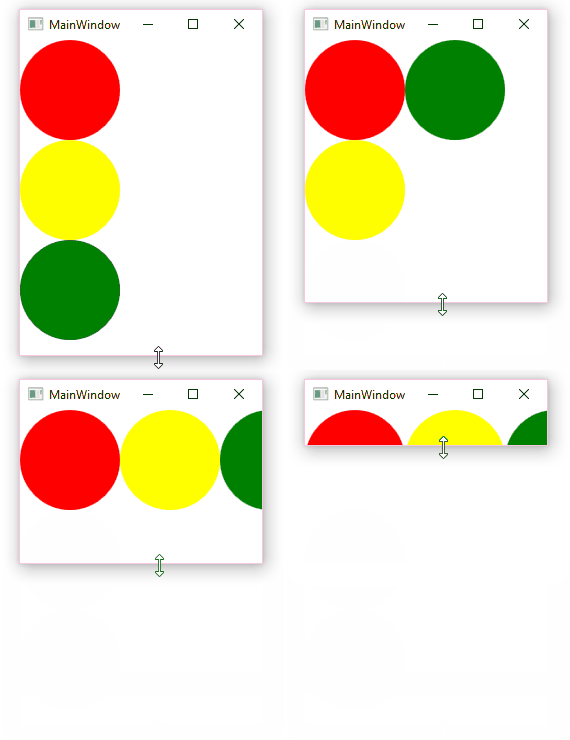
如何在内容不适合时显示垂直和水平滚动条?
注意:这应该适用于任何内容。
我试着把它放到ScrollViewer里
<ScrollViewer HorizontalScrollBarVisibility="Auto" VerticalScrollBarVisibility="Auto">
    <WrapPanel Orientation="Vertical">
        ...
    </WrapPanel>
</ScrollViewer>但是,WrapPanel停止包装任何东西(总是一列):
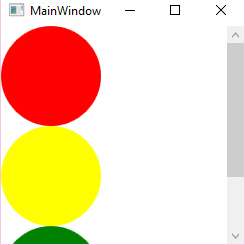
这里的问题是,ScrollViewer为它提供了(NaN, NaN)大小,因此永远不会发生包装。
我试图通过将滚动查看器可用高度绑定到面板的最大高度来修复它:
<ScrollViewer ...>
<WrapPanel MaxHeight="{Binding ViewportHeight, RelativeSource={RelativeSource AncestorType=ScrollViewer}}" ...>这将限制面板高度(不再是NaN ),因此现在开始包装。但是,因为这也会调整面板的高度--垂直滚动条永远不会出现:
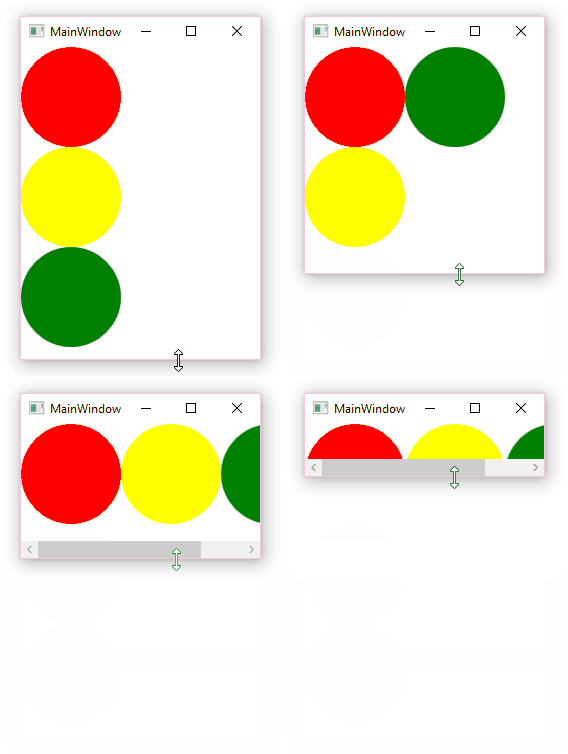
如何添加垂直滚动条?
在我的例子中,WrapPanel是垂直的,意味着它将尽可能多地填充列,然后从左到右换到一个新列。当儿童不适合垂直(当可用空间小于儿童高度)或水平不适合时,需要滚动条。
这种思想可以用于标准(水平) WrapPanel:从左到右,在满时创建新行。同样的问题也会出现(刚试过)。
回答 3
Stack Overflow用户
发布于 2017-07-25 16:04:42
如果不显式地将WrapPanel的Height/MinHeight设置为Vertical方向,或者将Width/MinWidth设置为Horizontal方向,这种行为在Vertical中是不可能的。只有当此滚动查看器包装的ScrollViewer不适合视图时,FrameworkElement才会显示滚动条。
您可以创建自己的包装面板,根据其子块计算其最小大小。
或者,您可以实现Behavior<WrapPanel>或附加属性。这并不像您可能期望的那样,只添加几个XAML标记就那么容易了。
我们用附加的财产解决了这个问题。让我告诉你我们做了什么。
static class ScrollableWrapPanel
{
    public static readonly DependencyProperty IsEnabledProperty =
        DependencyProperty.RegisterAttached("IsEnabled", typeof(bool), typeof(ScrollableWrapPanel), new PropertyMetadata(false, IsEnabledChanged));

    // DP Get/Set static methods omitted

    static void IsEnabledChanged(DependencyObject d, DependencyPropertyChangedEventArgs e)
    {
        var panel = (WrapPanel)d;
        if (!panel.IsInitialized)
        {
            panel.Initialized += PanelInitialized;
        }
        // Add here the IsEnabled == false logic, if you wish
    }

    static void PanelInitialized(object sender, EventArgs e)
    {
        var panel = (WrapPanel)sender;
        // Monitor the Orientation property.
        // There is no OrientationChanged event, so we use the DP tools.
        DependencyPropertyDescriptor.FromProperty(
            WrapPanel.OrientationProperty,
            typeof(WrapPanel))
        .AddValueChanged(panel, OrientationChanged);

        panel.Unloaded += PanelUnloaded;

        // Sets up our custom behavior for the first time
        OrientationChanged(panel, EventArgs.Empty);
    }

    static void OrientationChanged(object sender, EventArgs e)
    {
        var panel = (WrapPanel)sender;
        if (panel.Orientation == Orientation.Vertical)
        {
            // We might have set it for the Horizontal orientation
            BindingOperations.ClearBinding(panel, WrapPanel.MinWidthProperty);

            // This multi-binding monitors the heights of the children
            // and returns the maximum height.
            var converter = new MaxValueConverter();
            var minHeightBiding = new MultiBinding { Converter = converter };
            foreach (var child in panel.Children.OfType<FrameworkElement>())
            {
                minHeightBiding.Bindings.Add(new Binding("ActualHeight") { Mode = BindingMode.OneWay, Source = child });
            }

            BindingOperations.SetBinding(panel, WrapPanel.MinHeightProperty, minHeightBiding);

            // We might have set it for the Horizontal orientation
            BindingOperations.ClearBinding(panel, WrapPanel.WidthProperty);

            // We have to define the wrap panel's height for the vertical orientation
            var binding = new Binding("ViewportHeight")
            {
                RelativeSource = new RelativeSource { Mode = RelativeSourceMode.FindAncestor, AncestorType = typeof(ScrollViewer)}
            };

            BindingOperations.SetBinding(panel, WrapPanel.HeightProperty, binding);
        }
        else
        {
            // The "transposed" case for the horizontal wrap panel
        }
    }

    static void PanelUnloaded(object sender, RoutedEventArgs e)
    {
        var panel = (WrapPanel)sender;
        panel.Unloaded -= PanelUnloaded;

        // This is really important to prevent the memory leaks.
        DependencyPropertyDescriptor.FromProperty(WrapPanel.OrientationProperty, typeof(WrapPanel))
            .RemoveValueChanged(panel, OrientationChanged);
    }

    private class MaxValueConverter : IMultiValueConverter
    {
        public object Convert(object[] values, Type targetType, object parameter, CultureInfo culture)
        {
            return values.Cast<double>().Max();
        }

        // ConvertBack omitted
    }
}
这可能不是最简单的方法,还有一些行只是几个XAML标记,但是它运行得非常完美。
但是,您必须小心处理错误。我刚才省略了示例代码中的所有检查和异常处理。
用法很简单:
<ScrollViewer HorizontalScrollBarVisibility="Auto" VerticalScrollBarVisibility="Auto">
    <WrapPanel Orientation="Vertical" local:ScrollableWrapPanel.IsEnabled="True">
    <!-- Content -->
    </WrapPanel>
</ScrollViewerStack Overflow用户
发布于 2017-07-25 14:08:32
您可以通过将包装包装在滚动查看器中,但随后将内部面板的高度和宽度绑定到滚动查看器的视图端口的高度和宽度,这样它就可以与屏幕的其余部分展开和收缩。我还在我的示例中添加了最小高度和宽度,这可以确保滚动条一旦按下包装面板的最小尺寸就会出现。
<ScrollViewer x:Name="sv" VerticalScrollBarVisibility="Auto" HorizontalScrollBarVisibility="Auto">
    <WrapPanel MinWidth="200" Width="{Binding ElementName=sv, Path=ViewportWidth}" MinHeight="200" Height="{Binding ElementName=sv, Path=ViewportHeight}">
        <Ellipse Fill="Red" Height="200" Width="200"/>
        <Ellipse Fill="Yellow" Height="200" Width="200"/>
        <Ellipse Fill="Green" Height="200" Width="200"/>
    </WrapPanel>
</ScrollViewer>Stack Overflow用户
发布于 2017-07-26 10:13:29
监测儿童似乎是实现通缉的重要任务之一。那么,为什么不创建自定义面板:
public class ColumnPanel : Panel
{
    public double ViewportHeight
    {
        get { return (double)GetValue(ViewportHeightProperty); }
        set { SetValue(ViewportHeightProperty, value); }
    }
    public static readonly DependencyProperty ViewportHeightProperty =
        DependencyProperty.Register("ViewportHeight", typeof(double), typeof(ColumnPanel),
            new FrameworkPropertyMetadata(double.PositiveInfinity, FrameworkPropertyMetadataOptions.AffectsMeasure | FrameworkPropertyMetadataOptions.AffectsArrange));

    protected override Size MeasureOverride(Size constraint)
    {
        var location = new Point(0, 0);
        var size = new Size(0, 0);
        foreach (UIElement child in Children)
        {
            child.Measure(new Size(double.PositiveInfinity, double.PositiveInfinity));
            if (location.Y != 0 && ViewportHeight < location.Y + child.DesiredSize.Height)
            {
                location.X = size.Width;
                location.Y = 0;
            }
            if (size.Width < location.X + child.DesiredSize.Width)
                size.Width = location.X + child.DesiredSize.Width;
            if (size.Height < location.Y + child.DesiredSize.Height)
                size.Height = location.Y + child.DesiredSize.Height;
            location.Offset(0, child.DesiredSize.Height);
        }
        return size;
    }

    protected override Size ArrangeOverride(Size finalSize)
    {
        var location = new Point(0, 0);
        var size = new Size(0, 0);
        foreach (UIElement child in Children)
        {
            if (location.Y != 0 && ViewportHeight < location.Y + child.DesiredSize.Height)
            {
                location.X = size.Width;
                location.Y = 0;
            }
            child.Arrange(new Rect(location, child.DesiredSize));
            if (size.Width < location.X + child.DesiredSize.Width)
                size.Width = location.X + child.DesiredSize.Width;
            if (size.Height < location.Y + child.DesiredSize.Height)
                size.Height = location.Y + child.DesiredSize.Height;
            location.Offset(0, child.DesiredSize.Height);
        }
        return size;
    }
}用法(而不是WrapPanel)如下:
<ScrollViewer HorizontalScrollBarVisibility="Auto" VerticalScrollBarVisibility="Auto">
    <local:ColumnPanel ViewportHeight="{Binding ViewportHeight, RelativeSource={RelativeSource AncestorType=ScrollViewer}}" ... >
        ...
    </local:ColumnPanel>
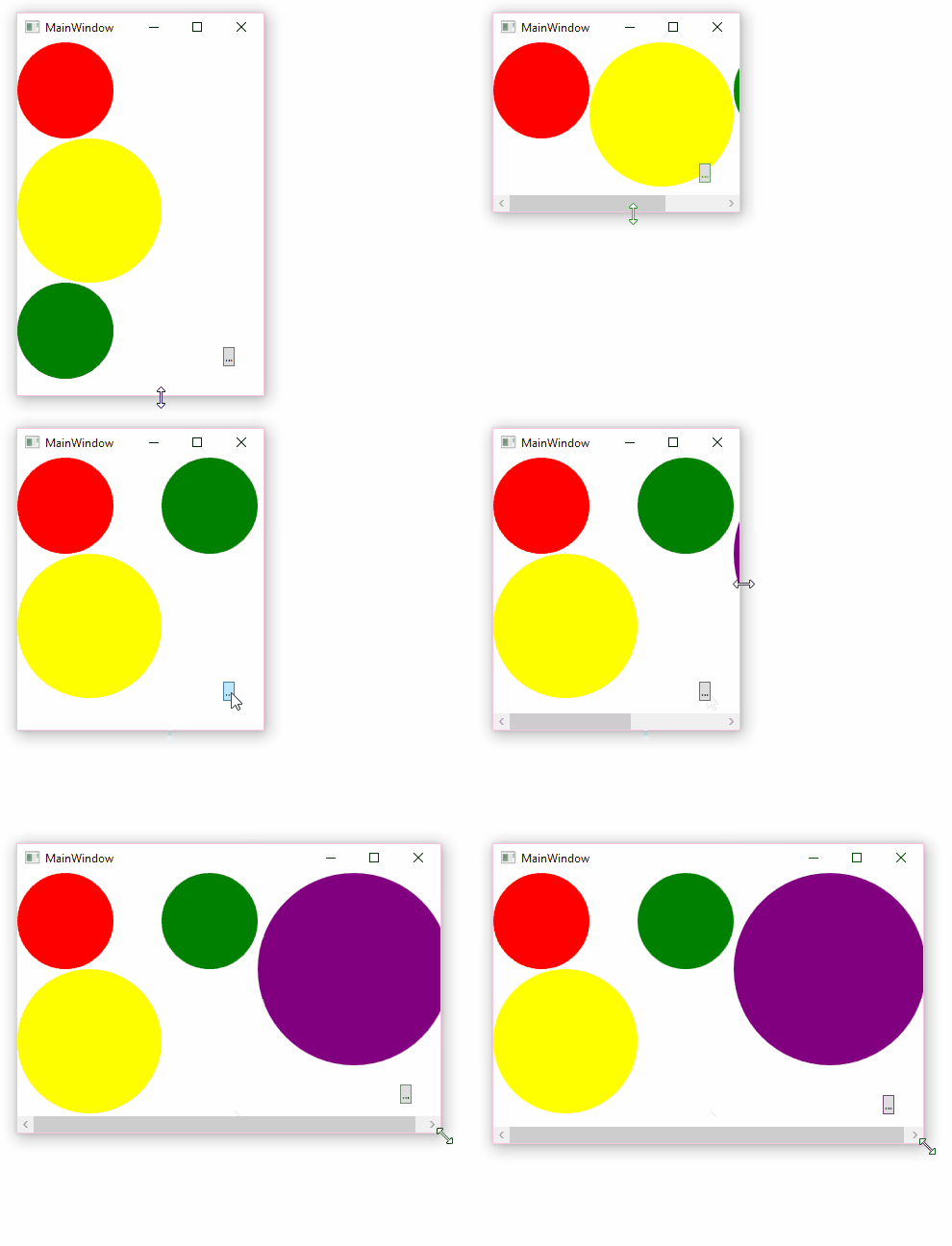
</ScrollViewer>这样做的目的是手动计算布局,而MeasureOverride和ArrangeOverride将在子级更改时自动调用:添加、删除、调整大小等。
度量逻辑很简单:从(0,0)开始并度量下一个子列的大小,如果它适合当前列--添加它,否则通过偏移位置开始和新列。在整个测量周期内,调整结果大小。
拼图中唯一缺少的部分是从父ViewportHeight中提供度量/排列周期ScrollViewer。这就是ColumnPanel.ViewportHeight的角色。
下面是演示(按钮添加紫色圆圈):
https://stackoverflow.com/questions/45303976
复制相似问题
腾讯云开发者

Copyright © 2013 - 2026 Tencent Cloud. All Rights Reserved. 腾讯云 版权所有
深圳市腾讯计算机系统有限公司 ICP备案/许可证号:粤B2-20090059  粤公网安备44030502008569号
腾讯云计算(北京)有限责任公司 京ICP证150476号 | 京ICP备11018762号