
画布画在Safari上花了很多时间,但在Chrome或FF上却没有花很多时间。
我在我的网站上做万花筒。它所做的就是获取一个图像(通过拖放或加载的默认图像)并复制它10次(每片万花筒一片)。在鼠标移动时,调整切片的旋转和缩放,以达到预期效果。
在Google和Firefox上,它无缝地工作,没有任何滞后。然而,在Safari网站是无法使用的,因为它太慢。我是不是遗漏了什么?
下面是一个显示问题的JSFiddle。请注意,我已经尝试用RequestAnimationFrame替换RequestAnimationFrame(update,1000 / 60),没有任何改进。
JSFiddle:链接
$(document).ready(function () {
    //SCRIPT KALEIDOSCOPE BASE

    var DragDrop, Kaleidoscope, c, dragger, gui, i, image, kaleidoscope, len, onChange, onMouseMoved, options, ref, tr, tx, ty, update,
        bind = function(fn, me){ return function(){ return fn.apply(me, arguments); }; };

    Kaleidoscope = (function() {
        Kaleidoscope.prototype.HALF_PI = Math.PI / 2;

        Kaleidoscope.prototype.TWO_PI = Math.PI * 2;

        var optimal_radius = window.innerHeight;

        if (window.innerWidth > optimal_radius) {
            optimal_radius = window.innerWidth;
        }

        function Kaleidoscope(options1) {
            var key, ref, ref1, val;
            this.options = options1 != null ? options1 : {};
            this.defaults = {
                offsetRotation: 0.0,
                offsetScale: 1.0,
                offsetX: 0.0,
                offsetY: 0.0,
                radius: optimal_radius / 1.4,
                slices: 12,
                zoom: 1.0
            };
            ref = this.defaults;
            for (key in ref) {
                val = ref[key];
                this[key] = val;
            }
            ref1 = this.options;
            for (key in ref1) {
                val = ref1[key];
                this[key] = val;
            }
            if (this.domElement == null) {
                this.domElement = document.getElementById('kaleidoscope');
            }
            if (this.context == null) {
                this.context = this.domElement.getContext('2d');
            }
            if (this.image == null) {
                this.image = document.createElement('img');
            }
        }

        Kaleidoscope.prototype.draw = function() {
            var cx, i, index, ref, results, scale, step;
            this.domElement.width = this.domElement.height = this.radius * 2;
            this.context.fillStyle = this.context.createPattern(this.image, 'repeat');
            scale = this.zoom * (this.radius / Math.min(this.image.width, this.image.height));
            step = this.TWO_PI / this.slices;
            cx = this.image.width / 2;
            results = [];
            for (index = i = 0, ref = this.slices; 0 <= ref ? i <= ref : i >= ref; index = 0 <= ref ? ++i : --i) {
                this.context.save();
                this.context.translate(this.radius, this.radius);
                this.context.rotate(index * step);
                this.context.beginPath();
                this.context.moveTo(-0.5, -0.5);
                this.context.arc(0, 0, this.radius, step * -0.51, step * 0.51);
                this.context.lineTo(0.5, 0.5);
                this.context.closePath();
                this.context.rotate(this.HALF_PI);
                this.context.scale(scale, scale);
                this.context.scale([-1, 1][index % 2], 1);
                this.context.translate(this.offsetX - cx, this.offsetY);
                this.context.rotate(this.offsetRotation);
                this.context.scale(this.offsetScale, this.offsetScale);
                this.context.fill();
                results.push(this.context.restore());
            }
            return results;
        };

        return Kaleidoscope;

    })();

    DragDrop = (function() {
        function DragDrop(callback, context, filter) {
            var disable;
            this.callback = callback;
            this.context = context != null ? context : document;
            this.filter = filter != null ? filter : /^image/i;
            this.onDrop = bind(this.onDrop, this);
            disable = function(event) {
                event.stopPropagation();
                return event.preventDefault();
            };
            this.context.addEventListener('dragleave', disable);
            this.context.addEventListener('dragenter', disable);
            this.context.addEventListener('dragover', disable);
            this.context.addEventListener('drop', this.onDrop, false);
        }

        DragDrop.prototype.onDrop = function(event) {
            var file, reader;
            event.stopPropagation();
            event.preventDefault();
            file = event.dataTransfer.files[0];
            if (this.filter.test(file.type)) {
                reader = new FileReader;
                reader.onload = (function(_this) {
                    return function(event) {
                        return typeof _this.callback === "function" ? _this.callback(event.target.result) : void 0;
                    };
                })(this);
                return reader.readAsDataURL(file);
            }
        };

        return DragDrop;

    })();

    image = new Image;

    image.onload = (function(_this) {
        return function() {
            return kaleidoscope.draw();
        };
    })(this);

    image.src = 'img/kaleidoscope.jpg';

    kaleidoscope = new Kaleidoscope({
        image: image,
        slices: 10
    });

    kaleidoscope.domElement.style.position = 'absolute';

    kaleidoscope.domElement.style.marginLeft = -kaleidoscope.radius + 'px';

    kaleidoscope.domElement.style.marginTop = -kaleidoscope.radius + 'px';

    kaleidoscope.domElement.style.left = '50%';

    kaleidoscope.domElement.style.top = '50%';

    document.getElementsByTagName('header')[0].appendChild(kaleidoscope.domElement);

    dragger = new DragDrop(function(data) {
        return kaleidoscope.image.src = data;
    });

    tx = kaleidoscope.offsetX;

    ty = kaleidoscope.offsetY;

    tr = kaleidoscope.offsetRotation;

    onMouseMoved = (function(_this) {
        return function(event) {
            var cx, cy, dx, dy, hx, hy;
            cx = window.innerWidth / 10;
            cy = window.innerHeight / 10;
            dx = event.pageX / window.innerWidth;
            dy = event.pageY / window.innerHeight;
            hx = dx - 0.5;
            hy = dy - 0.5;
            tx = hx * kaleidoscope.radius * -2;
            ty = hy * kaleidoscope.radius * 2;
            return tr = Math.atan2(hy, hx);
        };
    })(this);

    window.addEventListener('mousemove', onMouseMoved, false);

    options = {
        interactive: true,
        ease: 0.1
    };

    (update = (function(_this) {
        return function() {
            var delta, theta;
            if (options.interactive) {
                delta = tr - kaleidoscope.offsetRotation;
                theta = Math.atan2(Math.sin(delta), Math.cos(delta));
                kaleidoscope.offsetX += (tx - kaleidoscope.offsetX) * options.ease;
                kaleidoscope.offsetY += (ty - kaleidoscope.offsetY) * options.ease;
                kaleidoscope.offsetRotation += (theta - kaleidoscope.offsetRotation) * options.ease;
                kaleidoscope.draw();
            }
            return setTimeout(update, 1000 / 60);
        };
    })(this))();

    onChange = (function(_this) {
        return function() {
            kaleidoscope.domElement.style.marginLeft = -kaleidoscope.radius + 'px';
            kaleidoscope.domElement.style.marginTop = -kaleidoscope.radius + 'px';
            options.interactive = false;
            return kaleidoscope.draw();
        };
    })(this);
});
据我所见,只有当画布处于全屏时,问题才会发生。如果它出现在一个很小的空间里,它就会无缝地工作。然而,在我的网站上,它将是全屏的。
回答 3
Stack Overflow用户
发布于 2017-08-03 09:11:16
对于您的代码所做的所有优化,以及在safari上仍然有一个接近于零的框架这一事实。我尝试修改您使用的图片,以减少大小(jpg质量60,30,10),更改图像格式(png24,png8),更改图片大小(250x500而不是750x1500),而所有这些更改都没有改变什么。仍然落后很多。
然后,我试图找到一些用Safari画布制作的基准测试。我发现了这张图表,它显示了带帆布的Safari的表演并不是最好的。
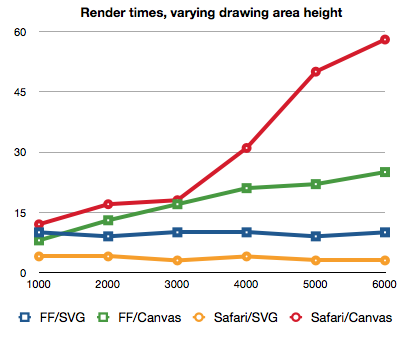
您可以看到完整的基准测试文章这里
我认为,即使在@Jorge Fuentes González进行了优化之后,您的代码在Safari上仍然呈现得很慢,这可能是有原因的,而且它是Webkit引擎的核心。
Stack Overflow用户
发布于 2017-07-28 06:57:35
哇!你的主要问题是你正在画一个巨大的画布。您正在创建一个比窗口大小大得多的画布。虽然画布的一部分没有显示出来,但无论如何,绘制该区域的计算都已完成。您只需绘制可查看的像素即可。
在这里您可以看到实际的画布大小:http://i.imgur.com/trOYlcV.png

使用这个和@Kaiido技巧,我创建了这个小提琴:https://jsfiddle.net/Llorx/sd1skrj8/9/
我的帆布尺寸:http://i.imgur.com/4BzmCqh.png

我只是创建了一个帆布填充视图,并在其中绘制增加弧度半径,作为画布限制像素“视图端口”,而不是窗口。
更改:
this.context.arc(0, 0, this.radius, step * -0.51, step * 0.51);
// [...]
kaleidoscope.domElement.style.marginLeft = -kaleidoscope.radius + 'px';
kaleidoscope.domElement.style.marginTop = -kaleidoscope.radius + 'px';
kaleidoscope.domElement.style.left = '50%';
kaleidoscope.domElement.style.top = '50%';
为
this.context.arc(0, 0, this.radius*1.5, step * -0.51, step * 0.51);
// [...]
kaleidoscope.domElement.style.width = "100vw";
kaleidoscope.domElement.style.height = "100vh";
kaleidoscope.domElement.style.left = 0;
kaleidoscope.domElement.style.top = 0;
这可以改进为有一个实际的圆圈时,屏幕比率不是方形的,诸如此类,但你有一个想法:永远不要让画布比需要大。
派出所:别让Safari测试。告诉我这是否提高了性能。
Stack Overflow用户
发布于 2017-08-03 07:21:18
有趣的缺陷,我会删除css样式在画布上的@Jorge建议,然后我会渲染效果在屏幕外的画布,然后复制渲染的框架到可见的画布。这样,DOM渲染器就不需要担心屏幕外裁剪了。
https://stackoverflow.com/questions/45300903
复制相似问题
腾讯云开发者

Copyright © 2013 - 2026 Tencent Cloud. All Rights Reserved. 腾讯云 版权所有
深圳市腾讯计算机系统有限公司 ICP备案/许可证号:粤B2-20090059  粤公网安备44030502008569号
腾讯云计算(北京)有限责任公司 京ICP证150476号 | 京ICP备11018762号