
闪亮的tableHTML :在单元格中显示图像
闪亮的tableHTML :在单元格中显示图像
提问于 2017-07-24 18:57:44
我想使用tableHTML在一个闪亮的UI单元格中显示一个图像。但是,它只是简单地显示文本。有什么帮助吗?
library(shiny)
a = data.frame(rows = 1:2, icons = '<img src =
   "http://flaglane.com/download/american-flag/american-flag-graphic.png"
    alt="Red Flag Warning"  height="30" width="40" >')


  shinyApp(
     ui = fluidPage(
      fluidRow(

  br(),
  column(width = 1),
  tableHTML_output("mytable"))
    ),
 server = function(input, output) {
  output$mytable <- render_tableHTML(
    tableHTML(a)
  )}
 )
这就是我运行代码后所显示的内容:

回答 1
Stack Overflow用户
回答已采纳
发布于 2017-07-24 20:10:48
这是一个带有已知问题的tableHTML,它将在下一个版本中修复。暂时(您的链接似乎没有指向图片,因此我将使用来自w3school的图片),您可以使用以下内容:
library(shiny)
library(tableHTML)
a = data.frame(rows = 1:2, icons = '<img src =
"https://www.w3schools.com/images/w3schools_green.jpg"
alt="Red Flag Warning" height="30" width="40" >')
shinyApp(
ui = fluidPage(
fluidRow(
br(),
column(width = 1),
tableHTML_output("mytable"))
),
server = function(input, output) {
output$mytable <- render_tableHTML(
tableHTML(a) %>%
replace_html(pattern = '<', '<', replace_all = TRUE) %>%
replace_html(pattern = '>', '>', replace_all = TRUE)
)}
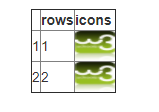
)输出:
页面原文内容由Stack Overflow提供。腾讯云小微IT领域专用引擎提供翻译支持
原文链接:
https://stackoverflow.com/questions/45288069
复制相关文章
相似问题
腾讯云开发者

Copyright © 2013 - 2026 Tencent Cloud. All Rights Reserved. 腾讯云 版权所有
深圳市腾讯计算机系统有限公司 ICP备案/许可证号:粤B2-20090059  粤公网安备44030502008569号
腾讯云计算(北京)有限责任公司 京ICP证150476号 | 京ICP备11018762号