
重启AnimatorSet of AnimatedVectorDrawableCompat
重启AnimatorSet of AnimatedVectorDrawableCompat
提问于 2017-07-24 08:34:47
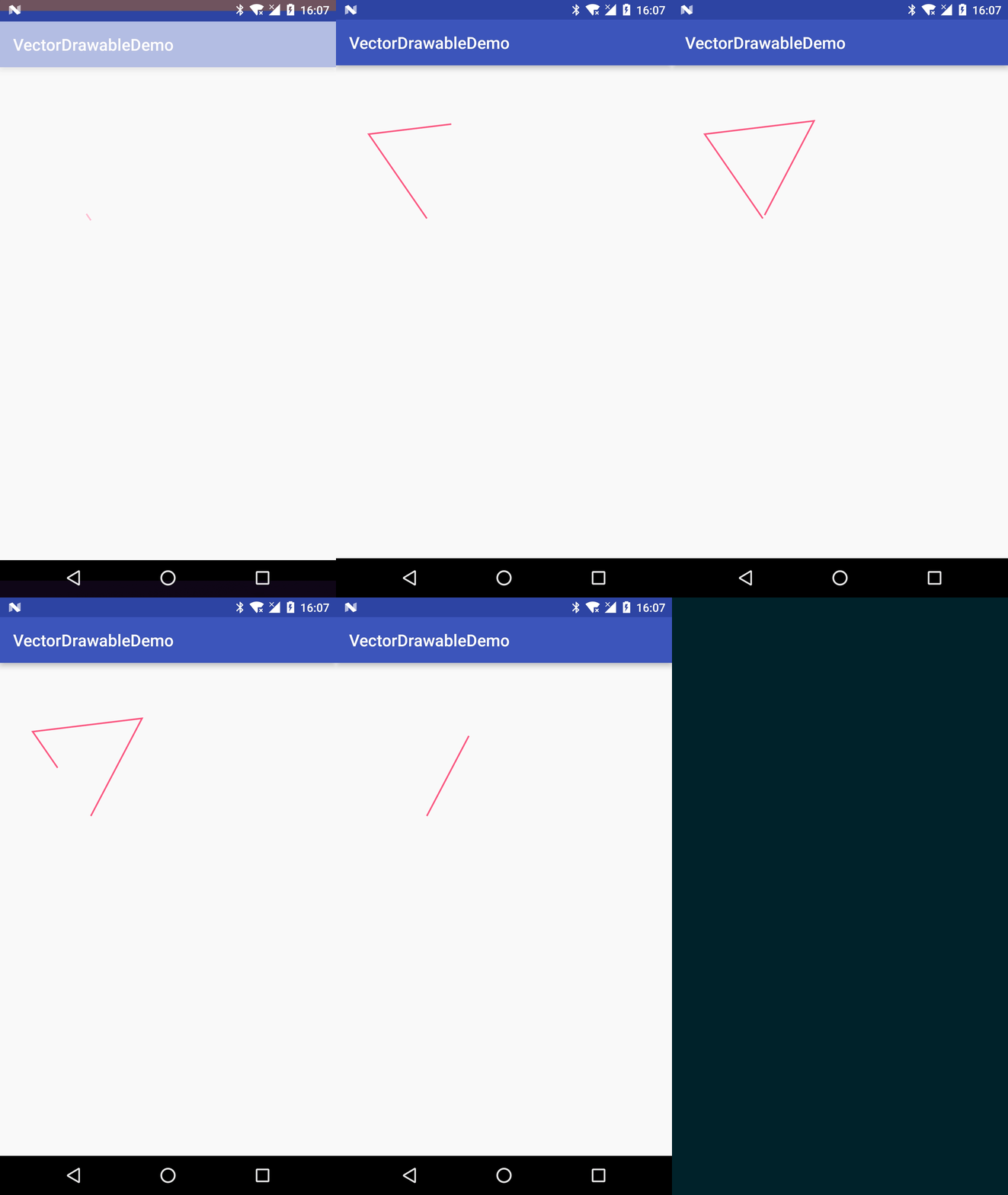
这是我需要通过AnimatedVectorDrawableCompat实现的效果。
vector_drawable_anim.xml
<animated-vector xmlns:android="http://schemas.android.com/apk/res/android"
                 android:drawable="@drawable/vector_drawable">
    <target
        android:name="star"
        android:animation="@animator/star_anim"/>
</animated-vector>
vector_drawable.xml
<vector xmlns:android="http://schemas.android.com/apk/res/android"
        android:width="500px"
        android:height="500px"
        android:viewportHeight="500"
        android:viewportWidth="500">
    <group
        android:name="star_group"
        android:scaleX="5.0"
        android:scaleY="5.0">
        <path
            android:name="star"
            android:pathData="M 50.0,90.0 L 82.9193546357,27.2774101308 L 12.5993502926,35.8158045183 Z"
            android:strokeColor="@color/colorAccent"
            android:strokeWidth="1"/>
    </group>
</vector>
star_anim.xml
<set xmlns:android="http://schemas.android.com/apk/res/android"
     android:ordering="sequentially">

    <objectAnimator
        android:duration="1000"
        android:propertyName="trimPathStart"
        android:valueFrom="1"
        android:valueTo="0"/>

    <objectAnimator
        android:duration="1000"
        android:propertyName="trimPathEnd"
        android:valueFrom="1"
        android:valueTo="0"/>

</set>但是AnimatorSet不能设置repeatMode。
如果我设置objectAnimator的repeatMode,第二个objectAnimator就不会出现。
我该怎么办?
回答 2
Stack Overflow用户
回答已采纳
发布于 2017-07-28 07:31:18
在一个线程中循环它,直到ImageView被销毁,怎么样?
完美工作的代码示例:
  ImageView animatedImageView = (ImageView) findViewById(R.id.iv);
  AnimatedVectorDrawableCompat animatedVectorDrawable = (AnimatedVectorDrawableCompat) animatedImageView.getDrawable();

        new Thread(new Runnable() {
            public void run() {
                while (animatedImageView != null) {
                    try {
                        animatedImageView.post(new Runnable() {
                            @Override
                            public void run() {
                                animatedVectorDrawable.start();
                            }
                        });
                        Thread.sleep(500);
                    } catch (Exception e) {
                        e.printStackTrace();
                    }
                }
            }
}).start();或者,您也可以使用azizbekian和这个git要点代码示例后面提到的这个git要点代码示例
import android.app.Activity;
import android.graphics.drawable.Animatable;
import android.graphics.drawable.Animatable2;
import android.graphics.drawable.AnimatedVectorDrawable;
import android.graphics.drawable.Drawable;
import android.os.Bundle;
import android.widget.ImageView;

public class MainActivity extends Activity {

    @Override
    protected void onCreate(Bundle savedInstanceState) {
        super.onCreate(savedInstanceState);
        setContentView(R.layout.activity_main);
        ImageView iv = (ImageView) findViewById(R.id.pin);
        final AnimatedVectorDrawable avd = (AnimatedVectorDrawable) iv.getDrawable();
        avd.registerAnimationCallback(new Animatable2.AnimationCallback() {
            @Override
            public void onAnimationEnd(Drawable drawable) {
                avd.start();
            }
        });
        avd.start();
    }
}Stack Overflow用户
发布于 2017-07-28 17:34:44
这几乎是您想要的,在纯XML中:
<set xmlns:android="http://schemas.android.com/apk/res/android"
    android:ordering="together">

    <objectAnimator
        android:duration="1000"
        android:propertyName="trimPathStart"
        android:repeatCount="infinite"
        android:startOffset="1000"
        android:valueFrom="1"
        android:valueTo="0" />

    <objectAnimator
        android:duration="1000"
        android:propertyName="trimPathStart"
        android:repeatCount="infinite"
        android:startOffset="1000"
        android:repeatMode="reverse"
        android:valueFrom="0"
        android:valueTo="1" />

</set>
与你想要的不同的是,路径的方向修剪回来。但看起来很棒。
页面原文内容由Stack Overflow提供。腾讯云小微IT领域专用引擎提供翻译支持
原文链接:
https://stackoverflow.com/questions/45275801
复制相关文章
相似问题
腾讯云开发者

Copyright © 2013 - 2026 Tencent Cloud. All Rights Reserved. 腾讯云 版权所有
深圳市腾讯计算机系统有限公司 ICP备案/许可证号:粤B2-20090059  粤公网安备44030502008569号
腾讯云计算(北京)有限责任公司 京ICP证150476号 | 京ICP备11018762号