
ConstraintLayout 1.0.2没有显示任何信息
ConstraintLayout 1.0.2没有显示任何信息
提问于 2017-07-20 23:23:29
我还是有这个奇怪的问题。只有在使用'alpha-7‘时,ConstraintLayout才能工作,当我将其更改为'1.0.2’(最新版本)时,它什么也不显示。
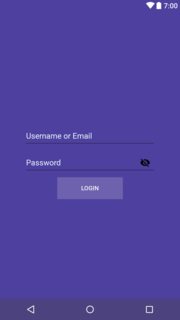
所需的布局应该如下所示:
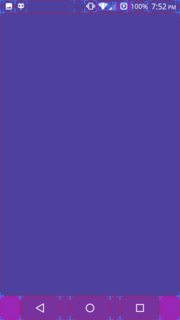
然而,我得到了这个:“在一个真正的HTC one M9 - CM 12.1.1”
**“显示布局界限”是打开的,这样您就可以看到设备上没有绘制任何内容。
**我也尝试使用“显示布局更新”,但它也没有显示任何内容。
在“布局检查器”中,用户名字段、密码字段和登录按钮显示:

XML布局:
<android.support.constraint.ConstraintLayout xmlns:android="http://schemas.android.com/apk/res/android"
    xmlns:app="http://schemas.android.com/apk/res-auto"
    xmlns:tools="http://schemas.android.com/tools"
    android:id="@+id/fragment_login"
    android:layout_width="match_parent"
    android:layout_height="match_parent"
    android:background="@color/login_background"
    android:clickable="true"
    tools:context=".ui.login_sing_up.LoginFragment">

    <android.support.design.widget.TextInputLayout
        android:id="@+id/login_username_container"
        android:layout_width="wrap_content"
        android:layout_height="wrap_content"
        android:layout_marginTop="250dp"
        android:textColorHint="@color/Azure"
        android:visibility="visible"
        app:layout_constraintLeft_toLeftOf="parent"
        app:layout_constraintRight_toRightOf="parent"
        app:layout_constraintTop_toTopOf="parent">

        <android.support.design.widget.TextInputEditText
            android:id="@+id/login_username"
            android:layout_width="300dp"
            android:layout_height="50dp"
            android:layout_gravity="center"
            android:layout_weight="1"
            android:hint="@string/Username_or_Email"
            android:inputType="textNoSuggestions|textEmailAddress"
            android:lines="1"
            android:linksClickable="false"
            android:textColor="@color/Azure"
            android:textColorHighlight="@color/black"
            android:textColorHint="@color/Azure"
            android:visibility="visible" />

    </android.support.design.widget.TextInputLayout>

    <android.support.design.widget.TextInputLayout
        android:id="@+id/login_password_container"
        android:layout_width="wrap_content"
        android:layout_height="wrap_content"
        android:layout_weight="1"
        android:textColorHint="@color/Azure"
        app:layout_constraintLeft_toLeftOf="parent"
        app:layout_constraintRight_toRightOf="parent"
        app:layout_constraintTop_toBottomOf="@+id/login_username_container"
        app:passwordToggleEnabled="true">

        <android.support.design.widget.TextInputEditText
            android:id="@+id/login_password"
            android:layout_width="300dp"
            android:layout_height="50dp"
            android:layout_gravity="center"
            android:layout_weight="1"
            android:hint="@string/password"
            android:inputType="textPassword"
            android:lines="1"
            android:linksClickable="false"
            android:textColor="@color/Azure"
            android:textColorHighlight="@color/black"
            android:textColorHint="@color/Azure" />
    </android.support.design.widget.TextInputLayout>

    <Button
        android:id="@+id/login_login"
        style="@style/Base.Widget.AppCompat.Button.Colored.login"
        android:layout_width="150dp"
        android:layout_height="50dp"
        android:layout_marginTop="8dp"
        android:text="@string/login"
        app:layout_constraintLeft_toLeftOf="@+id/login_password_container"
        app:layout_constraintRight_toRightOf="@+id/login_password_container"
        app:layout_constraintTop_toBottomOf="@+id/login_password_container" />


</android.support.constraint.ConstraintLayout>
LogCat什么也没有显示
07-20 20:00:01.028 7144-7144/? I/art: Late-enabling -Xcheck:jni
07-20 20:00:01.083 7144-7158/? E/art: Failed sending reply to debugger: Broken pipe
07-20 20:00:01.084 7144-7158/? I/art: Debugger is no longer active
07-20 20:00:03.344 7144-7144/xxxxxxxxxxx.xxxxxxxxxxxxx I/LoadedApk: No resource references to update in package common
07-20 20:00:03.344 7144-7144/xxxxxxxxxxx.xxxxxxxxxxxxx I/LoadedApk: No resource references to update in package com.brit.swiftdark
07-20 20:00:03.346 7144-7144/xxxxxxxxxxx.xxxxxxxxxxxxx I/InstantRun: starting instant run server: is main process
07-20 20:00:03.473 7144-7144/xxxxxxxxxxx.xxxxxxxxxxxxx W/ResourceType: For resource 0x01030224, entry index(548) is beyond type entryCount(29)
07-20 20:00:03.473 7144-7144/xxxxxxxxxxx.xxxxxxxxxxxxx W/ResourceType: For resource 0x01030224, entry index(548) is beyond type entryCount(29)
07-20 20:00:03.511 7144-7144/xxxxxxxxxxx.xxxxxxxxxxxxx W/art: Before Android 4.1, method android.graphics.PorterDuffColorFilter android.support.graphics.drawable.VectorDrawableCompat.updateTintFilter(android.graphics.PorterDuffColorFilter, android.content.res.ColorStateList, android.graphics.PorterDuff$Mode) would have incorrectly overridden the package-private method in android.graphics.drawable.Drawable
07-20 20:00:03.614 7144-7144/xxxxxxxxxxx.xxxxxxxxxxxxx D/DispatcherActivity: there is no user
07-20 20:00:03.621 7144-7144/xxxxxxxxxxx.xxxxxxxxxxxxx D/UserCoordinator: making new Instance
07-20 20:00:03.652 7144-7144/xxxxxxxxxxx.xxxxxxxxxxxxx D/DispatcherActivity: checking if there is user in Pref
07-20 20:00:03.653 7144-7144/xxxxxxxxxxx.xxxxxxxxxxxxx D/DispatcherActivity: there is no user in Pref
07-20 20:00:03.653 7144-7144/xxxxxxxxxxx.xxxxxxxxxxxxx D/DispatcherActivity: there is no user
07-20 20:00:03.658 7144-7144/xxxxxxxxxxx.xxxxxxxxxxxxx D/DispatcherActivity: createFragment-LoginFragment
07-20 20:00:03.856 7144-7144/xxxxxxxxxxx.xxxxxxxxxxxxx D/LoginFragment: creating ver
07-20 20:00:03.856 7144-7144/xxxxxxxxxxx.xxxxxxxxxxxxx D/LoginFragment: done creating ver
07-20 20:00:03.861 7144-7144/xxxxxxxxxxx.xxxxxxxxxxxxx D/DispatcherActivity: onResume
07-20 20:00:03.861 7144-7144/xxxxxxxxxxx.xxxxxxxxxxxxx D/DispatcherActivity: onResume - null == mUC
07-20 20:00:03.861 7144-7144/xxxxxxxxxxx.xxxxxxxxxxxxx D/UserCoordinator: got Instance from preferences
07-20 20:00:03.862 7144-7144/xxxxxxxxxxx.xxxxxxxxxxxxx D/UserCoordinator: get userCoordinator
07-20 20:00:03.873 7144-7249/xxxxxxxxxxx.xxxxxxxxxxxxx D/OpenGLRenderer: Use EGL_SWAP_BEHAVIOR_PRESERVED: true
07-20 20:00:03.877 7144-7144/xxxxxxxxxxx.xxxxxxxxxxxxx D/Atlas: Validating map...
07-20 20:00:03.878 7144-7169/xxxxxxxxxxx.xxxxxxxxxxxxx W/Binder: Caught a RuntimeException from the binder stub implementation.
                                                                java.lang.NullPointerException: Attempt to read from field 'android.view.HardwareRenderer android.view.View$AttachInfo.mHardwareRenderer' on a null object reference
                                                                    at android.view.WindowManagerGlobal.dumpGfxInfo(WindowManagerGlobal.java:476)
                                                                    at android.app.ActivityThread$ApplicationThread.dumpGfxInfo(ActivityThread.java:1089)
                                                                    at android.app.ApplicationThreadNative.onTransact(ApplicationThreadNative.java:546)
                                                                    at android.os.Binder.execTransact(Binder.java:446)
07-20 20:00:03.944 7144-7249/xxxxxxxxxxx.xxxxxxxxxxxxx I/Adreno: QUALCOMM build                   : 065751b,
                                                                Build Date                       : 04/15/15
                                                                OpenGL ES Shader Compiler Version: E031.25.03.07
                                                                Local Branch                     :
                                                                Remote Branch                    : quic/LA.BF64.1.2.1_rb2.9
                                                                Remote Branch                    : NONE
                                                                Reconstruct Branch               : AU_LINUX_ANDROID_LA.BF64.1.2.1_RB2.05.01.00.081.016 + 065751b +  NOTHING
07-20 20:00:03.967 7144-7249/xxxxxxxxxxx.xxxxxxxxxxxxx I/OpenGLRenderer: Initialized EGL, version 1.4
07-20 20:00:03.989 7144-7249/xxxxxxxxxxx.xxxxxxxxxxxxx D/OpenGLRenderer: Enabling debug mode 0
07-20 20:00:04.121 7144-7144/xxxxxxxxxxx.xxxxxxxxxxxxx I/Timeline: Timeline: Activity_idle id: android.os.BinderProxy@3781b87d time:768477070
07-20 20:00:04.130 7144-7144/xxxxxxxxxxx.xxxxxxxxxxxxx E/SpannableStringBuilder: SPAN_EXCLUSIVE_EXCLUSIVE spans cannot have a zero length
07-20 20:00:04.130 7144-7144/xxxxxxxxxxx.xxxxxxxxxxxxx E/SpannableStringBuilder: SPAN_EXCLUSIVE_EXCLUSIVE spans cannot have a zero length
build.gradle
repositories {
    jcenter();
}

dependencies {
    compile 'com.android.support.constraint:constraint-layout:1.0.2'
}
我试过的事情:
- 使Android工作室失效并重新启动。
- 在仿真器上试过。
- 在华为的设备上试过。
- 在HTC one M9设备上试用。
- 回滚到'Alpha-7‘很好。
,如果您需要更多的细节,请在评论中告诉我
回答 1
Stack Overflow用户
回答已采纳
发布于 2017-07-21 03:59:25
经过一年的等待一个真正的解释发生了什么和发生了什么后‘阿尔法-7’,我“金达a~”找到了答案。
,简短的答案,
使用ConstraintLayout的活动会做得很好。但是,如果要在顶部添加片段,请确保活动背景透明。
页面原文内容由Stack Overflow提供。腾讯云小微IT领域专用引擎提供翻译支持
原文链接:
https://stackoverflow.com/questions/45226676
复制相关文章
相似问题
腾讯云开发者

Copyright © 2013 - 2026 Tencent Cloud. All Rights Reserved. 腾讯云 版权所有
深圳市腾讯计算机系统有限公司 ICP备案/许可证号:粤B2-20090059  粤公网安备44030502008569号
腾讯云计算(北京)有限责任公司 京ICP证150476号 | 京ICP备11018762号