
由SSIS脚本任务引发的错误
我正致力于将2005年SSIS软件包升级到2016年。我已经升级了这个包,但是当我尝试运行它时,它正在中断控制流中的脚本任务。
#region Namespaces
using System;
using System.Data;
using Microsoft.SqlServer.Dts.Runtime;
using System.Windows.Forms;
using System.IO;
#endregion

namespace ST_9752d9eb585d4a4d97a334ef01ccf313
{

[Microsoft.SqlServer.Dts.Tasks.ScriptTask.SSISScriptTaskEntryPointAttribute]
public partial class ScriptMain : Microsoft.SqlServer.Dts.Tasks.ScriptTask.VSTARTScriptObjectModelBase
{
    public void Main()
    {

        string fileName;

        fileName = Dts.Variables["User::Source_File_And_Path"].Value.ToString();

        using (StreamWriter w = File.AppendText(fileName))
        {
            w.Write("\r\n");
            w.Close();
        }

            Dts.TaskResult = (int)ScriptResults.Success;
    }

    #region ScriptResults declaration
    /// <summary>
    /// This enum provides a convenient shorthand within the scope of this class for setting the
    /// result of the script.
    ///
    /// This code was generated automatically.
    /// </summary>
    enum ScriptResults
    {
        Success = Microsoft.SqlServer.Dts.Runtime.DTSExecResult.Success,
        Failure = Microsoft.SqlServer.Dts.Runtime.DTSExecResult.Failure
    };
    #endregion

}
}这个脚本任务被用来在文件中的数据末尾添加一个CRLF,我已经在代码中添加了断点,并且我看到它在using (StreamWriter w = file.AppendText(fileName))行崩溃了。我收到以下错误。
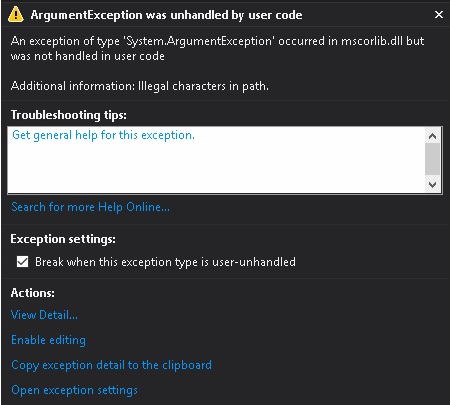
以下是例外的详细信息:
System.ArgumentException未被路径中的用户代码HResult=-2147024809 Message=Illegal字符处理。Source=mscorlib StackTrace: 在System.Security.Permissions.FileIOPermission.EmulateFileIOPermissionChecks(String fullPath)在System.IO.FileStream.Init(字符串路径、FileMode模式、FileAccess access、Int32权限、布尔useRights、FileShare共享、Int32 bufferSize、FileOptions选项、SECURITY_ATTRIBUTES secAttrs、String msgPath、Boolean、Boolean、Boolean )在System.IO.FileStream.Init(String路径、bFromProxy模式、access、共享、en22#、选项、字符串、布尔)处(字符串路径、布尔追加,在ST_9752d9eb585d4a4d97a334ef01ccf313.ScriptMain.Main()的c:\Users\aluhman\AppData\Local\Temp\2\Vsta\5c1672d48682401d852b1b44649f951b\ScriptMain.cs:line 31 InnerException中,在System.IO.StreamWriter..ctor(字符串路径、布尔追加、编码编码、Int32 bufferSize、布尔checkHost)的System.IO.StreamWriter..ctor(字符串路径,布尔追加)的System.IO.File.AppendText(字符串路径)处:
这一切都发生在2005年,这是我在2016年看到的一个新的错误。
回答 1
Stack Overflow用户
发布于 2017-07-20 17:28:09
您不能一次打开每个文件,而是必须一个一个地遍历它们:
类似于:
string fileName = Dts.Variables["User::Source_File_And_Path"].Value.ToString();
string [] fileEntries = Directory.GetFiles(Path.GetFullPath(fileName));
foreach (string f in fileEntries)
{
     if (Path.GetExtension(f).ToUpper()==".TXT".ToUpper() && f.StartsWith("Customers_")==true)
     {
        using (StreamWriter w = File.AppendText(f))
            {
                w.Write("\r\n");
                w.Close();
            }
     }
}https://stackoverflow.com/questions/45219936
复制相似问题
腾讯云开发者

Copyright © 2013 - 2026 Tencent Cloud. All Rights Reserved. 腾讯云 版权所有
深圳市腾讯计算机系统有限公司 ICP备案/许可证号:粤B2-20090059  粤公网安备44030502008569号
腾讯云计算(北京)有限责任公司 京ICP证150476号 | 京ICP备11018762号