
如何查看文本文件中的特定字符串并将该字符串粘贴到SSIS/C#/VB中的变量中
我正在将一段旧软件改写成SSIS包。我有一个类似于此的文本文件:
junk
other junk
other junk2
Sent: Friday, July 14, 2017 1:56 PM
more junk
more junk2我需要打开文件(路径和文件名是常量),查找“已发送:”并复制所有内容,直到新行(在本例中是“”,2017年7月14日( 1:56 PM") )进入一个变量,稍后可以供SSIS包使用。我的理解是,SSIS没有所需的组件,为此我需要一个脚本任务。有人能帮我解决这个问题吗?
另外,由于我没有使用脚本任务/C#/VB的经验,所以非常感谢详细的指南。
回答 3
Stack Overflow用户
发布于 2017-07-18 15:24:32
您需要一个Script Component,而不是Script Task,因为您将使用Data Flow级别的Flat File Connection获取数据。在您的Flat File Source中只有一个列,并将其称为Column0。
然后添加Transformation类型的Script Component。首先转到Input Columns选项卡并选择Column0。然后,您需要返回到Script龙头,并将输出变量OutputLine添加为如下所示的读和写变量:
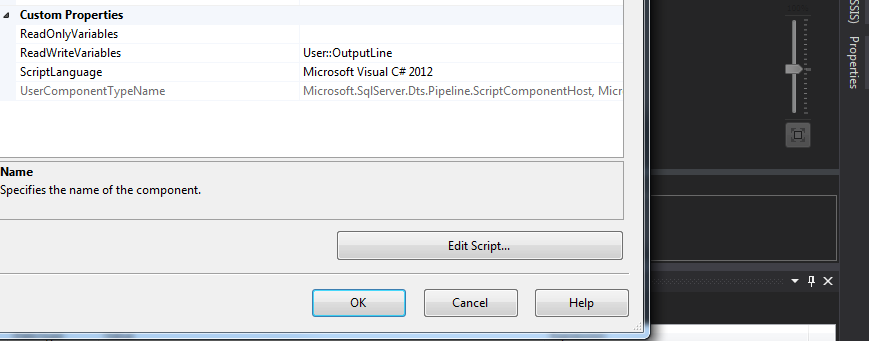
单击Edit Script按钮,有3种方法:PreExecute、PostExecute和Input0_ProcessInputRow。将以下代码行添加到PostExecute和Input0_ProcessInputRow:
public override void PostExecute()
{
    base.PostExecute();
    this.Variables.OutputLine = LineValue;
}

// Add this variable that will hold the desired line value.
string LineValue = "";

public override void Input0_ProcessInputRow(Input0Buffer Row)
{
    if (Row.Column0.StartsWith("Sent:"))
    {
        LineValue = Row.Column0.Substring(5);
    }

}构建它,关闭它,点击OK,你就完成了。
Stack Overflow用户
发布于 2017-07-18 14:35:27
我不知道SSIS,也不知道如何在其中使用C#,但这里有一个非常基本的C#方法,以防它对您有所帮助:
public string GetSent()
{
    foreach (var line in File.ReadLines("sample.txt")) // replace with your path
    {
        if (line.StartsWith("Sent:"))
        {
            return line.Substring(5);
        }
    }

    return "NOT FOUND"; // or null or whatever you want to default to
}Stack Overflow用户
发布于 2017-07-18 15:02:42
使用ADO对象变量和字符串变量创建包。
添加数据流任务
在数据流中添加以下对象:
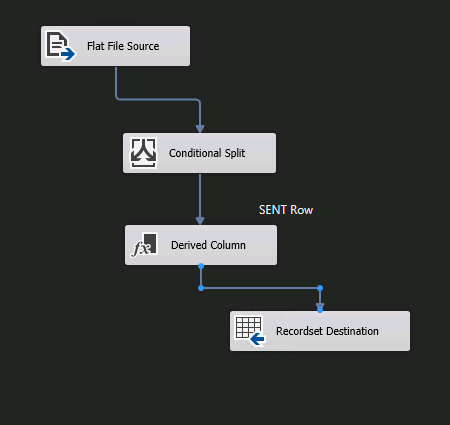
创建与平面文件的连接
在条件拆分的情况下,设置一个输出,其中(col1,5) ==“发送:”
将条件拆分与发送的输出连接到派生列
派生列并使用子字符串
映射记录集为对象变量,映射到派生列
回到“控制流”中,使用ADO枚举器在Foreach中使用对象,并将列映射到字符串变量。
https://stackoverflow.com/questions/45168805
复制相似问题
腾讯云开发者

Copyright © 2013 - 2026 Tencent Cloud. All Rights Reserved. 腾讯云 版权所有
深圳市腾讯计算机系统有限公司 ICP备案/许可证号:粤B2-20090059  粤公网安备44030502008569号
腾讯云计算(北京)有限责任公司 京ICP证150476号 | 京ICP备11018762号