
如何在Xamarn.forms中显示地图的全局视图(3D视图)
如何在Xamarn.forms中显示地图的全局视图(3D视图)
提问于 2017-07-18 08:04:21
我们需要在安卓、iOS和Windows.UWP的三维地球地图上使用Xamarin.Forms显示选定的城市。目前我们正在使用Xamarin.Forms.Maps,但它只显示了地球的二维地图。
我们怎样才能得到三维地形图?
注:我们将需要放大功能的地图以及。
回答 1
Stack Overflow用户
发布于 2017-07-18 12:08:39
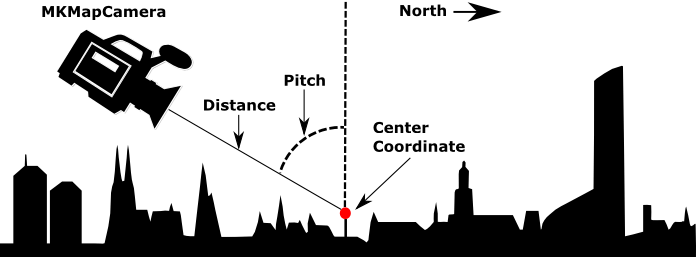
如果你想要谷歌地球这样的东西,你可能需要创建你自己的实现。然而,在Xamarin表单中,您可以做的是使用现有的Xamarin.Forms.Maps控件并添加所谓的照相机。基本上,这是一个你看地图的观点。这些可以是在三维空间,所以它看起来像你有一个三维地图。您可以使用自定义呈现器创建此选项。
在这些定制渲染器中,你会遇到像俯仰、航向和距离这样的东西。这张图片显示的是:
iOS自定义渲染器
[assembly: ExportRenderer(typeof(Map3d), typeof(MapView3dRenderer))]
namespace MyApp.iOS.Renderers
{
    public class MapView3dRenderer : MapRenderer
    {
        MKMapView _nativeMap;

        protected override void OnElementChanged(ElementChangedEventArgs<View> e)
        {
            base.OnElementChanged(e);

            if (e.NewElement != null && Control != null)
            {
                _nativeMap = Control as MKMapView;
            }
        }

        protected override void OnElementPropertyChanged(object sender, System.ComponentModel.PropertyChangedEventArgs e)
        {
            base.OnElementPropertyChanged(sender, e);

            if (_nativeMap == null)
                return;

            if (e.PropertyName == "VisibleRegion")
                UpdateCameraView();
        }

        void UpdateCameraView()
        {
            var target = new CLLocationCoordinate2D(50.890119f, 5.857798f);

            //Enable 3D buildings
            _nativeMap.ShowsBuildings = true;
            _nativeMap.PitchEnabled = true;

            // Attach the camera
            var camera = MKMapCamera.CameraLookingAtCenterCoordinate(target, 650, 60, 0);
            _nativeMap.Camera = camera;
        }
    }
}
Android
对于Android,我还没有一个定制的渲染器准备好,但你应该能弄清楚。它还涉及附加一个Camera对象。这一次,您将它添加到GoogleMap的实例中。
// Create the camera
CameraPosition cameraPosition = new CameraPosition.Builder()
                                                  .Target(location)
                                                  .Tilt(45)
                                                  .Zoom(10)
                                                  .Bearing(0)
                                                  .Build();
// Convert to an update object
CameraUpdate cameraUpdate = CameraUpdateFactory.NewCameraPosition(cameraPosition);

// Attach the camera
map.MoveCamera(cameraUpdate); // map is of type GoogleMap看看Android文档是如何工作的。
页面原文内容由Stack Overflow提供。腾讯云小微IT领域专用引擎提供翻译支持
原文链接:
https://stackoverflow.com/questions/45160885
复制相关文章
相似问题
腾讯云开发者

Copyright © 2013 - 2026 Tencent Cloud. All Rights Reserved. 腾讯云 版权所有
深圳市腾讯计算机系统有限公司 ICP备案/许可证号:粤B2-20090059  粤公网安备44030502008569号
腾讯云计算(北京)有限责任公司 京ICP证150476号 | 京ICP备11018762号