
在Rhino/蚱蜢项目中找不到文件或依赖项的Alea运行时错误
我在Alea上遇到了一个运行时问题,它没有找到所有相关的文件(我猜是dll的)。作为.NET新手,我在找出正确的路径时遇到了问题,如果有人可以根据我下面介绍的路径给我一些提示的话,那就是黄金了。
背景
我使用Nuget为VS2017安装了Alea包,我的项目代码为Rhino3d编译并创建了所需的GrassHopper组件。此组件在RT中也会正确显示,但在输入包含Alea调用的“解决程序”方法时,会出现以下错误消息。
错误消息
错误信息(我从瑞典语翻译而来):
"1. Solution exception:Cannot find the File or the Assembly Alea, Version=3.0.0.0, Culture=neutral, PublicKeyToken=ba52afc3c2e933d6 or one of its dependencies. Cannot find the file.“
也许不是最相关的,但下面是带有错误消息的失败组件(用瑞典语):
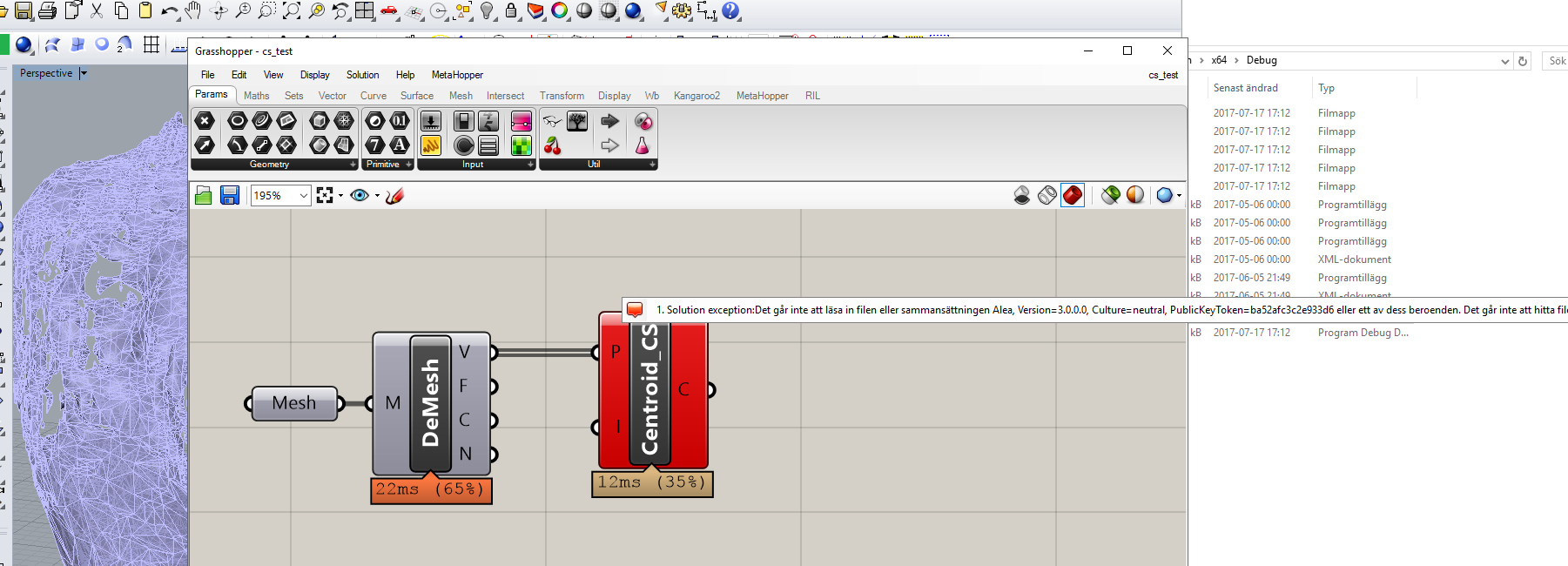
调用.dll (.gha)
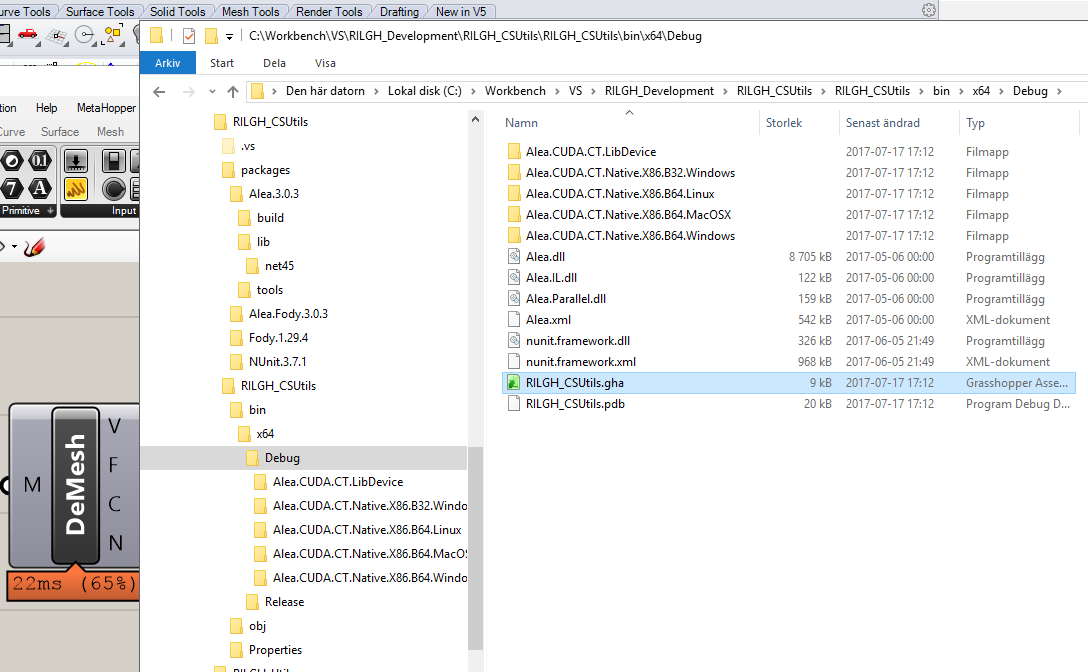
运行这一称为"GrassHopper定义“(本质上是.dll的.gha文件)的代码位于VS项目中的以下文件夹结构中,其中还显示了Alea包结构。
调用GrassHopper (.gha)文件:
C:\Workbench\VS\RILGH_Development\RILGH_CSUtils\RILGH_CSUtils\bin\x64\Debug\RILGH_CSUtils.gha
Alea.targets
文件"...\packages\Alea.3.0.3\Alea.targets“的内容如下:
<?xml version="1.0" encoding="utf-8"?>
<Project ToolsVersion="4.0" xmlns="http://schemas.microsoft.com/developer/msbuild/2003">
  <PropertyGroup>
    <AleaPackageDir Condition="$(AleaPackageDir) == '' Or $(AleaPackageDir) == '*Undefined*'">$(MSBuildThisFileDirectory)..\</AleaPackageDir>
    <AleaResourceDir Condition="$(AleaResourceDir) == '' Or $(AleaResourceDir) == '*Undefined*'">$(OutputPath)</AleaResourceDir>
    <AleaDoExtractCTResources Condition="$(AleaDoExtractCTResources) == '' Or $(AleaDoExtractCTResources) == '*Undefined*'">true</AleaDoExtractCTResources>
  </PropertyGroup>
  <UsingTask
    TaskName="Alea.Build.ExtractCTResourcesTask"
    AssemblyFile="$(AleaPackageDir)tools\Alea.Build.dll"/>
  <Target AfterTargets="AfterBuild" Name="AleaExtractCTResources" Condition="$(AleaDoExtractCTResources) == 'true' Or $(AleaDoExtractCTResources) == 'True'">
    <Alea.Build.ExtractCTResourcesTask
      ResourceAssemblyDir="$(AleaPackageDir)tools\"
      ResourceDir="$(AleaResourceDir)" />
  </Target>
  <Target AfterTargets="AfterClean" Name="AleaCUDACleanCTResources">
    <RemoveDir Directories="$(AleaResourceDir)\Alea.CUDA.CT.LibDevice"/>
    <RemoveDir Directories="$(AleaResourceDir)\Alea.CUDA.CT.Native.ARM.B32.Linux"/>
    <RemoveDir Directories="$(AleaResourceDir)\Alea.CUDA.CT.Native.X86.B32.MacOSX"/>
    <RemoveDir Directories="$(AleaResourceDir)\Alea.CUDA.CT.Native.X86.B32.Windows"/>
    <RemoveDir Directories="$(AleaResourceDir)\Alea.CUDA.CT.Native.X86.B64.Linux"/>
    <RemoveDir Directories="$(AleaResourceDir)\Alea.CUDA.CT.Native.X86.B64.MacOSX"/>
    <RemoveDir Directories="$(AleaResourceDir)\Alea.CUDA.CT.Native.X86.B64.Windows"/>
  </Target>
</Project>
.csproj设置
<ItemGroup>
    <Reference Include="Alea, Version=3.0.0.0, Culture=neutral, PublicKeyToken=ba52afc3c2e933d6, processorArchitecture=MSIL">
      <HintPath>..\packages\Alea.3.0.3\lib\net45\Alea.dll</HintPath>
    </Reference>
    <Reference Include="Alea.IL, Version=3.0.0.0, Culture=neutral, PublicKeyToken=ba52afc3c2e933d6, processorArchitecture=MSIL">
      <HintPath>..\packages\Alea.3.0.3\lib\net45\Alea.IL.dll</HintPath>
    </Reference>
    <Reference Include="Alea.Parallel, Version=3.0.0.0, Culture=neutral, PublicKeyToken=ba52afc3c2e933d6, processorArchitecture=MSIL">
      <HintPath>..\packages\Alea.3.0.3\lib\net45\Alea.Parallel.dll</HintPath>
    </Reference>
    <Reference Include="nunit.framework, Version=3.7.1.0, Culture=neutral, PublicKeyToken=2638cd05610744eb, processorArchitecture=MSIL">
      <HintPath>..\packages\NUnit.3.7.1\lib\net45\nunit.framework.dll</HintPath>
    </Reference>
    <Reference Include="System" />
    <Reference Include="System.Core" />
    <Reference Include="System.Data" />
    <Reference Include="System.Xml" />
    <Reference Include="System.Xml.Linq" />
    <Reference Include="System.Drawing" />
    <Reference Include="System.Windows.Forms" />
    <Reference Include="RhinoCommon">
      <SpecificVersion>False</SpecificVersion>
      <HintPath>C:\Program Files\Rhinoceros 5 (64-bit)\System\RhinoCommon.dll</HintPath>
      <Private>False</Private>
    </Reference>
    <Reference Include="Grasshopper">
      <SpecificVersion>False</SpecificVersion>
      <HintPath>C:\Program Files\Common Files\McNeel\Rhinoceros\5.0\Plug-ins\Grasshopper (b45a29b1-4343-4035-989e-044e8580d9cf)\0.9.76.0\Grasshopper.dll</HintPath>
      <Private>False</Private>
    </Reference>
    <Reference Include="GH_IO">
      <SpecificVersion>False</SpecificVersion>
      <HintPath>C:\Program Files\Common Files\McNeel\Rhinoceros\5.0\Plug-ins\Grasshopper (b45a29b1-4343-4035-989e-044e8580d9cf)\0.9.76.0\GH_IO.dll</HintPath>
      <Private>False</Private>
    </Reference>
  </ItemGroup>
..。.csproj中的最后一行:
  <Import Project="..\packages\Alea.3.0.3\build\Alea.targets" Condition="Exists('..\packages\Alea.3.0.3\build\Alea.targets')" />
  <Target Name="EnsureNuGetPackageBuildImports" BeforeTargets="PrepareForBuild">
    <PropertyGroup>
      <ErrorText>This project references NuGet package(s) that are missing on this computer. Use NuGet Package Restore to download them.  For more information, see http://go.microsoft.com/fwlink/?LinkID=322105. The missing file is {0}.</ErrorText>
    </PropertyGroup>
    <Error Condition="!Exists('..\packages\Alea.3.0.3\build\Alea.targets')" Text="$([System.String]::Format('$(ErrorText)', '..\packages\Alea.3.0.3\build\Alea.targets'))" />
    <Error Condition="!Exists('..\packages\Fody.1.29.4\build\dotnet\Fody.targets')" Text="$([System.String]::Format('$(ErrorText)', '..\packages\Fody.1.29.4\build\dotnet\Fody.targets'))" />
  </Target>
<Import Project="..\packages\Fody.1.29.4\build\dotnet\Fody.targets" Condition="Exists('..\packages\Fody.1.29.4\build\dotnet\Fody.targets')" />希望这是关于路径和修改位置的足够信息,以便可以找到运行时文件,考虑到单独调用GrassHopper文件的路径("C:\Workbench\VS\RILGH_Development\RILGH_CSUtils\RILGH_CSUtils\bin\x64\Debug\RILGH_CSUtils.gha")和GrassHopper执行平台搜索相关组件dll的一般路径( Alea似乎不太关心的路径),"C:\Program Files\Common Files\McNeel\Rhinoceros\5.0\Plug-ins\Grasshopper (b45a29b1-4343-4035-989e-044e8580d9cf)\0.9.76.0\Components\“。我已经告诉GrassHopper在这两个目录中搜索,甚至尝试在这个文件夹(最后一个)中删除Alea的副本,但是没有。
Q:那么像Alea这样的包库是如何根据我可以控制的文件和路径控制它在运行时使用的路径的呢?
阅读标记为aleagpu的帖子对我没有帮助,也无助于alea文档页面上的稀疏故障排除信息(可能是因为我是.Net和VS的新手)。
提前谢谢。
// Rolf
回答 1
Stack Overflow用户
发布于 2017-07-18 11:08:27
看来这是蚱蜢的一个老问题。
不管怎样,我可能有办法解决这个问题,至少它对我有用。
从这次讨论中:http://www.grasshopper3d.com/forum/topics/how-do-i-install-a-custom-ghx?id=2985220%3ATopic%3A168876&page=2#comments
总之,要解决这个问题:
- 将Alea.dll文件复制到本目录
C:\Program Files\Rhinoceros 5 (64-bit)\System\ - 在Rhino中键入命令
GrasshopperDeveloperSettings并取消选中选项:Memory load *.GHA assemblies using COFF byte arrays
即使不将Rhino作为管理员并选中COFF框,它也可能工作,但我还没有尝试。
https://stackoverflow.com/questions/45149974
复制相似问题
腾讯云开发者

Copyright © 2013 - 2026 Tencent Cloud. All Rights Reserved. 腾讯云 版权所有
深圳市腾讯计算机系统有限公司 ICP备案/许可证号:粤B2-20090059  粤公网安备44030502008569号
腾讯云计算(北京)有限责任公司 京ICP证150476号 | 京ICP备11018762号