
在圆形QML中排列多个对象
在圆形QML中排列多个对象
提问于 2017-07-15 23:42:15
我需要排列多个qt腿对象(圆圈形状),使它们本身形成一个圆。我找不到一种创建对象的方法,这样它们的属性就可以在创建后访问。目前,我正在JS for循环中创建三个不同的对象:圆圈、旋转和转换。然后,我将旋转和转换设置为每个圆的转换组件,在它们的临时变量( for循环中)超出作用域之前。但是我希望能够在任何时候改变每个圆的变换分量。有办法这样做吗?
这是我的JS代码:
function drawCircles() {
var translationcomponent = Qt.createComponent("translations.qml");
var circlecomponent = Qt.createComponent("circles.qml");
var rotationcomponent = Qt.createComponent("rotations.qml");
for(var i = 0; i<5; i++) {
    var circle = circlecomponent.createObject(appbase);
    var translation = translationcomponent.createObject(appbase);
    var rotation = rotationcomponent.createObject(appbase);

    rotation.angle = 72*i;
    rotation.origin.x = 25;
    rotation.origin.y = 25;
    translation.y = -150
    circle.transform = [translation,rotation];

}
我的主要qml文件:
import QtQuick 2.7
import QtQuick.Controls 2.0
import QtQuick.Layouts 1.0
import "drawcircles.js" as Dcop

Rectangle {
property int originx: qmlwidth/2
property int originy: qmlheight/2
id: appbase
height: qmlheight
width: qmlwidth
color: "green"

Component.onCompleted: Dcop.drawCircles();

// below here unimportant
Rectangle {
    height: 50
    width: height
    color: "red"
    radius: width/2
    anchors.horizontalCenter: parent.horizontalCenter
    anchors.verticalCenter: parent.verticalCenter

}

Text {
    id: qmlw
    text: appbase.width
}

Text {
    anchors.left: qmlw.right
    text: appbase.height

}

}
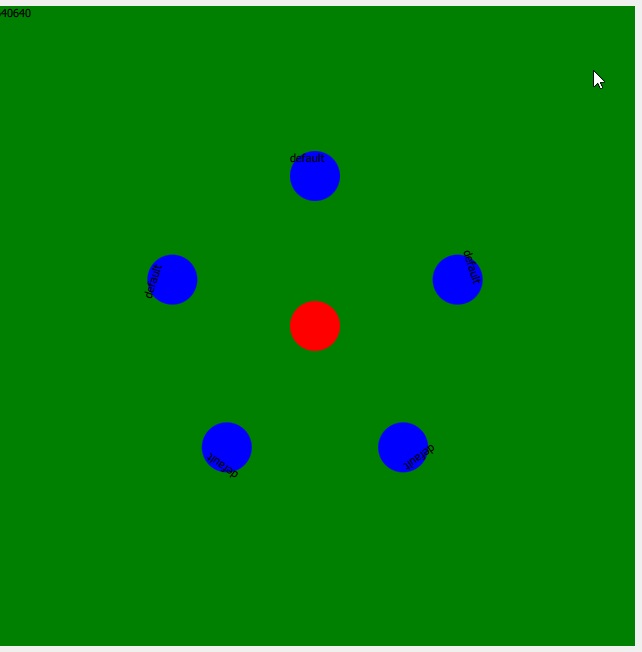
下面是应用程序的样子:
回答 1
Stack Overflow用户
回答已采纳
发布于 2017-07-16 07:43:44
第一个想法是使用PathView来安排项目,并使用一个路径段(例如PathSvg )
PathView {
    width: 400
    height: 400
    anchors.centerIn: parent
    model: ListModel {
        ListElement { name: "element1" }
        ListElement { name: "element2" }
        ListElement { name: "element3" }
        ListElement { name: "element4" }
        ListElement { name: "element5" }
        ListElement { name: "element6" }
        ListElement { name: "element7" }
        ListElement { name: "element8" }
    }
    delegate: Rectangle {
        width: 40
        height: 40
        radius: 20
        color: "blue"
        Text {
            text: name
            anchors.centerIn: parent
            transform: [
                Translate {y: -30}
            ]
        }
    }
    path: Path {
        id: myPath
        startX: 0; startY: 0
        PathSvg { path: "M 200 200 m -200 0 a 200 200 0 1 0 400 0 a 200 200 0 1 0 -400 0" }
    }
}path在这里是硬编码的,但是您可以根据下面的代码采用它:
M cx cy m -r, 0 a r,r 0 1,0 (r * 2),0 a r,r 0 1,0 -(r * 2),0
其中r是圆的te半径,(cx,cy) -是中心。
同样的方式,但更清楚:
path: Path {
        startX: 200
        startY: 0
        PathArc { x: 200; y: 400; radiusX: 200; radiusY: 200; useLargeArc: true }
        PathArc { x: 200; y: 0; radiusX: 200; radiusY: 200; useLargeArc: true }
    }
问题是,您不能绘制填充圆,因为在这种情况下,开始点=端点结束时,不会绘制任何东西。解决办法是使用两个半圆。
页面原文内容由Stack Overflow提供。腾讯云小微IT领域专用引擎提供翻译支持
原文链接:
https://stackoverflow.com/questions/45123705
复制相关文章
相似问题
腾讯云开发者

Copyright © 2013 - 2026 Tencent Cloud. All Rights Reserved. 腾讯云 版权所有
深圳市腾讯计算机系统有限公司 ICP备案/许可证号:粤B2-20090059  粤公网安备44030502008569号
腾讯云计算(北京)有限责任公司 京ICP证150476号 | 京ICP备11018762号