
如何配置Eclipse以使用“ehcache”
Summary/Question
我介绍了一个使用ehcache的项目。该项目启用了maven,当我从cli运行mvn clean install时,结果都很好。
项目也可以在NetBeans中打开,一切都显示正常,但是当我在eclipse中打开项目时,我看到了一些与ehcache相关的错误。在NetBeans中,Springcache.xml位于“网页”文件夹下。这使我认为eclipse项目可能不会被识别为动态web项目,但是按照这里的说明:https://www.mkyong.com/java/how-to-convert-java-project-to-web-project-in-eclipse/ I能够验证该项目确实是为了支持动态Web模块、Java和JavaScript而设置的。
我还在IntelliJ中打开了这个项目,也没有看到spring-cache.xml有任何问题。
我也没有在http://www.ehcache.org/documentation/上找到与ehcache这个版本相关的文档,但事实是NetBeans、IntelliJ和通过mvn clean install可以工作,这让我认为这是我的eclipse设置。有什么想法?
详细信息:
我在eclipse中看到的错误是:
Multiple annotations found at this line:
- cvc-complex-type.2.4.c: The matching wildcard is strict, but no declaration can be found for element 'ehcache:annotation-driven'.
- schema_reference.4: Failed to read schema document 'http://ehcache-spring-annotations.googlecode.com/svn/schema/ehcache-spring-1.1.xsd, because 1) could not find the document; 2) the document could not be read; 3) the root element of the document is not <xsd:schema>.
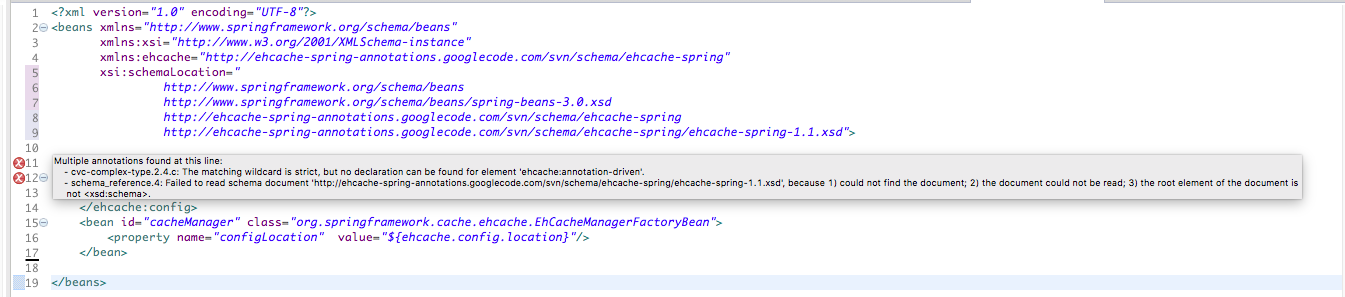
和
cvc-complex-type.2.4.c: The matching wildcard is strict, but no declaration can be found for element 'ehcache:config'.
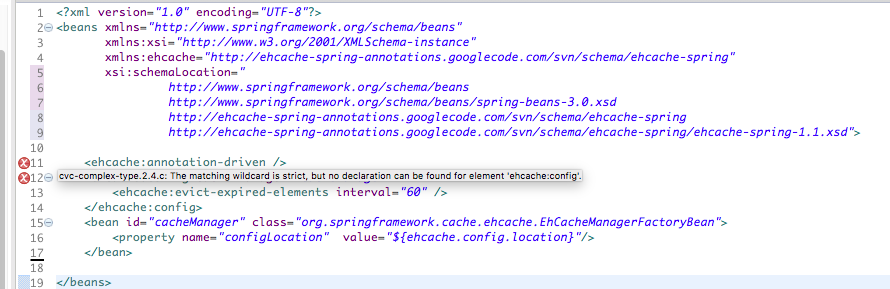
我的maven依赖项看起来如下:
<dependency>
    <groupId>com.googlecode.ehcache-spring-annotations</groupId>
    <artifactId>ehcache-spring-annotations</artifactId>
    <version>1.2.0</version>
</dependency>它与它应该是什么相匹配,基于:https://mvnrepository.com/artifact/com.googlecode.ehcache-spring-annotations/ehcache-spring-annotations/1.2.0
我的spring-cache.xml文件如下所示:
<?xml version="1.0" encoding="UTF-8"?>
<beans xmlns="http://www.springframework.org/schema/beans"
       xmlns:xsi="http://www.w3.org/2001/XMLSchema-instance"
       xmlns:ehcache="http://ehcache-spring-annotations.googlecode.com/svn/schema/ehcache-spring"
       xsi:schemaLocation="
                http://www.springframework.org/schema/beans
                http://www.springframework.org/schema/beans/spring-beans-3.0.xsd
                http://ehcache-spring-annotations.googlecode.com/svn/schema/ehcache-spring
                http://ehcache-spring-annotations.googlecode.com/svn/schema/ehcache-spring/ehcache-spring-1.1.xsd">

    <ehcache:annotation-driven />
    <ehcache:config cache-manager="cacheManager">
        <ehcache:evict-expired-elements interval="60" />
    </ehcache:config>
    <bean id="cacheManager" class="org.springframework.cache.ehcache.EhCacheManagerFactoryBean">
        <property name="configLocation"  value="${ehcache.config.location}"/>
    </bean>

</beans>回答 2
Stack Overflow用户
发布于 2017-07-14 14:37:48
看起来,当前版本的NetBeans和IntelliJ并没有eclipse那么严格地检查东西。)以下是我发现的情况。
从ehcache with Spring. google code xsd file not found中,我发现最重要的错误与xsd不再驻留在提供的url中有关。
做一些google之后,我找到了对github at:https://raw.githubusercontent.com/agentgt/ehcache-spring-annotations/master/core/src/main/resources/com/googlecode/ehcache/annotations/ehcache-spring-1.2.xsd版本的引用,通过将我的底层xsi模式位置更改为上面的url,它解决了eclipse中的问题。
引用的堆栈溢出问题,还提供了指向:https://code.google.com/archive/p/ehcache-spring-annotations/source/default/source的google代码存档的链接。
如果下载zip,就可以在zip at:/schema/ehcache-spring/ehcache-spring-1.2.xsd中找到正式的xsd (它还有ehcache-spring-1.0.xsd和ehcache-spring1.1.xsd,以防其他人对更早的版本有问题)。
我在这里找到了一种引用本地模式文件的方法:How to reference a local XML Schema file correctly?
我将发布一个关于如何从项目的相对路径引用它的问题,因为我们在这个项目中有windows和mac开发人员。如果这对您有用,详细信息将在这里:How to Reference Local XSD File By Relative Path
Stack Overflow用户
发布于 2018-04-12 06:17:21
问题摘要:
xsi-方案定位参考:
http://ehcache-spring-annotations.googlecode.com/svn/schema/ehcache-spring/ehcache-spring-1.1.xsd
验证结果-- eclipse中的问题,在命令行maven上没有问题。
将参考文献替换为:
解决eclipse中的问题。然而,在maven中,如果您没有连接到internet,那么saxparser就会抱怨。通过放置一个代理ref:-Dhttp.proxyHost=proxyhost -Dhttp.proxyPort=proxyport -Dhttps.proxyHost=proxyhost -Dhttps.proxyPort=proxyport,maven构建成功了.
我研究了这种行为上的差异:在ehcache-spring jar、ehcache-spring-注释-1.1.2.jar中,存在一个META/spring.spring文件。
该文件的内容:http\://ehcache-spring-annotations.googlecode.com/svn/schema/ehcache-spring/ehcache-spring-1.0.xsd=com/googlecode/ehcache/annotations/ehcache-spring-1.0.xsd http\://ehcache-spring-annotations.googlecode.com/svn/schema/ehcache-spring/ehcache-spring-1.1.xsd=com/googlecode/ehcache/annotations/ehcache-spring-1.1.xsd
cmdline使用此内容(并在jar中找到xsd )。月食不是。
我使用的解决方案:转到、XML -> XML目录并添加一个新的用户条目:
密钥类型:公共id
密钥:http://ehcache-spring-annotations.googlecode.com/svn/schema/ehcache-spring/ehcache-spring-1.1.xsd
重新验证spring上下文文件解决了eclipse工作区中的问题。
我更喜欢这个解决方案,因为它是eclipse的一个缺点,我用eclipse特定的解决方案来解决。
https://stackoverflow.com/questions/45091553
复制相似问题
腾讯云开发者

Copyright © 2013 - 2026 Tencent Cloud. All Rights Reserved. 腾讯云 版权所有
深圳市腾讯计算机系统有限公司 ICP备案/许可证号:粤B2-20090059  粤公网安备44030502008569号
腾讯云计算(北京)有限责任公司 京ICP证150476号 | 京ICP备11018762号