
在WPF中使用ItemsControl时正确地对齐控件
有人能告诉我在使用ItemsControl时如何正确地对齐和调整控件的大小吗?
我希望对在一个TextBox中定义的多个字段在左边有一个描述,在右边有一个TextBox,这样的结果如下:
First Name:    [FirstNameTextBox]
Last Name:     [LastNameTextBox]
Date of Birth: [DobTextBox]
但我却得到了这个:
First Name: [FirstNameTextBox]
Last Name: [LastNameTextBox]
Date of Birth: [DobTextBox]我希望所有的文本框都基于最大的<TextBlock>对齐。如果这是直接在<Grid>控件中完成的,它将是直接向前的,因为所有控件都直接在网格中,您只需要定义以下列定义
<Grid.ColumnDefinitions>
    <ColumnDefinition Width="Auto"/>
    <ColumnDefinition/>
</Grid.ColumnDefinitions>我以为我可以在SharedSizeGroup中使用<Grid>属性,但它仍然不能正确调整大小。相反,它只显示跨越<TextBlock>的<Grid>范围。
这是我的密码:
<Grid Grid.IsSharedSizeScope="True" Grid.Row="1">
    <Grid.ColumnDefinitions>
        <ColumnDefinition Width="Auto" SharedSizeGroup="Labels" />
        <ColumnDefinition Width="*" SharedSizeGroup="InputControls" />
    </Grid.ColumnDefinitions>
    <ItemsControl Grid.Row="1" ItemsSource="{Binding SelectedTemplate.Fields}">
        <ItemsControl.ItemTemplate>
            <DataTemplate>
                <Grid>
                    <Grid.ColumnDefinitions>
                        <ColumnDefinition SharedSizeGroup="Labels"/>
                        <ColumnDefinition SharedSizeGroup="InputControls"/>
                    </Grid.ColumnDefinitions>
                    <TextBlock Text="{Binding Path=Label}" Grid.Column="0" Margin="5"
                     VerticalAlignment="Center" Background="Red" />
                    <TextBox Text="{Binding Path=Value}"  Grid.Column="1" Margin="5"
                     VerticalAlignment="Center" Background="Blue" />
                </Grid>
            </DataTemplate>
        </ItemsControl.ItemTemplate>
    </ItemsControl>
</Grid>
知道我怎么能解决这个问题吗?
谢谢。
UPDATE1: --我不能让它像我所需要的那样工作。到目前为止,这就是我所得到的:
<Grid Grid.Row="1" Background="Purple">
    <Grid.ColumnDefinitions>
        <ColumnDefinition Width="*" SharedSizeGroup="Overall" />
    </Grid.ColumnDefinitions>
    <Grid>
        <Grid.ColumnDefinitions>
            <ColumnDefinition SharedSizeGroup="Labels" Width="Auto" />
            <ColumnDefinition SharedSizeGroup="InputControls" Width="*" />
        </Grid.ColumnDefinitions>
        <ItemsControl ItemsSource="{Binding SelectedTemplate.Fields}"
                  Background="Yellow"
                  Grid.IsSharedSizeScope="True">
            <ItemsControl.ItemTemplate>
                <DataTemplate>
                    <Grid Background="Green">
                        <Grid.ColumnDefinitions>
                            <ColumnDefinition SharedSizeGroup="Labels"/>
                            <ColumnDefinition SharedSizeGroup="InputControls"/>
                        </Grid.ColumnDefinitions>
                        <TextBlock Text="{Binding Path=Label}"
                               Grid.Column="0"
                               Margin="5"
                               VerticalAlignment="Center"/>
                        <TextBox Text="{Binding Path=Name}"
                             Grid.Column="1"
                             Margin="5"
                             VerticalAlignment="Center"/>
                    </Grid>
                </DataTemplate>
            </ItemsControl.ItemTemplate>
        </ItemsControl>
    </Grid>
这将以这样的方式显示我的布局:
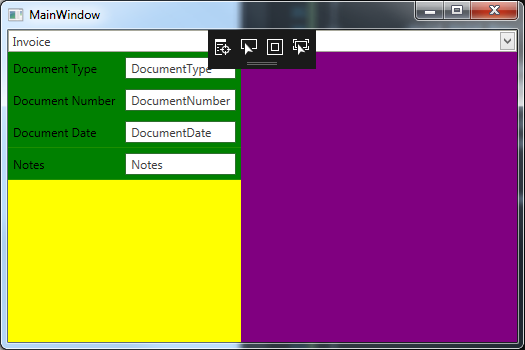
正如您所看到的,我的TextBox是基于最大的TextBlock正确地对齐的,但是我的ItemsControls并没有一直延伸。我想这是有意义的,因为它在定义ColumnDefinitions的同一网格中。
现在,如果我移动ColumnDefinitions' out this grid to the outer grid and remove all instances ofGrid.IsSharedSizeScope`,我猜如下所示:
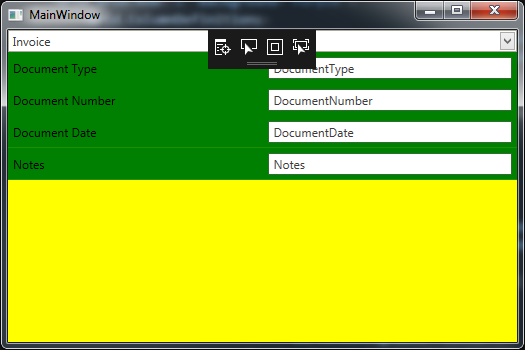
这再次接近了我所需要的,因为我的ItemsControl现在一直在拉伸,因为我设置了它的Grid.ColumnSpan="2",我的TextBox仍然与TextBlock保持一致,并且一直延伸到整个TextBlock,但是现在的问题是,当列设置为Auto时,TextBlock应该更小,但是它们的表现似乎就好像列被设置为*,而且我想,自从它被移除之后,我就失去了使用IsSharedSizeScope的目的。
现在,如果将IsSharedSizeScope="True"添加到外部网格中,则得到以下结果:
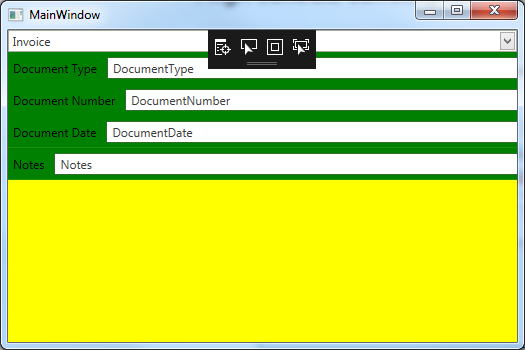
同样,这与我想要的接近,因为我的ItemsControl是拉伸的,我的文本框也是拉伸的,但是它们不再对齐到最大的TextBlock。
最后,如果我按照@mm8的最初建议将Grid.IsSharedSizeScope="True"添加到ItemsControl中,
<Grid Grid.Row="1" Background="Purple" Grid.IsSharedSizeScope="True">
    <Grid.ColumnDefinitions>
        <ColumnDefinition SharedSizeGroup="Labels" Width="Auto" />
        <ColumnDefinition SharedSizeGroup="InputControls" Width="*" />
    </Grid.ColumnDefinitions>
    <Grid Grid.ColumnSpan="2" >
        <ItemsControl ItemsSource="{Binding SelectedTemplate.Fields}"
                      Background="Yellow"
                      Grid.IsSharedSizeScope="True">
            <ItemsControl.ItemTemplate>
                <DataTemplate>
                    <Grid Background="Green">
                        <Grid.ColumnDefinitions>
                            <ColumnDefinition SharedSizeGroup="Labels"/>
                            <ColumnDefinition SharedSizeGroup="InputControls"/>
                        </Grid.ColumnDefinitions>
                        <TextBlock Text="{Binding Path=Label}"
                               Grid.Column="0"
                               Margin="5"
                               VerticalAlignment="Center"/>
                        <TextBox Text="{Binding Path=Name}"
                             Grid.Column="1"
                             Margin="5"
                             VerticalAlignment="Center"/>
                    </Grid>
                </DataTemplate>
            </ItemsControl.ItemTemplate>
        </ItemsControl>
    </Grid>

    <!--<TextBlock Text="Invoice Number" Grid.Column="0" Margin="5" VerticalAlignment="Center"/>
        <TextBox Text="InvoiceNumber" Grid.Column="1" Margin="5" VerticalAlignment="Center"/>-->
</Grid>
我得到以下信息:
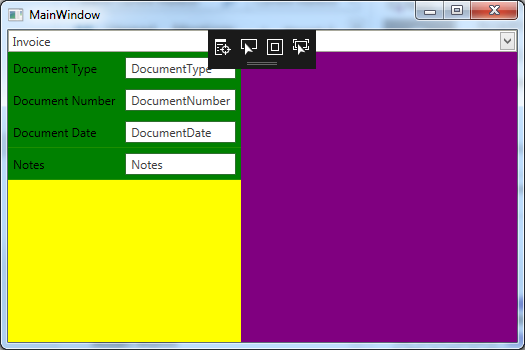
这让我回到了第一步,尽管定义不同?
我需要实现以下目标:
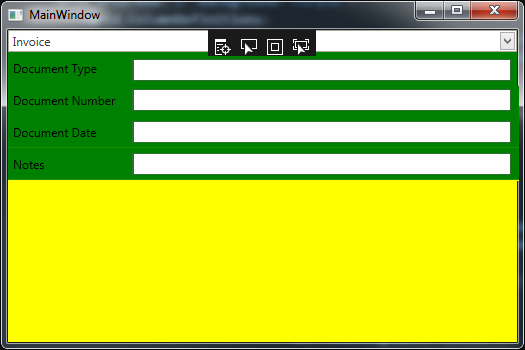
我做错什么了??
谢谢。
回答 2
Stack Overflow用户
发布于 2017-07-13 12:26:49
尝试设置ItemsControl本身的ItemsControl属性:
<ItemsControl Grid.Row="1" ItemsSource="{Binding SelectedBarcodeTemplate.Fields}"
              Grid.IsSharedSizeScope="True">
同步ItemsControl: https://joshsmithonwpf.wordpress.com/2008/09/06/synchronizing-the-width-of-elements-in-an-itemscontrol/中元素的宽度
Stack Overflow用户
发布于 2017-07-17 13:22:31
我最终在以下文章中找到了答案:WPF教程-网格面板,在本节中:“如何在多个网格上共享列的宽度”。
根据条款:
参加大小共享的列和行不尊重星号大小。在大小共享方案中,星号大小将被视为自动调整。由于TextWrapping on TextBlocks中的SharedSize列不能工作,所以可以将最后一列排除在共享大小之外。这往往有助于解决问题。
所以我的最后一个XAML是这样的:
<Grid Grid.Row="1" Background="Purple" >
    <Grid>
        <Grid.ColumnDefinitions>
            <ColumnDefinition SharedSizeGroup="Labels" Width="Auto" />
            <ColumnDefinition SharedSizeGroup="InputControls" Width="*" />
        </Grid.ColumnDefinitions>
    </Grid>

    <ItemsControl ItemsSource="{Binding SelectedBarcodeTemplate.Fields}"
                  Background="Yellow"
                  Grid.IsSharedSizeScope="True">
        <ItemsControl.ItemTemplate>
            <DataTemplate>
                <Grid Background="Green" ShowGridLines="True">
                    <Grid.ColumnDefinitions>
                        <ColumnDefinition SharedSizeGroup="Labels"/>
                        <ColumnDefinition />
                    </Grid.ColumnDefinitions>
                    <TextBlock Text="{Binding Path=Label}"
                               Grid.Column="0"
                               Margin="5"
                               VerticalAlignment="Center"/>
                    <TextBox Text="{Binding Path=Name}"
                             Grid.Column="1"
                             Margin="5"
                             VerticalAlignment="Center"
                             HorizontalAlignment="Stretch"/>
                </Grid>
            </DataTemplate>
        </ItemsControl.ItemTemplate>
    </ItemsControl>
</Grid>
现在看来,最终的结果是正确的:
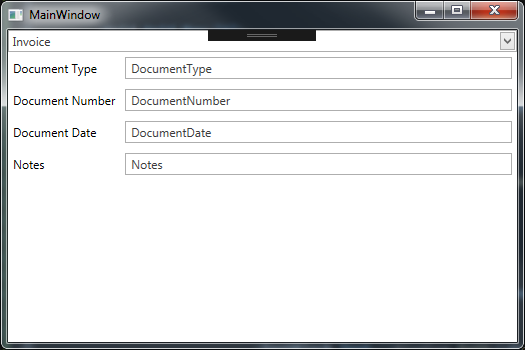
希望这能帮到别人!
https://stackoverflow.com/questions/45080451
复制相似问题
腾讯云开发者

Copyright © 2013 - 2026 Tencent Cloud. All Rights Reserved. 腾讯云 版权所有
深圳市腾讯计算机系统有限公司 ICP备案/许可证号:粤B2-20090059  粤公网安备44030502008569号
腾讯云计算(北京)有限责任公司 京ICP证150476号 | 京ICP备11018762号