
移除纸对话框中应用工具条中的顶部填充物。
移除纸对话框中应用工具条中的顶部填充物。
提问于 2017-07-10 13:57:56
在我的生活中,当我在顶部有一个应用程序工具栏时,我似乎无法从这个paper-dialog顶部删除愚蠢的空白。
通过使用div,我只使用了一个标准的margin-top: 0px;就能将它排序,但是对于app-toolbar,我不能这样做。

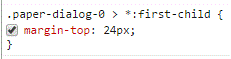
Chrome上开发模式的罪魁祸首似乎是这条线,但我无法进入.
码
paper-dialog {
  border-radius: 2px;
}

app-toolbar {
  background: green;
  margin-top: 0px;
}

.card-content {
  margin-top: 0px;
}<base href="https://polygit.org/polymer+polymer+v1.9.1/components/" />
<script src="webcomponentsjs/webcomponents-lite.js"></script>
<link rel="import" href="polymer/polymer.html" />
<link rel="import" href="paper-dialog/paper-dialog.html" />
<link rel="import" href="app-layout/app-toolbar/app-toolbar.html" />
<link rel="import" href="paper-input/paper-input.html" />
<link rel="import" href="neon-animation/animations/scale-up-animation.html" />
<paper-dialog modal alwaysOnTop opened horizontalAlign="auto" entry-animation="scale-up-animation" exit-animation="fade-out-animation">
<app-toolbar>Log in</app-toolbar>
<div class="card-content">
<paper-input placeholder="username or email"></paper-input>
<paper-input placeholder="password"></paper-input>
</div>
</paper-dialog>
回答 1
Stack Overflow用户
回答已采纳
发布于 2017-07-10 14:32:46
试着添加:
padding-top: 0px;
margin-top: 0px;
到您的css文件对话框或包含纸对话框的div!
页面原文内容由Stack Overflow提供。腾讯云小微IT领域专用引擎提供翻译支持
原文链接:
https://stackoverflow.com/questions/45013985
复制相关文章
相似问题
腾讯云开发者

Copyright © 2013 - 2026 Tencent Cloud. All Rights Reserved. 腾讯云 版权所有
深圳市腾讯计算机系统有限公司 ICP备案/许可证号:粤B2-20090059  粤公网安备44030502008569号
腾讯云计算(北京)有限责任公司 京ICP证150476号 | 京ICP备11018762号