
无法就谷歌的行动与basic_card作出回应
无法就谷歌的行动与basic_card作出回应
提问于 2017-07-06 14:30:06
我正在用Api.ai构建一个应用程序,在这里我需要响应一个名为Login的基本卡的意图。我正在尝试这没有网络钩子的实现。通过Api.ai try部分,我的查询返回以下内容:
{
  "id": "bb09aa94-a2d0-48d5-8c7f-62fc688d17b1",
  "timestamp": "2017-07-06T13:19:30.776Z",
  "lang": "en",
  "result": {
"source": "agent",
"resolvedQuery": "login",
"action": "Login",
"actionIncomplete": false,
"parameters": {},
"contexts": [],
"metadata": {
  "intentId": "39842aa0-53c4-4d47-b3b7-61ba0fc6d80c",
  "webhookUsed": "false",
  "webhookForSlotFillingUsed": "false",
  "intentName": "account.login"
},
"fulfillment": {
  "speech": "You should visit http://www.curlpad.com for login.",
  "messages": [
    {
      "type": "basic_card",
      "platform": "google",
      "title": "Login to Curlpad",
      "subtitle": "",
      "formattedText": "Visit this link to login to your account",
      "image": {
        "url": "http://www.curlpad.com/favicons/apple-icon.png"
      },
      "buttons": [
        {
          "title": "Curlpad",
          "openUrlAction": {
            "url": "http://www.curlpad.com"
          }
        }
      ]
    },
    {
      "type": 1,
      "platform": "telegram",
      "title": "Curlpad | Login",
      "subtitle": "Click on login button to continue",
      "imageUrl": "http://www.curlpad.com/favicons/apple-icon.png",
      "buttons": [
        {
          "text": "Login",
          "postback": "http://www.curlpad.com/"
        }
      ]
    },
    {
      "type": 0,
      "speech": "Open this url http://www.curlpad.com"
    }
  ]
},
"score": 1
  },
  "status": {
"code": 200,
"errorType": "success"
  },
  "sessionId": "7ba9cd11-239c-4467-8c3f-2d79d867ba18"
}
电报卡在我的电报机器人上运行得很好,但是在Google上的操作上出现了错误。下面是对Actions的响应:
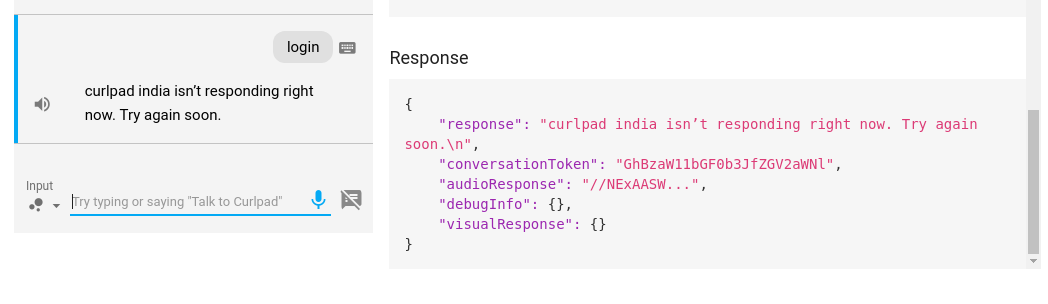
其他查询在该模拟器上运行良好。有人能帮上忙吗?我还有一个意图是搜索使用webhook实现的用户,在返回basic_card时也会遇到同样的问题。
在api.ai上尝试的意图响应截图:
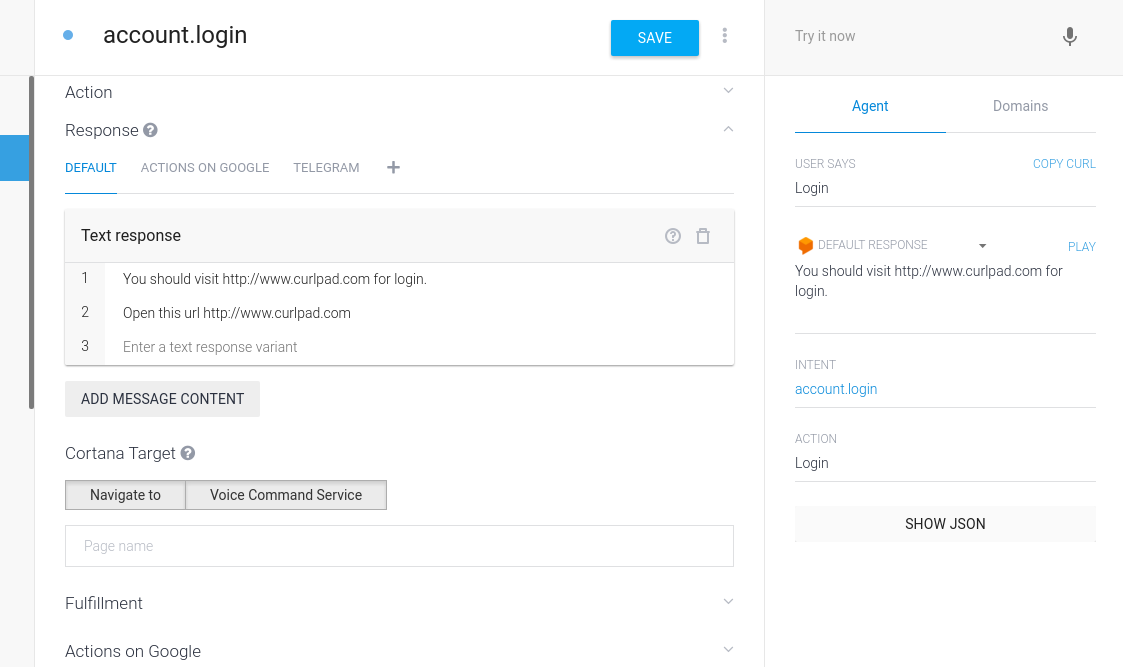
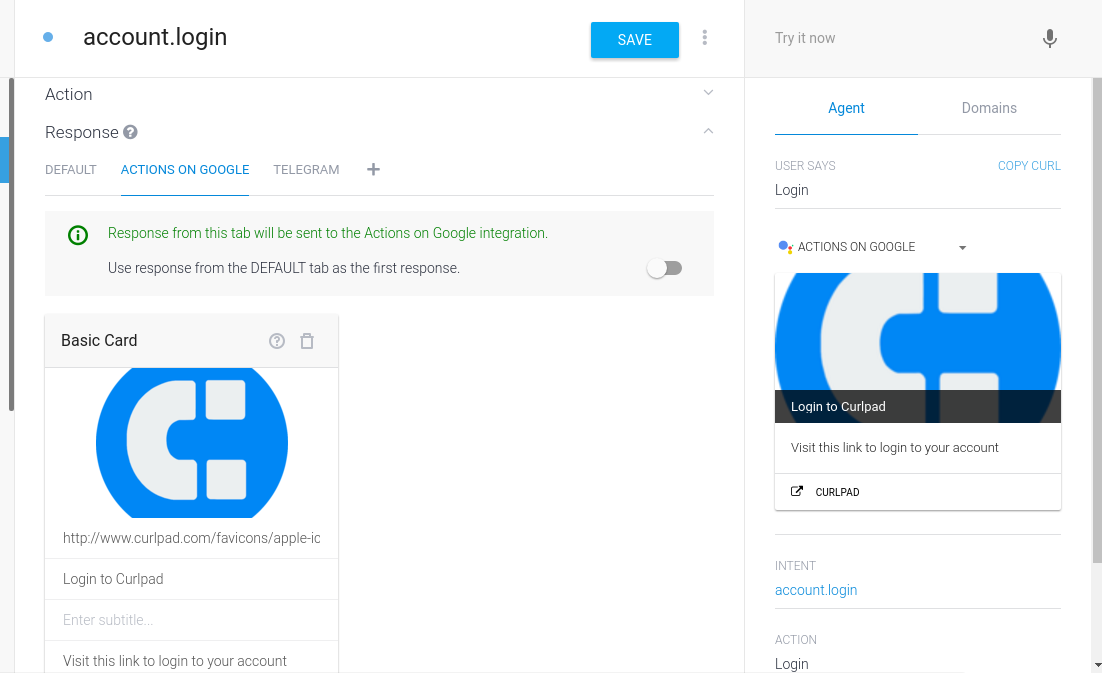
回答 2
Stack Overflow用户
回答已采纳
发布于 2017-07-08 11:17:23
问题是没有“基本响应”就不支持“basic_card”,所以我们需要首先设置“基本响应”,或者使用默认选项卡中的响应作为第一个响应。
基本响应对于basic_card是强制性的
Stack Overflow用户
发布于 2017-07-07 10:49:43
如果您没有使用web钩子,您需要在下面的屏幕截图中执行以下3个步骤来启用基本卡片响应。如果您没有在GOOGLE选项卡上看到该操作,请单击+标志来添加它。
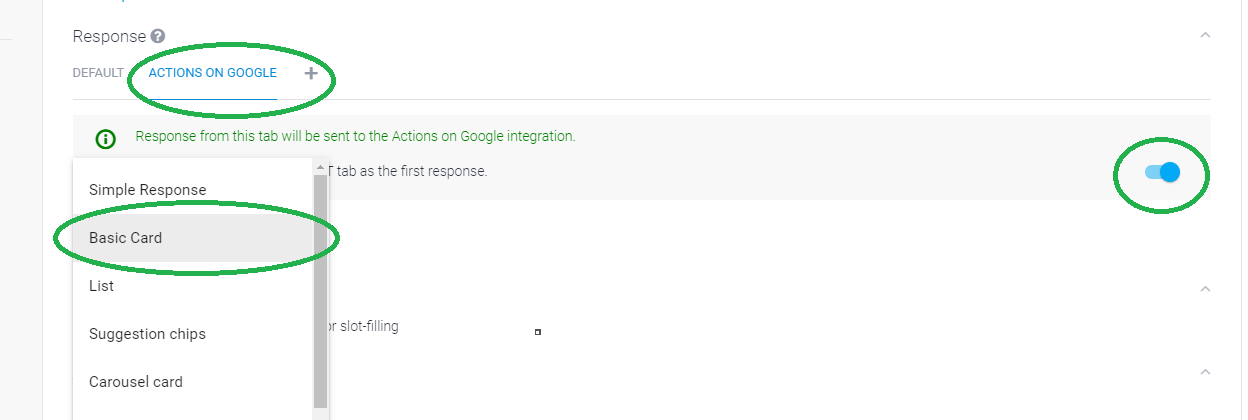
如果您正在使用web钩子,下面是为我工作的示例代码。您还可以跟随下面的google文档。google基本卡文档
'use strict';

const express = require('express')();
const router = require('express').Router();
const bodyParser = require('body-parser');
const ApiAiApp = require('actions-on-google').ApiAiApp;

express.use(bodyParser.json({type: 'application/json'}));

router.post('/card', (req, res) => {
	const app = new ApiAiApp({request: req, response: res});
	const WELCOME_INTENT = 'input.welcome';

	const actionMap = new Map();
	actionMap.set(WELCOME_INTENT, welcomeIntent);
	app.handleRequest(actionMap);

});

function welcomeIntent(app){
	app.ask(app.buildRichResponse()
	// Create a basic card and add it to the rich response
	.addSimpleResponse('Math and prime numbers it is!')
		.addBasicCard(app.buildBasicCard(`42 is an even composite number. It
		 is composed of three distinct prime numbers multiplied together. It
		 has a total of eight divisors. 42 is an abundant number, because the
		 sum of its proper divisors 54 is greater than itself. To count from
		 1 to 42 would take you about twenty-one…`)
		 .setTitle('Math & prime numbers')
		 .addButton('Read more')
		 .setImage('https://example.google.com/42.png', 'Image alternate text')
		)
	);
}

express.use('/example', router);

express.listen('8081', function () {
  console.log('Example app is running')
})
页面原文内容由Stack Overflow提供。腾讯云小微IT领域专用引擎提供翻译支持
原文链接:
https://stackoverflow.com/questions/44951816
复制相关文章
相似问题
腾讯云开发者

Copyright © 2013 - 2026 Tencent Cloud. All Rights Reserved. 腾讯云 版权所有
深圳市腾讯计算机系统有限公司 ICP备案/许可证号:粤B2-20090059  粤公网安备44030502008569号
腾讯云计算(北京)有限责任公司 京ICP证150476号 | 京ICP备11018762号